
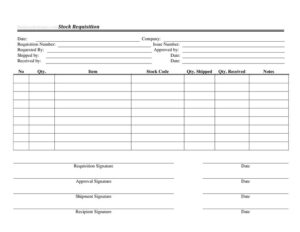
Stock Requisition Form
Free stock requisition form template in PDF & DOCX to request and approve items from inventory. Track who requested, approved, shipped, and received stock.
PDF
DOCX
18 downloads
0
likes
Download Files
- DOCX
A stock requisition form is an internal document used to request items from a company’s own inventory or storeroom, with sign-off from the people who approve and fulfill the request. It keeps stock movements controlled, accountable, and tracked. Download this free stock requisition template in PDF or DOCX and put it to work. No signup required.
What Is a Stock Requisition Form?
A stock requisition form is the paperwork an employee or department uses to draw items that the business already holds in inventory — as opposed to buying new from an outside supplier. It records what’s being requested, who asked for it, who approved it, and who issued and received it, so every movement of stock out of the storeroom has a name attached to it. This simple control prevents inventory from quietly walking off the shelves, keeps stock counts accurate, and gives managers visibility into what each team is consuming.
When Do You Need a Stock Requisition Form?
- A department needs parts, supplies, or materials from the company storeroom or warehouse.
- You want approval recorded before stock is released, not after.
- Tracking internal consumption of inventory by team, job, or project.
- Maintaining accurate stock counts by documenting every item that leaves the shelf.
- Creating an audit trail of who requested, approved, issued, and received each item.
- Reordering triggers — knowing what’s been drawn helps you replenish on time.
What the Form Should Capture
A complete requisition leaves a clear chain of custody. It records the date, company, and a unique requisition number for tracking, the items requested with quantities and stock codes, and the names of everyone in the chain: requested by, approved by, shipped by, and received by. Capturing both the quantity requested and the quantity actually shipped and received catches discrepancies before they become missing inventory.
How to Fill Out a Stock Requisition Form
- Enter the date, company, and a unique requisition number (and issue number if used).
- Record who the request is requested by and route it for approval.
- For each line, enter the item number, quantity, item description, and stock code.
- When fulfilled, note the quantity shipped and, on receipt, the quantity received.
- Record who shipped and received the items, with dates, and add any notes.
- Collect the requisition and approval signatures to complete the record.
Why Requisitions Matter for Inventory Control
The value of a requisition is the pause it creates between “we need something” and “stock has left the building.” That pause lets a manager confirm the request is legitimate and within budget, and the paper trail it leaves is what keeps your stock counts trustworthy. When quantities requested, shipped, and received are all recorded, any mismatch is obvious immediately rather than surfacing weeks later as an unexplained shortage. Over time, requisition records also reveal consumption patterns that help you set reorder points and avoid both stockouts and overstock.
Common Mistakes to Avoid
- Releasing stock without recorded approval, defeating the purpose of the form.
- Skipping the requisition number, which breaks tracking and reconciliation.
- Recording only the quantity requested, not the quantity actually shipped and received.
- Vague item descriptions or missing stock codes that cause the wrong item to be pulled.
- Leaving signature lines blank, so there’s no accountability if something goes missing.
- Not feeding requisition data back into reorder decisions.
Stock Requisition vs. Purchase Order
It helps to see where a stock requisition sits in the wider flow of getting goods to where they’re needed. A stock requisition draws items the business already owns — pulling parts, supplies, or materials out of your own storeroom or warehouse and handing them to the department that asked. A purchase order, by contrast, is an instruction to buy new items from an outside supplier. The two often work in sequence: requisitions steadily deplete your inventory, and when stock of an item runs low, that triggers a purchase order to replenish it. Treating both as controlled, documented steps is what keeps a business’s inventory honest. Every requisition records who took what and who approved it, so stock can’t quietly disappear; every purchase order records what you committed to buy and at what price, so spending stays visible. Together they close the loop — goods are issued, inventory falls, replenishment is ordered, and stock is received back in — with a name and a signature at each stage. For a small business this discipline might feel like extra paperwork, but it’s exactly what prevents the two classic inventory failures: running out of something critical at the worst moment, and tying up cash in overstock nobody is using. Reviewing your requisition history also reveals real consumption patterns, which lets you set sensible reorder points instead of guessing, and makes your next purchase orders far more accurate.
Frequently Asked Questions
What is a stock requisition form? It’s an internal form used to request items from a company’s own inventory, with the request, approval, issue, and receipt all documented so every stock movement is tracked and accountable.
What’s the difference between a stock requisition and a purchase requisition? A stock requisition draws items already held in inventory; a purchase requisition requests buying new items from an outside supplier. Both control spending and movement, but they pull from different places.
Who approves a stock requisition? Typically a manager or storeroom supervisor signs off before items are released, confirming the request is legitimate and within budget. Larger requests may need a second approval.
How do I fill one out? Enter the date, company, and requisition number, list the items with quantities and stock codes, record who requested and approved it, then note quantities shipped and received with signatures. The template above guides each step.
Why record quantity shipped and received separately? Because comparing the two catches discrepancies immediately — if more was shipped than received, or less, you can investigate before it becomes an unexplained inventory shortage.
Can the same form work for any size business? Yes. A small shop might use a few lines a week while a warehouse processes dozens a day, but the same fields — request, approval, quantities, and signatures — keep stock accountable at any scale.
How much does this template cost? Nothing — it’s free to download in PDF and DOCX, with no signup required.
Related Forms
- Short Term Disability Claims Tracker
- Monthly Editorial Calendar
- Used Truck Inventory Card
- List of Vehicles
- Vehicle Maintenance Log
- Meeting Minutes
Browse more in Log and Inventory.