
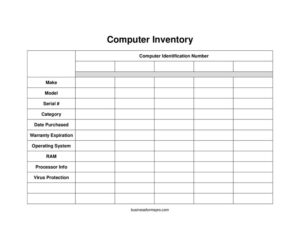
Computer Inventory
Track every workstation with our free Computer Inventory template — record make, model, serial number, warranty, and specs. Free download in PDF and DOCX.
PDF
DOCX
2 downloads
0
likes
Download Files
- DOCX
A Computer Inventory is a simple tracking sheet used to record every desktop, laptop, and workstation an organization owns, along with each machine’s identifying details and specifications. Most people reach for one when they need to know exactly what hardware exists, where it is, and when its warranty runs out. This template is free to download in both PDF and DOCX formats, with no signup required.
What Is a Computer Inventory?
A Computer Inventory is a structured log that documents an organization’s computing assets in one place. It is typically maintained by an IT administrator, office manager, or asset coordinator, and it captures both the physical identity of each machine (make, model, serial number, internal asset tag) and its technical configuration (operating system, RAM, processor, antivirus status). The goal is to give a clear, current picture of what hardware is in service. A well-kept Computer Inventory supports budgeting, warranty claims, security audits, equipment refresh planning, and insurance or theft-recovery efforts. It turns scattered knowledge — often locked in one person’s memory — into a shareable, auditable record.
When Do You Need a Computer Inventory?
Almost any business or department that owns more than a handful of computers benefits from keeping a current inventory. Common situations include:
- Onboarding new hardware: Logging each machine the moment it arrives so nothing slips into use untracked.
- Warranty management: Knowing which devices are still covered before paying for a repair out of pocket.
- Security and compliance audits: Demonstrating that every machine has current virus protection and a supported operating system.
- Equipment refresh planning: Identifying aging processors or low-RAM machines that are due for replacement.
- Insurance and theft recovery: Providing serial numbers and purchase dates if a device is lost, stolen, or damaged.
- Employee transitions: Reassigning or reclaiming hardware cleanly when staff join or leave.
What a Computer Inventory Should Have
A useful Computer Inventory balances physical identification with technical detail. At minimum it should let you uniquely identify each machine, trace its purchase and warranty timeline, and describe its core specifications. The fields in this template — a computer identification number, make, model, serial number, category, date purchased, warranty expiration, operating system, RAM, processor info, and virus protection — cover those needs. The identification number and serial number provide two layers of unique tracking, while the specification fields help you plan upgrades and confirm security coverage. Keeping the columns consistent across every entry is what makes the inventory searchable and trustworthy over time.
How to Fill Out a Computer Inventory
- Computer identification number: Assign your own internal asset tag or ID (for example, PC-001) so each machine has a unique, company-controlled label.
- Make: Record the manufacturer, such as Dell, HP, Lenovo, or Apple.
- Model: Enter the specific model name or number, like Latitude 5440 or MacBook Pro 14.
- Serial #: Copy the manufacturer’s serial number exactly, usually found on a sticker or in system settings — this is essential for warranty and theft claims.
- Category: Note the device type, such as desktop, laptop, server, or workstation.
- Date purchased: Log when the machine was bought, which anchors depreciation and replacement timelines.
- Warranty expiration: Enter the coverage end date so you can act before it lapses.
- Operating system: Record the OS and version, like Windows 11 Pro or macOS Sonoma.
- RAM: Note installed memory, such as 16 GB.
- Processor info: Capture the chip, like Intel Core i7-1355U or Apple M3.
- Virus protection: List the antivirus or endpoint software installed and confirm it is active.
Keeping the Inventory Accurate Over Time
An inventory is only valuable if it stays current, so build a routine around it. Add a row the day any new computer is received, and update or retire entries when machines are reassigned, sold, or scrapped. Many teams perform a full physical reconciliation once or twice a year, walking the floor with the list and confirming each serial number is where it should be. If you maintain the inventory in the DOCX version, consider sorting or filtering by warranty expiration each quarter to flag devices approaching the end of coverage. For larger fleets, the identification number column becomes your master key, letting you cross-reference repair tickets, software licenses, and assigned users without confusion.
Computer Inventory vs. General Asset Register
A Computer Inventory is a focused subset of a broader asset register. While a general asset register might list furniture, vehicles, and machinery with only basic purchase and value data, a Computer Inventory goes deeper on the details that matter for IT: operating system, RAM, processor, and virus protection. That technical depth is what lets you answer questions a finance ledger cannot, such as which machines can run a new software package or which still lack endpoint security. Many organizations keep both and link them through the shared identification number, so finance and IT see the same hardware from their own perspectives.
Common Mistakes to Avoid
- Transposing the serial number: A single wrong character can invalidate a warranty claim, so double-check each entry against the device.
- Leaving the virus protection field blank: An empty status hides whether a machine is actually protected — always note the product and confirm it’s running.
- Reusing identification numbers: Retiring a machine and giving its ID to a new one breaks historical tracking; assign fresh numbers instead.
- Letting the inventory go stale: A list that hasn’t been touched in a year is worse than none, because people trust it without verifying.
- Recording vague specs: “8 GB” without noting the processor or OS version limits how useful the record is for upgrade planning.
- Storing only one copy: Keep a backup; if the inventory lives only on a single machine, you lose it when that machine fails.
Frequently Asked Questions
What is a Computer Inventory used for? It is used to track every computer an organization owns in one organized record. Teams rely on it for warranty management, security audits, replacement budgeting, and recovering details quickly if a device is lost or stolen.
How do I fill out a Computer Inventory? Create one row per machine and complete each column: assign an internal identification number, then record the make, model, serial number, category, purchase date, warranty expiration, operating system, RAM, processor, and virus protection. Pull the serial number and specs directly from the device or its system settings to ensure accuracy.
What is the difference between the identification number and the serial number? The serial number is assigned by the manufacturer and is fixed for the life of the device. The identification number is your own internal asset tag, which you control and can format consistently across your whole fleet for easier sorting and reference.
How often should I update a Computer Inventory? Update it in real time whenever a machine is added, reassigned, or retired, and perform a full physical reconciliation at least once a year. Reviewing warranty expiration dates quarterly also helps you act before coverage lapses.
Is this Computer Inventory template free? Yes. You can download it free in both PDF and DOCX formats with no signup required. The editable DOCX version lets you add columns, such as assigned user or location, to fit your needs.
Can I use this for both office and remote computers? Absolutely. Use the category and identification number fields to distinguish device types and locations, and consider adding a notes column to record whether a machine is in the office, with a remote employee, or in storage.
This Computer Inventory template is provided as a general example for informational purposes only and does not constitute legal, financial, security, or compliance advice. Asset-tracking requirements, data-handling rules, and warranty terms vary by organization and jurisdiction — consult a qualified IT or compliance professional for guidance specific to your situation.
Related Forms
- Employee Covid Vaccine Log
- Perpetual Inventory Form
- Volunteer Hours Tracker
- Cigar Tasting Log
- New Car Inventory Card
- Store Opening Procedure Checklist
Browse more in Log and Inventory.