
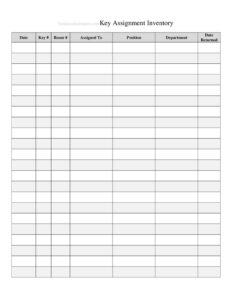
Key Assignment Inventory
Track who holds every key with this free Key Assignment Inventory template, available as a free download in PDF and DOCX with no signup required.
PDF
DOCX
1 downloads
0
likes
Download Files
- DOCX
A Key Assignment Inventory is a tracking log used to record every physical key in a building or organization and document exactly who currently holds each one. The most common reason people use it is to maintain accountability and security when keys are issued, returned, or lost. It is free to download here in both PDF and DOCX formats with no signup required.
What Is a Key Assignment Inventory?
A Key Assignment Inventory is a centralized record that links each key in your possession to a specific door, lock, or area and to the individual responsible for it. It is typically maintained by a facilities manager, office administrator, property manager, or security officer. The log documents key identifiers, the doors they open, the people assigned to them, issue and return dates, and the number of copies in circulation. By keeping this information in one place, an organization can quickly answer questions like who has access to a sensitive area, how many duplicates exist, and which keys are outstanding when an employee leaves.
When Do You Need a Key Assignment Inventory?
Almost any organization that controls access to physical spaces benefits from a structured key log. Common situations include:
- Onboarding new staff — recording which keys, fobs, or master sets you hand to a new employee on their first day.
- Employee offboarding — verifying that every key issued to a departing worker is returned before their final day.
- Property and tenant management — tracking unit keys, mailbox keys, and common-area access across multiple rental units.
- Lost or stolen keys — identifying which doors are compromised so you can decide whether to rekey a lock.
- Audits and inspections — demonstrating to insurers, auditors, or security reviewers that access is controlled and documented.
- Contractor and vendor access — issuing temporary keys to cleaning crews or maintenance teams and confirming their return.
What a Key Assignment Inventory Should Have
A complete inventory captures enough detail to trace any key from the lock it opens to the person who holds it. Essential elements include a unique key number or tag ID, a description of the door or area it accesses, the name and department or contact details of the assigned holder, the date the key was issued, the expected or actual return date, the quantity of copies made, and a notes column for exceptions. Many organizations also add a signature line so the recipient acknowledges responsibility, and a status indicator showing whether each key is active, returned, or reported lost. The clearer your column headings, the easier the log is to audit later.
How to Fill Out a Key Assignment Inventory
Because this template is a flexible log, you build it row by row as keys are issued. Follow these steps:
- Add header details. At the top, enter your organization or building name, the location or facility, and the date the inventory was created or last updated.
- Assign a key ID. In the first column of a new row, record the key’s unique number or tag label so it can never be confused with another.
- Describe the access point. Note the specific door, room, gate, or area the key opens, including floor or suite where relevant.
- Record the holder. Enter the full name of the person receiving the key, plus their department, role, or contact information.
- Log the issue date. Write the date the key was handed over.
- Note copies and quantity. Record how many duplicates of this key exist or were issued.
- Set the return date. Add the expected return date, then update the actual return date when the key comes back.
- Capture acknowledgment. Have the recipient sign or initial to confirm they accepted responsibility.
- Use the notes column. Record exceptions such as temporary loans, lost reports, or rekeying actions, and update the status as keys move.
Master Keys and Access Levels
Not all keys are equal, and your inventory should reflect that. A grand master key may open every door in a building, while a sub-master opens a single floor or department and an individual key opens just one lock. When logging high-level keys, flag them clearly so reviewers can see at a glance who holds broad access. Limiting and documenting master key distribution is one of the most effective security practices a facility can adopt, because a single lost master can compromise an entire building. Use the notes or description column to indicate the access level of each key, and review master key assignments more frequently than ordinary ones.
Keeping the Inventory Accurate Over Time
A key log is only useful if it stays current. Update it the moment a key changes hands rather than relying on memory at the end of the week. Schedule a periodic reconciliation — quarterly is common — where you physically verify that listed holders still possess their assigned keys. When someone leaves the organization, treat key return as part of the formal offboarding checklist and mark the row as returned with a date. If a key is lost, document it immediately and assess whether the affected lock should be rekeyed. Keeping a digital copy in DOCX alongside a printed signed version gives you both searchability and a paper trail.
Common Mistakes to Avoid
- Leaving keys untagged — without a unique ID, you cannot reliably tell duplicate keys apart.
- Forgetting to record return dates — open rows make it impossible to know what is still outstanding.
- Skipping the holder’s signature — without acknowledgment, accountability becomes a he-said-she-said dispute.
- Ignoring duplicate copies — failing to log how many copies exist hides real security exposure.
- Not updating after offboarding — leaving departed staff listed as active holders creates false confidence.
- Storing only one copy — keep a backup so a lost or damaged log doesn’t erase your records.
Frequently Asked Questions
What is a Key Assignment Inventory used for? It is used to track every physical key in a building and document who currently holds each one. Organizations rely on it for security, accountability, audits, and ensuring keys are returned when staff leave. It links each key to a specific door and a named responsible person.
How do I fill out a Key Assignment Inventory? Add your building details at the top, then create one row per key with its unique ID, the door it opens, the holder’s name, the issue date, the number of copies, and an expected return date. Have the recipient sign to acknowledge responsibility and update the status as keys are returned or reported lost.
Does this form need to be notarized or witnessed? No, a key inventory is an internal operational record and does not require notarization or formal witnesses. A signature from each key recipient is recommended, however, because it confirms acceptance of responsibility and strengthens accountability if a key goes missing.
Is a key inventory legally binding? The inventory itself is a record-keeping tool rather than a contract, but the signed acknowledgments within it can serve as evidence that a person received a particular key. For formal employment or liability terms, pair it with your organization’s policies and any signed key-holder agreement.
How much does this template cost? Nothing — it is completely free to download from Business Forms Pro in both PDF and DOCX formats, with no signup or payment required. You can print it as-is or customize the columns in the DOCX version to match your facility.
How often should I review the inventory? Update it in real time whenever a key changes hands, and perform a full reconciliation on a regular schedule such as quarterly. Always review and update it during employee offboarding and immediately after any reported lost or stolen key.
This template is a general example provided for informational purposes only and does not constitute legal, security, or professional advice. Key control requirements and best practices vary by organization and jurisdiction, so consult a qualified facilities or security professional to ensure your procedures meet your specific needs.
Related Forms
- List of Home Services
- Inventory Cards Spreadsheet — Black And White
- Basic Inventory Card
- Warranty Tracker
- Geocache Log
- Maintenance Log
Browse more in Log and Inventory.