
Book Inventory
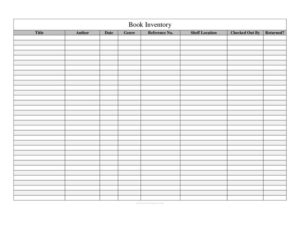
Track titles, authors, shelf locations, and checkouts with this free Book Inventory template, available as a free download in PDF and DOCX.
PDF
DOC
6 downloads
0
likes
Download Files
- DOC
A Book Inventory is a simple log used to catalog the books in a collection and track where each one is and who has it. People most often use it to keep a library, classroom, or office bookshelf organized and to know at a glance which titles are checked out. It’s completely free to download in PDF and DOCX, with no signup required.
What Is a Book Inventory?
A Book Inventory is a record that lists every book in a collection along with key details such as title, author, genre, and shelf location. It is used by school librarians, teachers, small business owners, book clubs, and home collectors to keep track of what they own and where it lives. The log also documents lending activity, noting who borrowed each book and whether it has been returned. By recording a reference number for each item, the inventory turns a loose pile of books into a searchable, accountable system. Whether you manage a few dozen titles or several hundred, the form gives you one reliable place to find, audit, and reconcile your collection.
When Do You Need a Book Inventory?
This log is useful any time books move between people or shelves and you need to keep order. Common situations include:
- Classroom libraries where teachers lend books to students and need to know what’s missing at year’s end.
- Small or community libraries tracking circulation without expensive cataloging software.
- Office or reference collections shared among staff who borrow manuals, textbooks, or industry guides.
- Book clubs that rotate copies among members and want to confirm everything comes back.
- Home collectors cataloging a personal library for insurance, organization, or lending to friends.
- Inventory audits when a new term, season, or fiscal year begins and you need a fresh count.
What a Book Inventory Should Have
A complete Book Inventory captures enough detail to identify each book and follow its movement. At minimum it should include the book’s title and author, a unique reference number for quick lookup, the genre or category, and the shelf location where it belongs. To track lending, it needs a field for who checked the book out, the date involved, and a clear indicator of whether the book has been returned. Together these fields let you sort by genre, locate any title fast, and immediately spot overdue or missing items. A clean, consistent layout is just as important as the fields themselves, because an inventory only works when everyone records entries the same way.
How to Fill Out a Book Inventory
- Title: Write the full title of the book exactly as it appears on the cover or spine, including any subtitle if it helps distinguish editions.
- Author: Enter the author’s name, last name first if you want to sort alphabetically. For multiple authors, list the primary one and add “et al.” or additional names.
- Date: Record the relevant date — typically the date the book was added to the inventory or the date it was checked out, depending on how you use the log.
- Genre: Note the category, such as fiction, biography, science, or reference, so you can group similar titles.
- Reference No.: Assign a unique identifier (for example, a sequential number or a shelf-based code) that links the physical book to this entry.
- Shelf Location: Indicate where the book belongs — a room, shelf, bay, or bin label — so it can be returned to the right spot.
- Checked Out By: Enter the name of the borrower when the book leaves the shelf, and leave it blank when the book is in.
- Returned?: Mark Yes or No (or check the box) to show whether the borrowed copy has come back.
Tips for an Organized Catalog
A few habits keep your Book Inventory accurate over time. Decide on a single reference numbering scheme before you start, and apply it to every book consistently — mixing styles makes searching frustrating. Label shelves to match the Shelf Location field so anyone can reshelve correctly. When a book is borrowed, fill in the Checked Out By and Date fields immediately rather than relying on memory. Set a recurring reminder to scan the Returned? column for outstanding loans, and follow up before items disappear for good. If your collection grows large, keep a digital copy of the DOCX so you can sort, filter, and back it up.
Physical Log vs. Digital Spreadsheet
You can run this inventory on paper at a circulation desk or as a digital file. A printed PDF posted near the shelf is quick for casual lending and small collections, and it works without devices. The DOCX or a spreadsheet version, however, lets you sort by author or genre, search instantly by reference number, and copy entries when you add new copies. Many users keep both: a paper sign-out sheet for daily use and a master digital file they update weekly. Choose whichever fits how often books move and how many people manage the collection.
Common Mistakes to Avoid
- Skipping the reference number — without a unique ID, two books with similar titles become impossible to tell apart.
- Forgetting to update the Returned? field when a book comes back, which makes the log show false overdues.
- Inconsistent shelf labels that don’t match the inventory, causing books to be misshelved.
- Leaving the Checked Out By field blank when lending, so you have no record of who has the book.
- Recording the author inconsistently (first name vs. last name first), which breaks alphabetical sorting.
- Never auditing the collection against the log, allowing small discrepancies to pile up unnoticed.
Frequently Asked Questions
What is a Book Inventory used for? It is used to catalog every book in a collection and track its location and lending status. Libraries, classrooms, offices, and home collectors use it to know what they own, where each book sits, and who currently has it checked out. The result is a system that prevents lost books and speeds up finding any title.
How do I fill out a Book Inventory? Record each book’s title, author, genre, a unique reference number, and shelf location, then use the date and Checked Out By fields whenever a book is borrowed. Mark the Returned? field Yes or No to show whether the copy is back on the shelf. Update the lending fields the moment a book moves so the log stays accurate.
What should the Reference No. be? The reference number is any unique code that links a physical book to its entry. You can use a simple sequential number, a shelf-based code, or an ISBN if you prefer. The key is to pick one system and apply it consistently across the whole collection.
Is a Book Inventory legally binding? No, it is an internal organizational and tracking document, not a contract. It helps you manage a collection and document lending, but it does not create legal obligations on its own. If you need a binding lending agreement, that would be a separate document.
How much does this Book Inventory template cost? Nothing — it is completely free to download from Business Forms Pro. You can get it in both PDF and DOCX formats with no signup required. Use it as-is or customize the DOCX to match your collection’s needs.
Can I use it for a large library? Yes, though for very large or high-traffic collections a digital version is easier to manage. The DOCX format lets you sort, filter, and search by reference number, author, or genre. For modest collections, a printed copy near the shelf often works perfectly well.
This template is a general example provided for informational and organizational purposes only and does not constitute legal, financial, or professional advice. Recordkeeping needs and any applicable requirements vary by organization and jurisdiction — consult a qualified professional if you need guidance specific to your situation.
Related Forms
- Garment Inventory Form
- Warranty Tracker
- Computer Time Tracker
- Asset List
- Project To Do List
- Yearly Cleaning Log
Browse more in Log and Inventory.