
Photo Log
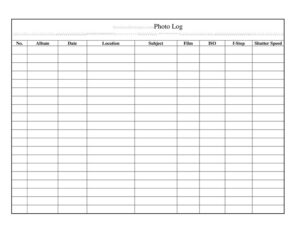
Track every shot with this free Photo Log template, recording date, location, subject, film, ISO, f-stop, and shutter speed — free download in PDF and DOCX.
PDF
DOCX
2 downloads
0
likes
Download Files
- DOCX
A Photo Log is a simple record sheet used to document the technical and contextual details of each photograph you take, from the date and location to exposure settings like ISO, f-stop, and shutter speed. Photographers most often use it to remember which settings produced which results so they can learn from and replicate their best shots. This template is free to download in both PDF and DOCX, with no signup required.
What Is a Photo Log?
A Photo Log is a structured tracking sheet that pairs each frame or image with the information you need to identify and understand it later. It is used by film and digital photographers, hobbyists, students, archivists, and working professionals to keep a written trail of what was shot, where, and with what camera settings. Rather than relying on memory or scattered notes, the log gives you one organized place to record the subject, the album or roll it belongs to, and the exposure values used. For film shooters especially, where settings are not embedded in the image automatically, a log is the only reliable way to connect a finished print back to the conditions that created it.
When Do You Need a Photo Log?
A Photo Log is useful any time you want to remember or reproduce how an image was made. Common situations include:
- Shooting film — film negatives carry no embedded metadata, so a log is the only record of ISO, aperture, and shutter speed for each frame.
- Learning exposure — students and beginners track settings against results to understand how aperture and shutter speed affect each photo.
- Organizing albums or rolls — assigning each shot to an album keeps large bodies of work sorted and searchable.
- Location and field work — recording the location of every subject helps when you need to return to a site or caption images accurately.
- Client and project work — documenting shots for a job creates an audit trail of what was delivered.
- Archiving and cataloging — museums, collectors, and hobbyists log photos so the collection remains identifiable over time.
What a Photo Log Should Have
A complete Photo Log captures both what the photo is and how it was taken. The essential elements are a sequential frame or entry number, the album or roll it belongs to, the date taken, the location, and a short subject description. On the technical side, it should record the film stock or sensor, the ISO rating, the f-stop (aperture), and the shutter speed. Together these fields let you trace any single image back to its exact conditions. A good log keeps one row per photograph so entries stay clean, consistent, and easy to scan, and leaves room to note unusual conditions such as bright sun, low light, or filters in use.
How to Fill Out a Photo Log
- No. — Enter a sequential number for the entry, matching the frame number on a roll of film or the order in which digital images were captured.
- Album — Record the album, roll, or project name this shot belongs to so related images stay grouped together.
- Date — Write the date the photo was taken; add the time if you shoot multiple sessions in one day.
- Location — Note where the image was made, from a city or address to a specific room or landmark.
- Subject — Briefly describe what is in the frame, such as a portrait, landscape, or product, so you can find it later.
- Film — List the film stock and format (for example, a 400-speed color negative) or the digital body and lens used.
- ISO — Enter the ISO or film speed rating in effect for the shot.
- f-Stop — Record the aperture value used, such as f/2.8 or f/11.
- Shutter Speed — Write the shutter speed, for example 1/250 or 1/60, that completed the exposure.
Tips for Keeping an Accurate Photo Log
Log each frame immediately after you shoot it, while the settings are still fresh — waiting until the end of a session is the fastest way to lose detail. Keep the log physically close to your camera, whether that is a printed sheet on a clipboard or a tablet running the DOCX version. Be consistent with how you write exposure values so f-stops and shutter speeds are always in the same format. If you bracket exposures or shoot several frames of one subject, give each its own numbered row rather than crowding them into a single line. For film, label the roll itself with the same album name you use in the log so the two never get separated.
Photo Log vs. Embedded Metadata
Digital cameras automatically embed EXIF data — ISO, aperture, shutter speed, and often GPS — into each file, which can make a written log feel redundant. A Photo Log still adds value because it captures context a camera cannot: the subject’s name, the purpose of the shot, the album it belongs to, and notes on conditions or intent. For film photography there is no embedded data at all, so the log is indispensable. Many photographers use both, treating the log as the human-readable companion to the machine-generated metadata.
Common Mistakes to Avoid
- Skipping rows — leaving out a frame because you were rushed breaks the link between your log numbers and the actual images.
- Vague subject notes — entries like “misc” make the log useless months later; be specific.
- Inconsistent settings format — mixing how you write shutter speeds and f-stops makes the data hard to compare.
- Forgetting the album field — without it, individual shots float free of the project they belong to.
- Logging after the fact — reconstructing settings from memory introduces errors, especially with film.
- Not labeling the physical roll — a perfect log helps little if you can’t match it to the right negatives.
Frequently Asked Questions
What is a Photo Log used for? It is used to record the details of each photograph — date, location, subject, album, and exposure settings — so you can identify, organize, and reproduce your images later. It is especially valuable for film photography, where camera settings are not saved automatically.
How do I fill out a Photo Log? Use one row per photograph, starting with a sequential number, then add the album, date, location, and subject. Finish each row with the technical fields: film stock, ISO, f-stop, and shutter speed used for that shot.
Do I still need a Photo Log if I shoot digital? Digital files store much of this data as EXIF metadata, but a log still adds the subject descriptions, album grouping, and context the camera cannot capture. Many photographers keep one for organization even when metadata exists.
What’s the difference between ISO, f-stop, and shutter speed in the log? ISO records the film or sensor sensitivity, f-stop records the lens aperture, and shutter speed records how long the sensor or film was exposed. Logging all three lets you see exactly how each exposure was built.
Can I customize this Photo Log template? Yes. The DOCX version is fully editable, so you can add columns for notes, lens, filters, or GPS coordinates, or remove fields you don’t use. The PDF is ready to print and fill in by hand.
Is this Photo Log template free? Yes, it is completely free to download in both PDF and DOCX formats with no signup required. Use it for personal projects, classes, or professional shoots as often as you like.
This Photo Log template is provided as a general example for informational purposes only and does not constitute professional advice. Recordkeeping needs and best practices vary by individual and project — adapt the template to your own workflow and consult a qualified professional where appropriate.
Related Forms
- Stock Requisition Form
- Monthly Project Timetable
- Short Term Disability Claims Tracker
- Customer Care Log
- IT Inventory
- Inspection Tags
Browse more in Log and Inventory.