
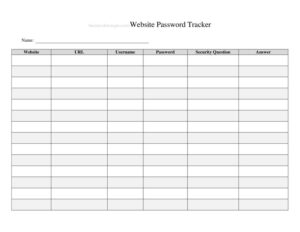
Website Password Tracker
Organize and secure your login credentials with a free Website Password Tracker template — easy to use, printable, free download in PDF and DOCX.
PDF
DOCX
2 downloads
0
likes
Download Files
- DOCX
A Website Password Tracker is a simple log that helps you record and organize the login credentials for every website, app, and online account you use. People most often turn to it because they are tired of resetting forgotten passwords and want one reliable place to keep account details. You can download it free in PDF and DOCX, with no signup required.
What Is a Website Password Tracker?
A Website Password Tracker is a structured document — printed or digital — used to record the websites you visit, your usernames, passwords, security questions, and related notes in one organized place. It is typically maintained by an individual, a family member managing household accounts, or a small business owner keeping track of shared logins. The tracker documents which credentials belong to which service so you never have to guess or repeatedly use the “forgot password” link. While it is not a replacement for a dedicated encrypted password manager, it serves as a clear, low-tech reference that many people find easier to use, especially for offline backup or for accounts that are rarely accessed.
When Do You Need a Website Password Tracker?
This tracker is useful any time you have more accounts than you can comfortably remember. Common situations include:
- Managing dozens of personal logins for banking, shopping, streaming, and social media without reusing the same password everywhere.
- Running a small business with shared accounts for email, web hosting, social platforms, and vendor portals that team members need to access.
- Setting up a new computer or phone and needing a master list of every account to sign back into.
- Keeping a secure offline backup in case a digital password manager fails, locks you out, or is unavailable.
- Helping an older family member organize their accounts so a trusted relative can assist if needed.
- Preparing an estate or emergency document so loved ones can access important accounts during a difficult time.
What a Website Password Tracker Should Have
A complete tracker captures enough detail to log into each account quickly while staying organized. The essential elements include the website name or URL, the username or email used to log in, the current password, any associated security questions and answers, and a notes column for reminders such as the date the password was last changed or which email address recovery messages go to. Grouping entries alphabetically or by category — finance, social, work, shopping — makes a long list far easier to scan. Because the document holds sensitive information, it should also include a clear label and be stored somewhere safe rather than left in plain view.
How to Fill Out a Website Password Tracker
Work through your accounts one at a time and complete a row for each. Follow these steps:
- Website / Service Name: Write the name of the site or app, such as “Gmail,” “Amazon,” or “Chase Bank,” so you can find the entry at a glance.
- Website URL: Record the exact login page address, for example, the sign-in link rather than just the homepage, to save time later.
- Username / Email: Enter the username or email address you use to sign in, since many people have more than one email tied to different accounts.
- Password: Write the current password exactly, including capitalization and symbols. Use clear handwriting or copy carefully so there is no confusion.
- Security Questions & Answers: Note any security questions and the answers you provided, as these are often required for account recovery.
- Notes: Add helpful reminders such as the date the password was last updated, whether two-factor authentication is enabled, or the recovery phone number on file.
Update the tracker each time you change a password so it always reflects your current credentials.
Keeping Your Tracker Secure
Because a Website Password Tracker stores some of your most sensitive information in one place, security matters as much as accuracy. If you keep a printed copy, store it in a locked drawer, safe, or another spot away from your computer where guests and visitors will not stumble across it. Avoid leaving the document on a desk, taping passwords to a monitor, or carrying the full list in a bag where it could be lost or stolen. For digital copies, consider password-protecting the file, storing it on an encrypted drive, and limiting how many people have access. Some people deliberately leave out one piece of each password — a personal code they remember but never write down — so that even a found tracker is incomplete. Whatever method you choose, treat the document with the same care you would give a stack of cash or your checkbook.
Tracker vs. Password Manager
A paper or document-based tracker and a dedicated password manager each have a role. A password manager generates strong, unique passwords, encrypts them automatically, and fills them in for you across devices, which makes it the safest day-to-day option for most people. A written tracker, by contrast, is simple, requires no software, and works as an offline reference or backup that cannot be locked out by a forgotten master password. Many people use both: the manager for everyday logins and the tracker as a controlled backup stored securely for emergencies. This template fits naturally into either approach.
Common Mistakes to Avoid
- Leaving the completed tracker in an obvious, unsecured location where anyone could read it.
- Forgetting to update an entry after changing a password, which leads to lockouts later.
- Recording only partial information, such as the password but not the matching username or recovery email.
- Using the same password across multiple accounts and copying that weakness into the tracker.
- Writing passwords so messily that capital letters, zeros, and the letter O become impossible to tell apart.
- Keeping the only copy with no backup, so a lost sheet means losing access to everything.
Frequently Asked Questions
What is a Website Password Tracker used for? It is used to record and organize the login details for your websites and online accounts in one place. This includes usernames, passwords, security questions, and notes so you can sign in quickly without relying on memory or repeated password resets.
How do I fill out a Website Password Tracker? List each account on its own row, entering the website name, URL, username or email, current password, security questions and answers, and any helpful notes. Write everything clearly and update each entry whenever you change a password so the information stays accurate.
Is a paper password tracker safe to use? It can be reasonably safe if you store it securely, such as in a locked drawer or safe, and keep it away from your computer and out of public view. For maximum protection, consider leaving out part of each password or pairing the tracker with an encrypted password manager.
Is a password tracker better than a password manager? A password manager is generally more secure for everyday use because it encrypts data and fills logins automatically. A written tracker is valuable as a simple offline backup or for people who prefer not to rely on software, and many people use both together.
How much does this template cost? The Website Password Tracker template is completely free to download from Business Forms Pro. There is no signup required, and you can choose between PDF and DOCX formats to print or edit on your computer.
Can I customize the tracker for my own needs? Yes. The DOCX version is fully editable, so you can add columns for two-factor authentication, recovery phone numbers, or account categories, and remove any fields you do not need to suit your personal or business setup.
This template is provided as a general example for informational purposes only and does not constitute security, legal, or financial advice. Best practices for storing sensitive credentials vary, and you are responsible for keeping your information safe — consult a qualified security professional for guidance specific to your situation.
Related Forms
- Laundry Dry Cleaning Form
- Asset Inventory
- Flood Emergency Checklist
- Bill Reminder Tracker
- Petsitter Daily Log
- Inventory Cards — Black And White
Browse more in Log and Inventory.