
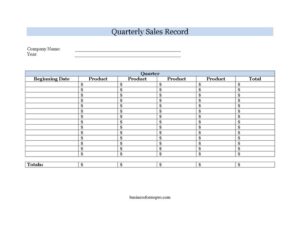
Quarterly Sales Record
Track and total your business sales by quarter with this free Quarterly Sales Record template, available as a PDF and DOCX download with no signup.
PDF
DOCX
2 downloads
0
likes
Download Files
- DOCX
A Quarterly Sales Record is a simple log used to capture and total a company’s sales over a three-month period, grouped by product. Most businesses use it to summarize revenue at the end of each quarter for reporting, forecasting, or tax preparation. You can download this Quarterly Sales Record free in both PDF and DOCX formats — no signup required.
What Is a Quarterly Sales Record?
A Quarterly Sales Record is a structured worksheet that consolidates a business’s sales figures across a defined quarter (typically Q1 through Q4). It identifies the company, the quarter and year being reported, and lists each product alongside its sales total, finishing with a combined grand total. Bookkeepers, small-business owners, and sales managers use it to move from scattered daily transactions to a clean, period-level summary. Unlike a full accounting ledger, it focuses narrowly on sales output by product over one quarter, making it easy to compare performance from one period to the next and to feed numbers into broader financial reports.
When Do You Need a Quarterly Sales Record?
This log is useful any time you need a clear, period-based snapshot of what sold and how much it earned. Common scenarios include:
- Quarterly reporting: Summarizing three months of revenue for owners, partners, or investors.
- Tax preparation: Organizing sales totals before filing quarterly estimated taxes or handing figures to an accountant.
- Product performance reviews: Comparing which items drove the most revenue so you can adjust pricing or inventory.
- Budgeting and forecasting: Using past quarters as a baseline to project the next period’s targets.
- Sales team check-ins: Giving a manager a tidy overview of results at the close of each quarter.
- Lender or grant documentation: Providing a concise revenue summary when applying for financing or reporting on funded activity.
What a Quarterly Sales Record Should Have
A complete and useful record contains everything a reader needs to understand the figures without asking follow-up questions. At minimum it should clearly state the company name, the quarter and year covered, and the beginning date of that reporting window. The body should list each product on its own line with a corresponding sales total, and the bottom should show a combined totals figure that sums every line. Consistent units (dollars), accurate product names, and a clearly labeled period make the document easy to compare against prior quarters and to reconcile with your bookkeeping system.
How to Fill Out a Quarterly Sales Record
- Company Name: Enter the legal or trading name of the business whose sales you are recording, exactly as it appears in your other financial documents.
- Quarter: Indicate which quarter the record covers — Q1 (Jan–Mar), Q2 (Apr–Jun), Q3 (Jul–Sep), or Q4 (Oct–Dec), or your fiscal-year equivalent.
- Year: Write the calendar or fiscal year the quarter belongs to so the record is never ambiguous when filed.
- Beginning Date: Enter the first day of the quarter’s reporting window. This anchors the period and helps if your fiscal calendar differs from the standard calendar.
- Product: List each product or product line on its own row. Use names consistent with your catalog or inventory so totals can be traced back.
- Total: Beside each product, record that item’s total sales for the quarter — either units multiplied by price or the summed revenue from your point-of-sale data.
- Totals: Add every product line and enter the grand total. Double-check this figure against your accounting software or bank deposits.
Tips for Keeping Accurate Quarterly Records
The value of a Quarterly Sales Record depends on the quality of the data behind it. Pull your figures from a single, reliable source — your point-of-sale system, invoicing software, or accounting ledger — rather than estimating from memory. Decide upfront whether totals represent gross sales, net sales (after returns and discounts), or revenue excluding tax, and apply that definition consistently across every quarter so comparisons stay meaningful. It helps to fill the record out promptly at quarter-end while transactions are fresh and supporting reports are easy to access. Save each completed quarter under a clear filename that includes the company, quarter, and year so you can build a multi-quarter history with minimal effort.
How It Differs From a Monthly or Annual Sales Report
A Quarterly Sales Record sits between granular monthly logs and a high-level annual summary. Monthly reports give you finer detail and faster feedback but can be noisy and time-consuming to review. An annual report shows the big picture but hides the seasonal swings that quarters reveal. The quarterly view strikes a practical balance: it aligns with how many businesses file estimated taxes and report to stakeholders, while still being detailed enough to spot trends. Many businesses keep monthly logs for operations and roll them up into this quarterly record for reporting — the two formats complement rather than replace each other.
Common Mistakes to Avoid
- Mixing reporting periods: Including transactions from outside the stated quarter inflates or deflates the totals and breaks year-over-year comparisons.
- Inconsistent product names: Listing the same item under different labels makes it impossible to track a product across quarters.
- Forgetting the year: A quarter without a year is meaningless once you have several records on file.
- Mismatched grand total: Failing to verify that the bottom Totals line equals the sum of all product rows.
- Switching between gross and net figures: Reporting gross sales one quarter and net the next produces misleading trends.
- Leaving the beginning date blank: Without it, anyone using a non-standard fiscal calendar cannot confirm the exact window covered.
Frequently Asked Questions
What is a Quarterly Sales Record used for? It is used to summarize a business’s sales by product over a single three-month period, producing a clear revenue total for that quarter. Owners rely on it for reporting, tax preparation, forecasting, and product performance reviews. It turns scattered daily transactions into one organized, comparable snapshot.
How do I fill out a Quarterly Sales Record? Start by entering the company name, the quarter, the year, and the beginning date of the period. Then list each product on its own line with its sales total, and finish by adding all the lines into a single grand total. Pull the figures from your point-of-sale or accounting system to keep them accurate.
Should sales totals be gross or net? Either approach works as long as you choose one and apply it consistently across every quarter. Gross sales reflect total revenue before returns, discounts, and taxes, while net sales subtract those items. Note your chosen method somewhere on the record so future readers interpret the numbers correctly.
Does a Quarterly Sales Record need to be notarized? No. It is an internal business and accounting document, not a legal contract, so it does not require notarization or witnesses. You simply complete it accurately and store it with your financial records for reference and tax support.
What time periods do the four quarters cover? On a standard calendar, Q1 is January through March, Q2 is April through June, Q3 is July through September, and Q4 is October through December. Businesses on a different fiscal year shift these accordingly. The beginning date field lets you mark the exact start of your quarter regardless of which calendar you follow.
Is this Quarterly Sales Record template free to download? Yes. You can download it free in both PDF and DOCX formats with no signup required. The DOCX version is fully editable, so you can add product rows, adjust labels, and insert your company branding before printing or filing.
This Quarterly Sales Record template is a general example provided for informational purposes only and does not constitute legal, financial, or tax advice. Reporting and record-keeping requirements vary by jurisdiction and business type — consult a qualified accountant or tax professional for guidance specific to your situation.
Related Forms
- Inventory Report
- Drivers Daily Log
- Customer Care Log
- Petsitter Daily Log
- Quotation Record
- Fire Drill Log
Browse more in Log and Inventory.