
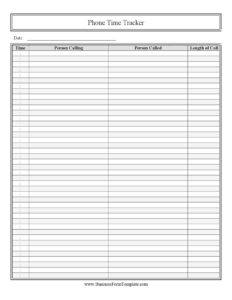
Telephone Time Tracker
Log every business call with this free Telephone Time Tracker template—record date, time, callers, and call length. Free download in PDF and DOCX.
PDF
3 downloads
0
likes
Download Files
A Telephone Time Tracker is a simple log used to record the details of phone calls—who called whom, when, and for how long. People most often use it to keep an accurate record of business calls for billing, productivity tracking, or accountability. It’s free to download here in both PDF and DOCX formats, with no signup required.
What Is a Telephone Time Tracker?
A Telephone Time Tracker is a structured worksheet that captures the essential facts about each phone call you make or receive. Instead of relying on memory or scattered notes, you record the date, the time the call started, the person calling, the person called, and the length of the call in a single, consistent row. Individuals, freelancers, receptionists, and small teams use it to document phone activity for client billing, expense reporting, or simply to understand how much time is spent on the phone. Because the format is uniform, the log is easy to scan, total, and reference weeks or months later when you need proof of contact or a record of billable minutes.
When Do You Need a Telephone Time Tracker?
This log fits any situation where the specifics of a phone conversation matter as much as the conversation itself. Common scenarios include:
- Billable client calls — consultants, attorneys, accountants, and agencies who bill by the minute or hour need an accurate record of call length.
- Customer service and reception — front-desk staff logging incoming and outgoing calls to track volume and follow-up needs.
- Sales call tracking — reps recording who they reached, when, and how long each prospect conversation lasted.
- Personal phone-use audits — anyone trying to reduce time on the phone and identify which calls eat up the day.
- Expense and reimbursement claims — documenting work calls made from a personal line for reimbursement.
- Dispute resolution — having a dated record of when a call occurred and who participated, in case a conversation is later questioned.
What a Telephone Time Tracker Should Have
An effective phone log keeps the columns short and the entries consistent. At minimum, each entry should capture the date of the call, the time it began, the name of the person who placed the call, the name of the person who was called, and the total duration. A complete tracker also leaves room for a running total of minutes per day or per client, and a clear header identifying the period covered and the person or department maintaining the log. Consistency is what gives the document value—every row should follow the same order and the same units (minutes), so the log can be totaled quickly and trusted later.
How to Fill Out a Telephone Time Tracker
- Date: Enter the calendar date of the call. Use a consistent format such as MM/DD/YYYY across every row so entries sort correctly.
- Time: Record the time the call started. Note whether you are using 12-hour (with AM/PM) or 24-hour time and stick with one style throughout the log.
- Person calling: Write the full name of the individual who initiated the call. For inbound calls, this is the caller; for outbound, it’s the person on your side who placed it.
- Person called: Enter the name of the person on the receiving end of the call. Adding a company or department in parentheses helps when names repeat.
- Length of call: Record the total duration, ideally in minutes (for example, 14 min). Round consistently—either to the nearest minute or to a set increment—so billing and totals stay fair.
- Total and review: At the end of the day or week, sum the length-of-call column to get a running total of phone time for reporting or invoicing.
Tips for Keeping an Accurate Phone Log
The best time to fill out the tracker is immediately after each call ends, while the details are fresh. Keep the blank log within arm’s reach of your phone—printed on paper or open on screen—so logging becomes automatic rather than a chore you reconstruct from memory at day’s end. If you bill clients, decide on a rounding policy before you start (such as rounding up to the next minute) and apply it uniformly. For teams sharing one log, consider adding initials to each row so it’s clear who recorded the entry. Save or photograph completed pages at the end of each period so nothing is lost.
Telephone Time Tracker vs. a General Call Notes Sheet
A Telephone Time Tracker focuses on the measurable facts of a call—date, time, participants, and duration—rather than the content of the conversation. A call notes sheet, by contrast, captures what was discussed, action items, and follow-up commitments. Many people use both: the tracker provides the clean, totalable record needed for billing or productivity analysis, while a separate notes page holds the substance. Keeping them distinct prevents your timing data from getting buried inside paragraphs of discussion notes and makes it far easier to add up minutes at the end of the week.
Common Mistakes to Avoid
- Logging from memory: Waiting until the end of the day leads to guessed times and forgotten calls. Record each entry right after the call.
- Mixing time formats: Switching between 12-hour and 24-hour clocks—or omitting AM/PM—makes the log ambiguous and hard to total.
- Inconsistent duration units: Writing “14 min” in one row and “0:14” in another invites errors when you sum the column.
- Vague names: Listing only first names when several contacts share one creates confusion later; add a company or last name.
- Skipping inbound calls: Tracking only outbound calls leaves your record incomplete and understates total phone time.
- Never totaling: A log with no running total forces you to re-add everything at invoice time and increases the chance of mistakes.
Frequently Asked Questions
What is a Telephone Time Tracker used for? It’s used to log the date, time, participants, and length of phone calls in a consistent format. People rely on it for client billing, productivity tracking, expense documentation, and keeping a dependable record of when calls happened and who was involved.
How do I fill out the length-of-call field? Record the total duration of the call, ideally in minutes such as “12 min.” Choose a rounding rule before you begin—for example, rounding up to the next full minute—and apply it to every entry so your totals stay consistent and fair.
Should I log both incoming and outgoing calls? Yes, if you want a complete picture. Use the “person calling” field for whoever initiated the call and “person called” for the recipient, so the log clearly shows direction whether the call was inbound or outbound.
Is a phone log legally binding or official? A Telephone Time Tracker is an internal record rather than a binding contract. It can serve as supporting documentation—for billing or a dispute—but its value depends on being accurate, contemporaneous, and consistent, so fill it in promptly and honestly.
Can I edit the template to fit my needs? Absolutely. The DOCX version is fully editable, so you can add columns for phone number, client, billing code, or follow-up notes. The PDF is ready to print and fill in by hand if you prefer a physical log by your phone.
How much does this template cost? Nothing—it’s a free download in both PDF and DOCX with no signup required. You can print as many copies as you need or duplicate the digital file for each week, project, or team member.
This Telephone Time Tracker template is a general example provided for informational purposes only and is not legal, financial, or tax advice. Recordkeeping and billing requirements vary by jurisdiction, industry, and contract—consult a qualified professional to ensure your phone logs meet your specific obligations.
Related Forms
- Weekly Music Practice Log
- Pool Maintenance Log
- College Packing Checklist
- Office Supplies Inventory
- Covid Disinfecting Checklist
- Computer Update Tracker
Browse more in Log and Inventory.