
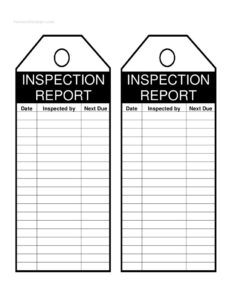
Inspection Tags
Download free Inspection Tags templates in PDF and DOCX to record equipment checks, pass or fail status, dates, and inspector sign-off with ease.
PDF
DOCX
6 downloads
0
likes
Download Files
- DOCX
Inspection tags are small, attachable records used to document that a piece of equipment, tool, or system has been checked and to show its current status at a glance. The most common reason people use them is to prove that a routine safety inspection was completed and to flag whether an item passed, failed, or needs follow-up. You can download these inspection tags free in both PDF and DOCX formats, with no signup required.
What Is an Inspection Tag?
An inspection tag is a compact label or card that is physically attached to equipment to record the result of a periodic check. It is typically issued by a technician, safety officer, maintenance worker, or qualified inspector and stays with the item until the next inspection cycle. The tag documents who performed the inspection, when it took place, the outcome, and when the next check is due. Inspection tags serve as both a working reminder for users in the field and a paper trail for compliance audits. They are widely used in workplaces where regular verification of equipment condition is required to keep operations safe and accountable.
When Do You Need an Inspection Tag?
Inspection tags appear anywhere equipment must be checked on a recurring schedule. Common situations include:
- Fire safety equipment: tagging fire extinguishers, hoses, and emergency lighting after monthly or annual checks.
- Lifting and rigging gear: recording inspections of slings, chains, hooks, and hoists before they are returned to service.
- Ladders and scaffolding: marking access equipment as safe to use or condemned after a visual and structural check.
- Electrical tools and portable appliances: documenting test-and-tag results so workers know an item is safe to plug in.
- Machinery and forklifts: showing a pre-use or scheduled service inspection has been completed.
- First aid kits, harnesses, and PPE: confirming contents and condition were verified on a set date.
Types of Inspection Tags
While the core fields stay similar, tags are often color-coded or worded to match their purpose. A pass tag confirms the item is safe and in service. A fail or do-not-use tag warns others to remove the item from service immediately. A maintenance or out-of-service tag indicates an item is awaiting repair, while a periodic inspection tag simply tracks the date of the last check and the next due date. Choosing the right wording prevents confusion in busy environments.
What an Inspection Tag Should Have
A complete inspection tag should clearly identify the item and its status without anyone having to dig through records. At minimum it should include the equipment name or identification number, the inspection date, the result (pass, fail, or needs attention), the inspector’s name and signature or initials, and the next inspection due date. Many tags also leave room for brief notes, a location, and a tag or asset number that links back to a master log or inventory sheet.
How to Fill Out an Inspection Tag
- Identify the equipment: write the item name, type, model, or asset/serial number so the tag can only refer to one specific piece of equipment.
- Record the location: note the building, room, vehicle, or work area where the item is normally kept or used.
- Enter the inspection date: add the day, month, and year the check was performed.
- Mark the status: clearly indicate Pass, Fail, or Needs Maintenance so any user can read it instantly.
- Describe what was checked: in the notes area, summarize the points inspected or any defects found.
- Set the next due date: calculate and write the date the next inspection should occur based on your schedule.
- Add the inspector’s details: print the inspector’s name, then sign or initial to confirm responsibility for the result.
- Attach the tag: secure it to the item with a wire, tie, or adhesive so it travels with the equipment.
Linking Tags to Your Inspection Log
An inspection tag works best as part of a larger system rather than on its own. Assign each tag a unique number and record the same details in a central inspection log or asset register. That way, if a tag is damaged, removed, or lost, your records still show the full inspection history. A consistent numbering and color scheme also makes it easy to spot overdue items during a walk-through and to pull the right paperwork during an audit. Keep blank tags stocked near inspection points so checks are never delayed by missing supplies.
Tips for Using Inspection Tags Effectively
Use weatherproof or laminated tags for outdoor and harsh environments so the writing does not fade. Write in permanent, legible ink and avoid abbreviations that only one person understands. Standardize the format across your whole organization so a tag from one site is instantly readable at another. Finally, remove and replace old tags at each inspection rather than stacking them, which keeps the most current status easy to find.
Common Mistakes to Avoid
- Leaving the next-due date blank: without it, no one knows when the item needs to be checked again.
- Illegible handwriting: a smudged or rushed tag is useless during an emergency or audit.
- Failing to remove failed equipment: a fail tag means nothing if the item stays in active use.
- No inspector signature: an unsigned tag cannot establish who is accountable for the result.
- Reusing outdated tags: old dates left in place create confusion about the item’s real status.
- Not matching the tag to a log entry: tags alone can be lost, so always back them up in your records.
Frequently Asked Questions
What is an inspection tag used for? An inspection tag is used to record that a piece of equipment has been checked and to display its current status, such as pass or fail. It acts as a quick visual reference for anyone using the equipment and as evidence that inspections happened on schedule.
How do I fill out an inspection tag? Identify the equipment, record the inspection date, mark the result, set the next due date, and sign or initial as the inspector. Add brief notes about what was checked or any defects, then attach the tag securely to the item.
Do inspection tags need to be signed? Most organizations require the inspector to sign or initial the tag so that responsibility for the result is clear. A signature also helps during audits by linking the inspection to a named, qualified person.
How often should equipment be inspected and re-tagged? Frequency depends on the equipment type, manufacturer guidance, and any regulations that apply in your industry or region. Common cycles range from daily pre-use checks to monthly, quarterly, or annual inspections.
Are inspection tags legally required? In many industries, regular inspection and documentation of safety equipment is required, though the exact rules vary by jurisdiction and equipment type. Always check the standards that apply to your workplace to confirm what is mandatory.
Is this inspection tag template free to download? Yes. You can download this inspection tags template free in both PDF and DOCX formats with no signup required, and customize it to match your equipment and inspection schedule.
This inspection tags template is a general example provided for informational purposes only and is not legal, safety, or compliance advice. Inspection and documentation requirements vary by jurisdiction, industry, and equipment type — consult a qualified safety professional or the relevant regulatory authority to ensure your practices meet applicable standards.
Related Forms
- Store Closing Procedure Checklist
- Housekeeping Inspection Checklist
- Vehicle Repair Log
- Large-Print Packing List
- Networking Tracker
- Inventory Cards Spreadsheet
Browse more in Log and Inventory.