
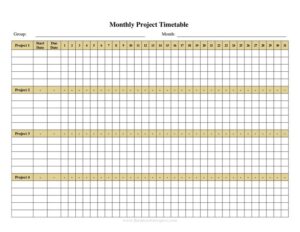
Monthly Multiple Project Timetable
Track several projects at once with a free Monthly Multiple Project Timetable template—organize tasks, deadlines, and progress, available as a free download.
PDF
DOCX
6 downloads
0
likes
Download Files
- DOCX
A Monthly Multiple Project Timetable is a planning sheet that maps out the tasks, milestones, and deadlines for several projects across the days or weeks of a single month on one page. People most often use it to keep parallel projects from colliding—seeing at a glance who is doing what and when so nothing slips. It’s free to download here in both PDF and editable DOCX formats, with no signup required.
What Is a Monthly Multiple Project Timetable?
A Monthly Multiple Project Timetable is a visual scheduling document that organizes two or more concurrent projects within the same calendar month. It is typically created and maintained by a project manager, team lead, business owner, or coordinator who needs to oversee competing priorities. The timetable documents each project’s key tasks, start and end dates, responsible owners, and progress against the month’s calendar. Its purpose is simple but powerful: to consolidate scattered to-do lists, individual project plans, and team commitments into a single reference that shows how multiple efforts overlap. By laying everything side by side, it exposes scheduling conflicts, resource bottlenecks, and idle gaps before they become problems—making it a staple log for any team juggling several initiatives at once.
When Do You Need a Monthly Multiple Project Timetable?
This timetable becomes essential whenever attention is split across more than one deliverable in the same period. Common situations include:
- A small agency managing three client campaigns that all have deliverables due the same month.
- A construction or facilities team coordinating overlapping renovation, maintenance, and inspection jobs across several sites.
- A marketing department running a product launch, a newsletter cycle, and an event in parallel.
- A freelancer or consultant balancing multiple client engagements and wanting to visualize their workload before overcommitting.
- A manager planning team capacity for the month and needing to spot weeks where everyone is double-booked.
- A nonprofit coordinating a fundraising drive, a grant deadline, and a volunteer program simultaneously.
In each case the timetable replaces guesswork with a clear monthly snapshot, helping you commit to realistic dates and reassign work when too many tasks land on the same day.
What a Monthly Multiple Project Timetable Should Have
A complete timetable balances enough detail to be useful with enough simplicity to scan quickly. The core elements include a clearly labeled month and year, a list of the projects being tracked, and a calendar grid or row-by-day layout that covers the full month. Each project should have its own row or color band so tasks are easy to follow. For every task you want a description, a start date, a target completion date, the person responsible, and a status or progress indicator. Many users add a priority marker, a notes column for dependencies or blockers, and a milestone flag for the dates that matter most. Together these fields turn a blank calendar into a working control panel.
How to Fill Out a Monthly Multiple Project Timetable
- Enter the month and year at the top so the sheet is unambiguous when filed or shared.
- List each project in its own row or section, using a short, recognizable name or code for fast reference.
- Break each project into tasks, writing one clear, action-based task per line (for example, “Draft client proposal” rather than just “Proposal”).
- Assign start and end dates to every task, placing or shading them on the correct days of the month grid.
- Name a responsible person for each task so ownership is never ambiguous.
- Mark milestones and deadlines—reviews, client handoffs, launch dates—using a flag, bold text, or distinct color.
- Add a status or progress note (not started, in progress, complete, blocked) and update it as the month unfolds.
- Use the notes column to capture dependencies, such as tasks that can’t begin until another finishes.
- Review the full grid for days where too many tasks overlap and rebalance the schedule before locking it in.
Tips for Keeping the Timetable Useful
A timetable only helps if it stays current. Set a fixed cadence—say every Monday morning—to update statuses, mark completed tasks, and shift dates that have moved. Color-coding by project or by status makes the page readable at a glance and lets stakeholders absorb the picture in seconds. Keep task descriptions short and verb-driven so anyone can understand them without explanation. When you spot a week that is overloaded, resist the urge to leave it; either move tasks, add resources, or renegotiate a deadline. If you use the DOCX version, consider duplicating the sheet at the start of each month and rolling unfinished tasks forward so you maintain a continuous history of what was planned versus what was delivered.
How It Differs From a Single-Project Plan
A traditional project plan—like a Gantt chart or work breakdown—dives deep into one initiative, often spanning many months and dozens of subtasks. A Monthly Multiple Project Timetable does the opposite: it zooms out to a single month and lays multiple projects side by side. It is intentionally lighter on detail so the focus stays on how efforts compete for the same days and people. Many teams use both: detailed plans for each project and this monthly timetable as the master view that keeps everything coordinated. Think of it as the air-traffic-control layer above your individual flight plans.
Common Mistakes to Avoid
- Cramming too many tasks into one cell so the grid becomes unreadable—keep each line to one task.
- Forgetting to assign an owner, which leaves tasks orphaned and easy to overlook.
- Setting every task to the same priority, which hides what truly matters this month.
- Letting the timetable go stale—an un-updated schedule is worse than none because people trust it.
- Ignoring dependencies and scheduling a task before its prerequisite is finished.
- Overloading single days or weeks without checking whether the same people are available across projects.
Frequently Asked Questions
What is a Monthly Multiple Project Timetable used for? It is used to plan and track several projects within the same month on one page. Teams rely on it to see overlapping tasks, deadlines, and owners so they can spot conflicts and balance workloads before problems arise.
How do I fill out the timetable? Start by entering the month and year, then list each project and break it into individual tasks. Assign start and end dates, name a responsible person, mark key milestones, and update the status of each task as the month progresses.
Can I track more than just a few projects on it? Yes, though readability matters. The format works well for roughly two to six concurrent projects; beyond that, consider grouping related efforts or using one timetable per program so the grid stays scannable.
Is this the same as a Gantt chart? Not exactly. A Gantt chart usually details one project across a long timeline, while this timetable gives a high-level monthly view of multiple projects at once. Many teams use both together for coordination and depth.
How much does the template cost? Nothing—it is completely free to download in both PDF and DOCX formats, with no signup or account required. You can edit the DOCX version to match your projects, columns, and color scheme.
How often should I update it? Update it on a regular rhythm, such as weekly, plus any time a deadline shifts or a task is completed. A timetable that reflects reality keeps your team aligned, while an outdated one quickly loses trust and usefulness.
This template is provided as a general example for informational purposes only and does not constitute project-management, legal, financial, or professional advice. Your organization’s planning needs and requirements may vary—consult a qualified professional or adapt the template to your specific circumstances before relying on it.
Related Forms
- Monthly Cleaning Log
- Contracts List
- Phone Log
- Advertisement Tracker
- Trip Itinerary
- College Application Comparison Checklist
Browse more in Log and Inventory.