
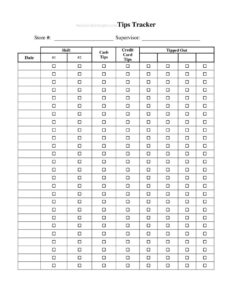
Tips Tracker
Use this free Tips Tracker template to log daily gratuities, totals, and shift earnings accurately — free download in PDF and DOCX, no signup.
PDF
DOCX
1 downloads
0
likes
Download Files
- DOCX
A Tips Tracker is a simple log used to record gratuities earned across shifts so you can keep accurate income records for budgeting, taxes, and tip-pooling. The most common reason people reach for one is to remember exactly how much they earned each day before that number fades from memory. This Tips Tracker is free to download in PDF and DOCX, with no signup required.
What Is a Tips Tracker?
A Tips Tracker is a personal record-keeping sheet used by servers, bartenders, baristas, delivery drivers, hairstylists, valets, and other tipped workers to document the gratuities they collect. It captures each shift’s date, hours worked, cash tips, card tips, and any tips shared or pooled with coworkers. The purpose is twofold: it gives you a reliable running total of your actual earnings, and it creates a paper trail that supports accurate income reporting. Because tips often arrive in cash and disappear quickly, a written log is far more dependable than memory. Whether you use it for weekly budgeting or end-of-year tax preparation, a Tips Tracker turns scattered, hard-to-recall amounts into organized, usable data.
When Do You Need a Tips Tracker?
Almost anyone who earns gratuities benefits from logging them consistently. A Tips Tracker becomes especially useful in these situations:
- Daily shift logging — recording cash and card tips at the end of each shift while the numbers are fresh.
- Tax season preparation — totaling your annual tip income so reporting is fast and accurate.
- Tip pooling or tip-outs — tracking what you contributed to a pool and what you received back from it.
- Budgeting and saving — understanding your true take-home pay when a large share comes from gratuities.
- Comparing shifts — figuring out which days, sections, or events earn the most so you can request better schedules.
- Income verification — showing consistent earnings when applying for a loan, lease, or apartment.
What a Tips Tracker Should Have
A complete Tips Tracker should make it easy to enter and total a few core data points. At minimum it should include the date of each shift, the hours or shift worked, the amount of cash tips, the amount of credit-card tips, any tip-out or pooled amount, and a daily total. Many trackers also include a column for the workplace or location (helpful if you hold more than one job), a notes field for context like a busy event or weather, and a running weekly or monthly subtotal. Clear column headings, consistent units, and a place to sum everything are what separate a useful log from a pile of scattered figures.
How to Fill Out a Tips Tracker
- Enter the date. Record the calendar date of the shift so entries stay in chronological order.
- Note the shift or hours. Write your start and end time or shift name, and total hours worked, which lets you calculate tips per hour later.
- Record cash tips. Count the cash you received and enter the exact amount before any tip-out.
- Record card tips. Add the gratuities paid on credit or debit cards, usually reported by your point-of-sale system at clock-out.
- Log tip-outs or pooling. Enter any amount you paid into a tip pool or shared with support staff as a negative or separate column.
- Calculate the daily total. Add cash and card tips, subtract tip-outs, and write the net total you actually kept.
- Add a location or notes. If you work multiple jobs or want context, note the workplace and anything notable about the shift.
- Total each week or month. Sum the daily totals at the bottom to track your earnings over time.
Tips for Keeping an Accurate Tip Log
The single most important habit is logging your tips immediately — at the end of each shift, not days later. Cash tips are easy to overestimate or forget entirely once they’ve been spent. Keep the tracker somewhere you’ll actually use it, whether that’s a printed sheet in your apron, a copy on your phone, or a spreadsheet you update at home. Be consistent about whether you record gross tips (before tip-out) or net tips (after tip-out), and stick to one method so your totals stay comparable. Save your point-of-sale tip reports as backup for the card portion, and consider photographing your handwritten log periodically so you have a digital copy if the paper is lost.
Why Tip Records Matter for Taxes
In many places, tips are considered taxable income that workers are responsible for reporting, including cash tips that never pass through an employer’s payroll. A well-kept Tips Tracker is the easiest way to substantiate those amounts if questions ever arise. Some employers require staff to report tips at regular intervals, and your personal log makes those reports faster and more accurate. Rules about thresholds, reporting frequency, and what counts as a reportable tip vary by jurisdiction, so treat your tracker as a record-keeping aid and confirm the specific requirements that apply to you.
Common Mistakes to Avoid
- Logging late. Waiting until the weekend to fill in a whole week guarantees forgotten cash amounts.
- Mixing gross and net. Recording some days before tip-out and others after makes your totals unreliable.
- Skipping small tips. A few dollars per shift adds up to a meaningful sum over a year.
- Forgetting card tips. Relying only on cash counts ignores a large portion of many workers’ earnings.
- No backup copy. A single paper sheet can be lost, spilled on, or thrown out.
- Not totaling regularly. Without weekly or monthly sums, the log loses much of its budgeting and reporting value.
Frequently Asked Questions
What is a Tips Tracker used for? It is a log for recording the gratuities you earn each shift, including cash and card tips and any tip-outs. People use it to keep accurate income records for budgeting, comparing shifts, and tax preparation. It replaces unreliable memory with an organized, totaled record.
How do I fill out a Tips Tracker? Enter the date and shift, then record your cash tips, card tips, and any amount paid into a tip pool. Add cash and card tips together, subtract tip-outs, and write the daily net total. Sum your daily totals at the end of each week or month for a running picture of your earnings.
Should I track cash and card tips separately? Yes, separating them is good practice. Card tips are usually documented by your point-of-sale system, while cash tips exist only in your own records. Logging them in separate columns makes it easier to verify card totals and ensures cash isn’t overlooked.
Do I have to report the tips I log? In many jurisdictions tips are taxable income that workers must report, including cash. Your tracker helps you do this accurately, but reporting rules and thresholds vary by location and employer, so confirm the requirements that apply to you.
Is this Tips Tracker free to download? Yes. You can download this Tips Tracker template completely free in both PDF and DOCX formats with no signup required. Use the PDF to print and carry, or the DOCX to customize columns to match your job.
Can I use one tracker for multiple jobs? Absolutely. Add a location or workplace column so each entry shows which job it came from. This keeps everything in one place while still letting you total each job separately when needed.
This Tips Tracker template is a general example provided for informational purposes only and is not legal, financial, or tax advice. Reporting requirements and recordkeeping rules vary by jurisdiction and employer — consult a qualified tax or accounting professional for guidance specific to your situation.
Related Forms
- Outgoing Mail Detailed Log
- List of Home Services
- Conference Call Log
- Bird Strike Form
- College Application Comparison Checklist
- Store Opening Procedure Checklist
Browse more in Log and Inventory.