
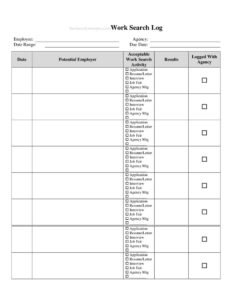
Work Search Log
Track your job search activity with this free Work Search Log template, available as a PDF and DOCX download to document applications and stay benefit-eligible.
PDF
DOCX
2 downloads
0
likes
Download Files
- DOCX
A Work Search Log is a record used to document the jobs you have applied for, contacts you have made, and other employment-seeking activities over a given period. Most people use it to satisfy unemployment benefit requirements or to keep their own job hunt organized, and it’s free to download here in both PDF and DOCX formats with no signup required.
What Is a Work Search Log?
A Work Search Log is a simple tracking document that captures the who, what, when, and how of your job-seeking efforts. It is typically maintained by an individual receiving unemployment insurance benefits, who must show ongoing, good-faith attempts to find work to remain eligible. The log records each employer contacted, the date, the position applied for, the method of contact, and the outcome. Beyond benefit compliance, anyone navigating a long job search uses one to avoid duplicate applications, schedule follow-ups, and measure progress. It serves as both a personal organizer and an official paper trail that can be submitted to a workforce agency or caseworker if your activity is ever reviewed or audited.
When Do You Need a Work Search Log?
This log becomes essential any time someone is required to prove they are actively looking for work, or simply wants to stay on top of a busy search. Common situations include:
- Collecting unemployment benefits: Most states require a minimum number of documented work search activities each week to keep receiving payments.
- Responding to an eligibility audit: If your state agency asks for proof of job-seeking, a complete log is your evidence.
- Managing a high-volume job hunt: Applying to dozens of positions makes it easy to forget who you contacted and when follow-up is due.
- Working with a career counselor or case manager: Many programs ask participants to bring a log to appointments to review activity together.
- Meeting workforce program or reemployment requirements: Training and reemployment services often mandate documented outreach.
- Tracking networking and events: Job fairs, recruiter calls, and informational interviews all count toward a thorough search.
What a Work Search Log Should Have
A useful and credible Work Search Log captures enough detail to verify each activity. Key elements include the claimant’s name and any claim or identification number, the week or date range being reported, and one row per activity. Each entry should record the date of contact, the employer or organization name, their address or website, a contact person and phone or email where available, the job title or type of work sought, the method used to apply (online, in person, email, phone, or job fair), and the result or status. A space for notes lets you record follow-up dates or interview details, and a signature line with a date adds accountability when the log is submitted to an agency.
How to Fill Out a Work Search Log
Because a clear log protects your benefits and your sanity, fill it out consistently. Work through it like this:
- Enter your identifying details: Write your full name and, if you are claiming benefits, your claim or social security reference number at the top.
- Set the reporting period: Note the week or date range the log covers so each sheet maps to one benefit week.
- Record the date: Log the exact day you made each contact or completed each activity.
- Name the employer: Add the company or organization, plus its address, website, or location.
- List the contact: Include a person’s name, phone number, or email if you have it.
- State the position: Write the job title or type of work you applied for.
- Note the method: Mark whether you applied online, in person, by email, by phone, or at an event.
- Record the result: Capture the outcome — application submitted, interview scheduled, no response, declined.
- Add notes and sign: Jot any follow-up reminders, then sign and date if submitting the log.
Tips for an Audit-Proof Log
Treat every entry as something a reviewer might one day read. Fill in the log on the same day you make contact, while details are fresh, rather than reconstructing a week from memory. Keep confirmation emails, job posting URLs, and screenshots in a folder so each row can be backed up if questioned. Check your state’s exact requirement for the number of activities per week, because some require two, others four or more, and the definition of a qualifying activity can vary. If you attend a job fair or a required reemployment workshop, log it just as you would an application, since these often count. Finally, keep your logs even after your claim ends — many agencies can review past weeks for months.
Work Search Log vs. a Personal Application Tracker
A personal application tracker is something you build for your own convenience, with whatever columns help you stay organized. A Work Search Log, by contrast, is meant to satisfy an external requirement and therefore prioritizes verifiable details: dates, contact names, and outcomes that an agency could independently confirm. You can absolutely use one document for both purposes, but if benefits are involved, make sure your log meets the minimum information your state expects rather than just tracking what is useful to you personally.
Common Mistakes to Avoid
- Listing too few activities: Falling short of your state’s weekly minimum can interrupt or end your benefits.
- Leaving out contact details: Entries with no employer name, phone, or website are hard to verify and may be rejected.
- Vague results: Writing “applied” without an outcome or follow-up makes the log less useful and less credible.
- Filling it in late: Reconstructing weeks from memory leads to errors and missed entries.
- Reusing the same employer to pad numbers: Repeated contact with one company often does not count as separate activities.
- Discarding old logs: Throwing away past sheets leaves you unable to respond if an earlier week is audited.
Frequently Asked Questions
What is a Work Search Log used for? It documents your job-seeking activities — applications, employer contacts, interviews, and events — over a specific period. Most people keep one to satisfy unemployment benefit rules that require proof of an active search, while others use it simply to stay organized during a long job hunt.
How many job searches do I need to record each week? The minimum varies by state and program, with some requiring two activities a week and others four or more. Check your state workforce agency’s current rules, since the number and the definition of a qualifying activity can change.
Does a Work Search Log need to be notarized or signed? Notarization is generally not required. A signature and date are useful when you submit the log to an agency because they affirm the information is accurate, but the log’s value comes from complete, truthful entries rather than any formal certification.
What counts as a valid work search activity? Submitting a job application, attending an interview, registering with a job service, going to a job fair, or contacting an employer about openings typically count. Some networking and reemployment workshops also qualify; confirm specifics with your program.
Is this Work Search Log template really free? Yes. You can download it here in both PDF and DOCX formats at no cost and with no signup. Use the PDF to print and write by hand, or the DOCX to type and customize the columns for your needs.
How long should I keep my completed logs? Keep your logs for the entire duration of your claim and for a period afterward, since agencies can review past weeks during an audit. Retaining supporting emails and confirmations alongside each log adds an extra layer of protection.
This Work Search Log template is provided as a general example for informational purposes only and is not legal, financial, or unemployment-benefit advice. Requirements for work search activities vary by state and program and can change over time — consult your local workforce agency or a qualified professional to confirm what applies to your situation.
Related Forms
- Outgoing Mail Detailed Log
- Interruptions Log
- Auction Sell List
- Beneficiaries List
- Weekly Music Practice Log
- Home Inventory List of Possessions
Browse more in Log and Inventory.