
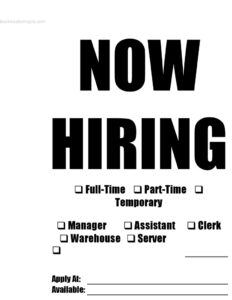
Customizable Now Hiring Sign
Use this free customizable Now Hiring sign template to advertise open jobs with position and apply-at details — free download in PDF and DOCX.
PDF
DOCX
17 downloads
0
likes
Download Files
- DOCX
A customizable Now Hiring sign is a ready-to-print poster that lets a business advertise open positions quickly by checking off the roles and schedules available and adding where to apply. The most common reason people use one is to fill local job openings fast — posting in a window, on a bulletin board, or at the front counter without paying for a designer. This template is free to download in PDF and DOCX, with no signup required.
What Is a Now Hiring Sign?
A Now Hiring sign is a simple recruitment notice that tells passersby and customers that a business is actively looking for staff. It is typically issued by a store owner, hiring manager, or office administrator and displayed in a high-traffic spot such as a storefront window, entrance, or break room. The sign documents which positions are open, the type of employment offered, and how an interested candidate can apply. Unlike a formal job listing or application form, its purpose is purely to attract attention and prompt a quick first contact. This particular template includes checkboxes for common schedules and roles plus space to write where and when to apply, so it works for retail, hospitality, warehouse, and office settings alike.
When Do You Need a Now Hiring Sign?
A printed sign is one of the cheapest and fastest ways to reach people who already know your location. Consider posting one in these situations:
- Seasonal rushes — a retail shop or restaurant needs extra hands for the holidays, summer, or a busy weekend stretch.
- Sudden turnover — an employee gives notice and you need a replacement clerk, server, or warehouse worker right away.
- New location or expansion — you are opening a second storefront and want to build a team before launch.
- Walk-in friendly roles — front-counter, kitchen, and stockroom jobs often attract great candidates who simply notice your sign.
- Supplementing online ads — you posted online but want to reach local applicants who pass your business every day.
- Quick part-time or temporary help — you need short-term coverage and want to signal flexible hours immediately.
What a Now Hiring Sign Should Have
An effective sign is readable from a distance and answers a candidate’s basic questions in seconds. Strong signs include a bold NOW HIRING headline, a clear indication of the position or positions open, the employment type (full-time, part-time, or temporary), and a simple instruction on how to apply. The best signs also note when applications are accepted or when the role is available to start. Keep the wording short, use high contrast so it reads from across a parking lot, and leave the details accurate so you do not field calls for roles that are already filled. This template gives you checkboxes for the most common options plus open fields so you can tailor it without redesigning anything.
How to Fill Out a Now Hiring Sign
- Keep the NOW HIRING headline at the top — it is the eye-catcher, so leave it large and bold.
- Mark the employment type: check Full-Time, Part-Time, or Temporary depending on the schedule you are offering. You can check more than one if you are flexible.
- Select the position: tick the role you need — Manager, Assistant, Clerk, Warehouse, or Server. If your opening is not listed, check Other and write the job title in the space provided.
- Complete the Apply At field: enter exactly how a candidate should reach you — an in-store request, a phone number, an email address, or a website. Be specific so people know the next step.
- Fill in the Available field: note when the role starts or when you accept applications (for example, “Immediately” or “Weekdays 9–5”).
- Review and print: double-check the details, then print on bright paper or card stock and display it where foot traffic is highest.
Tips for a Sign That Actually Gets Responses
Placement matters as much as wording. Post the sign at eye level near the entrance, register, or window where people naturally pause. Use bright paper to draw the eye, and protect it in a sleeve or laminate it if it will be exposed to sunlight or weather. If you are hiring for several roles, print one sign per position so candidates immediately see the job that fits them. Update or remove the sign the moment a position is filled — an outdated notice frustrates applicants and wastes your staff’s time answering inquiries for jobs that no longer exist.
How It Differs From a Job Posting or Application
A Now Hiring sign is an attention-getter, not a complete hiring document. It does not collect candidate information the way a job application does, and it does not detail duties, pay, or qualifications like a full job posting. Think of the sign as the first touchpoint that gets a person to ask about the role; the application and interview handle the rest. Because of this, keep the sign uncluttered — too much text defeats its purpose. Pair it with a stack of application forms at the counter so interested candidates can act on the spot.
Common Mistakes to Avoid
- Vague apply instructions — “inquire within” without a name or contact can stall interested candidates; be specific.
- Listing too many roles on one sign, which overwhelms readers and dilutes the message.
- Tiny or low-contrast text that cannot be read from a passing car or across the room.
- Forgetting to remove it once the job is filled, leading to wasted calls and visits.
- Leaving the Available field blank, so candidates do not know if they can start now or later.
- Poor placement — hiding the sign behind merchandise or below the line of sight.
Frequently Asked Questions
What is a Now Hiring sign used for? It is a printed notice that tells customers and passersby a business has open positions. It quickly communicates which roles and schedules are available and how to apply, making it an inexpensive way to attract local candidates.
How do I fill out this Now Hiring sign template? Check the employment type and position that match your opening, write the job title in the Other field if needed, then complete the Apply At and Available fields with clear contact and timing details. Print it on bright paper and display it where foot traffic is heaviest.
Do I have to include pay or job details on the sign? No — a sign is meant to be brief and eye-catching, so most businesses leave pay and full duties for the job posting or interview. You can add a short note if a perk like flexible hours helps attract applicants.
Can I use this sign for more than one open position? Yes, you can check multiple boxes or print a separate sign for each role. For clarity, many businesses prefer one sign per position so candidates immediately see the job that fits them.
Is this Now Hiring sign really free? Yes. You can download it for free in PDF and DOCX with no signup required, edit the fields to match your opening, and print as many copies as you need.
What format can I download and edit? The template is available as a print-ready PDF and an editable DOCX. Use the DOCX if you want to type your details and adjust the layout, or print the PDF and fill it in by hand.
This template is a general example provided for informational purposes only and is not legal, employment, or HR advice. Hiring practices, posting requirements, and equal-opportunity rules vary by jurisdiction — consult a qualified professional to ensure your recruitment materials comply with applicable laws.
Related Forms
- Logic Model
- US Time Zone Mini Reference
- Backstage Pass
- Travel Itinerary
- Housesitting Instructions
- Obedience School Intake Form
Browse more in Miscellaneous.