
Bill Organizer
Track every monthly payment with a free Bill Organizer template—log amounts, due dates, and payment status in seconds. Free download in PDF and DOCX.
PDF
DOCX
0
likes
Download Files
- DOCX
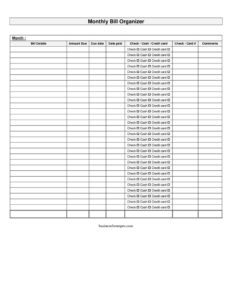
A Bill Organizer is a simple monthly tracking sheet that lets you list every recurring expense, record what you owe, and check off each payment as you make it. People most often use it to stop missing due dates and avoid late fees by seeing all their bills in one place. You can download this Bill Organizer for free in PDF and DOCX—no signup required.
What Is a Bill Organizer?
A Bill Organizer is a personal money-management worksheet used by individuals, households, and small budgeters to document monthly financial obligations. It captures each bill, the amount due, when it is due, when it was actually paid, and how it was paid. Unlike a full budget that projects income and spending categories, a Bill Organizer focuses narrowly on the payment lifecycle of each obligation—from “due” to “paid.” It serves as both a checklist and a record. By keeping one sheet per month, you build a running history of payments that is helpful for spotting trends, disputing errors, and reconciling your bank or credit card statements at month’s end.
When Do You Need a Bill Organizer?
This form is useful any time you juggle multiple recurring payments and want a clear, repeatable system. Common situations include:
- You have several bills—rent or mortgage, utilities, phone, insurance, and subscriptions—with different due dates scattered across the month.
- You have been hit with late fees or service interruptions and want a reliable reminder of what is owed and when.
- You share household expenses with a partner or roommate and need a single sheet everyone can see and update.
- You are paying down debt and want to confirm each payment cleared and was applied on time.
- You are reconciling your checking account or credit card statement and need to match each payment to a check or card number.
- You are recovering from a busy season, a move, or a new job and want to rebuild a steady payment routine month by month.
What a Bill Organizer Should Have
An effective Bill Organizer balances detail with simplicity so you will actually keep using it. At minimum it should identify the month it covers, list each bill clearly, and show the amount due and due date for each entry. To track follow-through, it needs space to record the date paid, the payment method (check, cash, or credit card), and a reference such as a check or card number. A comments column rounds it out, giving you room to note confirmation numbers, partial payments, autopay status, or reminders for next month. Together these fields turn a vague mental to-do list into a verifiable record.
How to Fill Out a Bill Organizer
Work top to bottom and update the sheet as payments go out:
- Month: Write the month (and year) at the top so each sheet stands on its own and your records stay organized.
- Bill details: List each obligation on its own row—for example “Electric – City Power,” “Rent,” or “Auto Insurance.” Use names you will recognize instantly.
- Amount due: Enter the dollar amount you expect to pay. For variable bills like utilities, write the current statement amount or your best estimate.
- Due date: Record the day payment is required. Listing bills in due-date order makes the busiest weeks easy to spot.
- Date paid: When you submit the payment, fill in the actual date so you can prove it was sent on time.
- Check/cash/credit card: Mark how you paid. This helps when reconciling statements later.
- Check/card #: Note the check number or the last digits of the card used for a quick reference.
- Comments: Add confirmation numbers, autopay notes, partial-payment details, or a flag if an amount looks unusual.
Tips for Getting the Most From Your Organizer
Keep a fresh copy for each month and store completed sheets together so you can compare spending over time. Sort entries by due date rather than alphabetically; this puts the most urgent payments at the top and helps you plan around paydays. If some bills are on autopay, still list them and write “AUTO” in the comments—this prevents nasty surprises when a card expires or a balance changes. Highlight or star bills that vary month to month, like electricity or water, since those are the ones worth reviewing closely. Finally, do a quick end-of-month review: confirm every row has a date paid, and carry forward any reminders into next month’s sheet.
Bill Organizer vs. a Full Budget
A Bill Organizer and a monthly budget work well together but serve different purposes. A budget plans your income against all categories of spending—savings, groceries, entertainment, and bills—and is forward-looking. A Bill Organizer is narrower and more operational: it tracks the actual status of each fixed obligation so nothing slips through the cracks. Many people use the organizer as the day-to-day checklist that feeds totals into their broader budget. If you are just starting out, the organizer is the easier place to begin because it requires no projections—only the facts of what you owe and what you have paid.
Common Mistakes to Avoid
- Forgetting to label the month, which makes it impossible to tell sheets apart later.
- Listing only some bills—leaving off annual or quarterly charges that catch you off guard.
- Recording the amount due but never filling in the date paid, so you lose your proof of on-time payment.
- Skipping the check or card number, which makes reconciling statements far harder.
- Treating autopay bills as “handled” and leaving them off the sheet entirely.
- Estimating variable bills and forgetting to correct the figure once the real statement arrives.
Frequently Asked Questions
What is a Bill Organizer used for? It is used to list your monthly bills in one place and track each one from due to paid. It records the amount due, due date, date paid, payment method, and a reference number so you can avoid late fees and confirm every payment cleared.
How do I fill out a Bill Organizer? Start by writing the month, then list each bill with its amount due and due date. As you pay, fill in the date paid, mark whether you used check, cash, or credit card, note the check or card number, and add any reminders in the comments column.
Is a Bill Organizer the same as a budget? No. A budget plans all your income and spending categories ahead of time, while a Bill Organizer simply tracks the status of your recurring bills. Many people use both, letting the organizer feed accurate payment totals into their budget.
Should I make a new sheet every month? Yes. A fresh sheet for each month keeps your records clean and lets you compare amounts over time, which is especially useful for variable bills like utilities. Store completed sheets together for an easy payment history.
Can I use this for shared household expenses? Absolutely. A single Bill Organizer works well for couples or roommates because everyone can see what is due, who paid it, and how. The comments column is handy for noting how a shared bill was split.
How much does this Bill Organizer cost? It is completely free to download here in both PDF and DOCX formats, with no signup required. Use the PDF to print and fill in by hand, or edit the DOCX on your computer to customize the rows and columns.
This Bill Organizer template is provided as a general example for informational purposes only and does not constitute financial, tax, or legal advice. Your personal circumstances and local requirements may vary—consult a qualified financial professional for guidance specific to your situation.
Official resource: for the rules that apply to your situation, see the Consumer Financial Protection Bureau.
Related Forms
- Quarterly Tax Payment Worksheet
- Insurance Worksheet
- Monthly Bill Organizer
- Appointment Of Collection Agent
- Debt Worksheet
- Tax Refund Planner
Browse more in Money.