
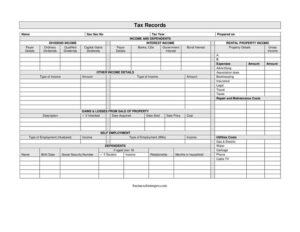
Tax Records
Organize income, dividends, rental, and dependent details with this free Tax Records template — a complete worksheet for tax prep, free download.
PDF
DOCX
8 downloads
0
likes
Download Files
- DOCX
A Tax Records form is a worksheet you use to gather and organize the income, expense, and dependent information needed to prepare an accurate tax return. The most common reason people reach for one is to pull every number into a single, organized place before sitting down with tax software or a preparer. This template is free to download in PDF and DOCX, with no signup required.
What Is a Tax Records Form?
A Tax Records form is a personal organizing document that collects the details a taxpayer needs to complete a return: identifying information, the tax year, sources of income, deductible expenses, property sale activity, and dependent data. It is typically filled out by an individual taxpayer or a small business owner, sometimes with help from a bookkeeper. The form itself is not filed with any tax authority — instead, it serves as a structured worksheet that feeds the actual return. By capturing dividend income, interest income, rental income, self-employment earnings, and household costs in one document, it reduces the chance of missing a deduction or forgetting a 1099. It is the staging area between scattered receipts and a finished return.
When Do You Need a Tax Records Form?
This worksheet is useful any time you are preparing for tax season or organizing financial documents. Common situations include:
- Compiling income before filing your annual individual return, including wages, dividends, and interest.
- Tracking rental property income and the related expenses such as repairs, insurance, and taxes.
- Reporting self-employment earnings and business deductions like advertising, association dues, and travel.
- Documenting gains and losses from the sale of property, including inherited assets, to calculate capital gains.
- Listing dependents with their birth dates, relationships, and months in the household to determine eligibility for credits.
- Handing complete, organized figures to a tax preparer or accountant so they can work efficiently.
What a Tax Records Form Should Have
A complete Tax Records worksheet should capture identity and period details first: the taxpayer’s name, Social Security number, the tax year, and the date prepared. From there it should organize income by category — dividend income (ordinary, qualified, and capital gains dividends), interest income (banks, CDs, government interest, bond interest), rental property income, self-employment income, and any other income with its type described. It should provide space for deductible expenses such as advertising, bookkeeping, insurance, legal, travel, taxes, and repair and maintenance. Sections for property sales (description, acquisition date, sale date, sale price, and cost) and for household utility costs round out the picture. Finally, a dependents section should record each person’s birth date, student status, relationship, and months in the household.
How to Fill Out a Tax Records Form
- Enter your name and Social Security number, then record the tax year the records cover and the date prepared on.
- In the income and dependents area, log dividend income, breaking it into ordinary dividends, qualified dividends, and capital gains dividends, with payer details.
- Record interest income from banks, CDs, government interest, and bond interest, listing each payer and amount.
- For rental property income, enter the property details, gross income, and each expense — advertising, association dues, bookkeeping, insurance, legal, travel, taxes, and repair and maintenance.
- Note any other income with its type and amount.
- For gains and losses from sale of property, give a description, mark if inherited, and enter the date acquired, date sold, sale price, and cost.
- Complete the self-employment section with the type of employment and income.
- List each dependent with birth date, student status, relationship, and months in household.
- Add utility costs — gas and electric, water, garbage, phone, and cable TV — where relevant to a deduction.
Organizing Income and Expense Categories
The strength of this worksheet is that it separates income by source, which mirrors how a return is built. Investment income lives in two buckets: dividends and interest. Splitting ordinary from qualified dividends matters because they can be taxed at different rates, and the form gives you a place to keep them distinct. Interest from banks, CDs, government securities, and bonds is grouped so you can reconcile it against the 1099-INT forms you receive. On the expense side, the rental and self-employment categories let you total deductions like advertising, insurance, legal, and travel without double-counting. Recording the payer details next to each entry makes it far easier to verify amounts against the statements you collect through the year.
Tracking Property Sales and Dependents
Two sections frequently trip people up: property sales and dependents. For a sale, you need a clear description, the date acquired, the date sold, the sale price, and the original cost — the difference drives your gain or loss. The if inherited checkbox matters because inherited property often uses a stepped-up basis rather than the original purchase price. For dependents, the birth date, relationship, student status, and months in household together determine whether someone qualifies and which credits may apply. Filling these in accurately on the worksheet prevents back-and-forth later.
Common Mistakes to Avoid
- Leaving the tax year blank, which makes the records ambiguous if you keep worksheets for several years.
- Lumping all dividends together instead of separating ordinary, qualified, and capital gains dividends.
- Forgetting to list payer details, making it impossible to match figures to 1099s later.
- Estimating rental or self-employment expenses instead of using actual receipts and statements.
- Using the purchase price for inherited property without noting it was inherited.
- Omitting months in household for a dependent, which can affect eligibility determinations.
Frequently Asked Questions
What is a Tax Records form used for? It is a worksheet for gathering all the income, expense, property sale, and dependent information you need before preparing a tax return. It keeps everything in one organized document so nothing gets overlooked. The form itself is not submitted to a tax authority.
Do I file this form with the IRS or my state? No. This is a personal organizing document, not an official return or schedule. You use the figures you record here to complete your actual return or to hand off to your preparer.
How do I record dividend and interest income correctly? Enter each amount alongside the payer’s details so you can later reconcile it against the 1099-DIV or 1099-INT statements you receive. Separate ordinary dividends, qualified dividends, and capital gains dividends, and break interest into banks, CDs, government interest, and bond interest.
What goes in the property sale section? Provide a description of the asset, mark whether it was inherited, and enter the date acquired, date sold, sale price, and original cost. These figures let you or your preparer calculate the capital gain or loss for the year.
Is this template legally binding? No. A Tax Records worksheet is an informational organizing tool, not a contract or a filed government form. Its purpose is to help you assemble accurate numbers; the legal obligation comes from the return you ultimately file.
How much does this Tax Records template cost? It is completely free to download from Business Forms Pro in both PDF and DOCX formats, with no signup required. You can fill it out on screen or print it and complete it by hand.
This Tax Records template is a general example provided for informational purposes only and is not legal, financial, or tax advice. Tax rules and reporting requirements vary by jurisdiction and change over time — consult a qualified tax professional or accountant about your specific situation.
Official resource: for the rules that apply to your situation, see the Consumer Financial Protection Bureau.
Related Forms
- Insurance Worksheet
- Christmas Cash Envelope
- Account Reconciliation Form
- Hobby Cash Envelope
- Insurance Coverage Record
- Savings Passbook
Browse more in Money.