
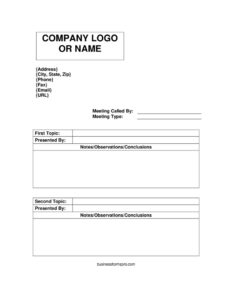
Meeting Agenda Portrait
Download a free Meeting Agenda Portrait template in PDF and DOCX to organize topics, presenters, and notes for productive, focused meetings.
PDF
DOCX
4 downloads
0
likes
Download Files
- DOCX
A Meeting Agenda Portrait is a vertically formatted document that lists the topics, presenters, and discussion points planned for an upcoming meeting. People most often use it to keep meetings on track, give attendees advance notice of what will be covered, and capture notes during the session. You can download this template free in both PDF and DOCX formats with no signup required.
What Is a Meeting Agenda Portrait?
A Meeting Agenda Portrait is a structured outline of everything a meeting will cover, laid out on a standard upright (portrait-orientation) page. It identifies who called the meeting, the type of meeting, the order of topics, who is presenting each one, and a space to record notes, observations, and conclusions. Team leads, office managers, committee chairs, and project coordinators typically prepare it before the meeting and distribute it to participants. The document serves three purposes at once: it sets expectations beforehand, guides the conversation during the meeting, and becomes a lightweight record afterward. Because the portrait layout fits neatly into binders, email attachments, and shared folders, it is a practical choice for routine office gatherings.
When Do You Need a Meeting Agenda Portrait?
Almost any gathering that involves decisions or updates benefits from a written agenda. This template is especially useful in these situations:
- Weekly team check-ins where you want each topic covered in a consistent order and nothing forgotten.
- Project status meetings that need a clear list of who is presenting which update.
- Committee or board sessions where members expect advance notice of discussion items.
- Client or vendor meetings that benefit from a professional, branded document with your company’s contact details at the top.
- Departmental planning sessions where decisions and action items must be captured in the notes column.
- One-on-one reviews when you want a tidy structure for two or three key topics and a place to log conclusions.
What a Meeting Agenda Portrait Should Have
A complete agenda gives attendees enough context to come prepared and gives the chair a tool to keep things moving. The essential elements include a clear header with your organization’s name and contact information, a line stating who called the meeting and why, the meeting type, an ordered list of topics, the name of the person presenting each topic, and dedicated space for notes, observations, and conclusions. Strong agendas also imply timing — even an informal sense of how long each topic should take helps prevent overruns. Finally, the document should leave room to note decisions reached and any follow-up actions, so the agenda doubles as a brief set of minutes once the meeting ends.
How to Fill Out a Meeting Agenda Portrait
- Add your contact block. Fill in the Address, City, State, Zip, Phone, Fax, Email, and URL fields at the top so attendees know which organization is hosting and how to reach you.
- Record who called the meeting. Enter the name of the person or role in the Meeting called by field — this signals ownership and accountability.
- Specify the meeting type. Use the Meeting type field to label it (for example, weekly standup, project review, or planning session) so participants know the purpose and tone.
- List the first topic. Write the headline of the opening discussion item in the First topic field, keeping it short and action-oriented.
- Assign a presenter. Fill the Presented by field with the name of whoever will lead that topic, so everyone knows who has the floor.
- Capture discussion. Use the Notes/observations/conclusions area to jot key points, decisions, and follow-up actions as they happen.
- Add the second topic. Enter the next item in the Second topic field and repeat the presenter-and-notes pattern, continuing for additional topics as needed.
Tips for Running a Meeting From Your Agenda
An agenda is only as useful as the discipline behind it. Distribute the document at least a day in advance so presenters can prepare and attendees can suggest additions. At the start of the meeting, confirm the topic order aloud and assign someone to capture notes in the conclusions section — ideally not the person leading the discussion. Move topics that balloon into longer debates to a separate follow-up rather than letting them consume the whole session. As each topic wraps, restate the decision and the owner of any next step before moving on. After the meeting, save the completed agenda as a record and circulate it so attendees have a shared reference for what was agreed.
Portrait vs. Landscape Agenda Layouts
The portrait orientation used here reads top to bottom, which suits agendas with a short list of topics and generous room for written notes under each one. It prints cleanly on letter-size paper, slots into binders, and displays well on phones and tablets. A landscape layout, by contrast, fits wider tables with columns for time, owner, and outcome side by side. If your meetings revolve around a handful of substantive discussion items rather than many quick line items, the portrait format keeps the focus on content and conclusions rather than on a crowded grid.
Common Mistakes to Avoid
- Leaving the meeting type blank. Without it, attendees may misjudge how to prepare or how formal the session is.
- Vague topic headings. “Budget” tells people less than “Approve Q3 marketing budget,” which sets a clear objective.
- Forgetting to name presenters. An unassigned topic often gets skipped or sparks confusion about who leads it.
- Not capturing conclusions. If the notes section stays empty, the agenda loses its value as a record of decisions.
- Overloading the agenda. Too many topics for the time available guarantees rushed discussion and unfinished items.
- Distributing it too late. Sending the agenda minutes before the meeting defeats the purpose of advance preparation.
Frequently Asked Questions
What is a Meeting Agenda Portrait used for? It is used to plan and structure a meeting by listing the topics, presenters, and notes in an upright page layout. It helps the chair keep the conversation on track and gives attendees a clear preview of what will be discussed. After the meeting, the notes section turns it into a simple record of decisions.
How do I fill out the topics and presenters? Enter each discussion item in the topic fields in the order you want to cover them, then write the responsible person’s name in the corresponding presented-by field. Keep topic titles concise but specific so everyone understands the goal. Use the notes area beneath each topic to record key points and conclusions during the meeting.
Is this template free to download? Yes. The Meeting Agenda Portrait template is completely free to download in both PDF and DOCX formats, with no signup or payment required. You can use the DOCX version to customize fields, fonts, and your organization’s contact block.
Can I add more than two topics? Absolutely. The template includes first and second topic fields as a starting structure, but you can duplicate that pattern in the editable DOCX version to add as many topics, presenters, and note sections as your meeting requires.
Should I include meeting times on the agenda? Including a rough time allocation for each topic is optional but highly recommended. Even a brief note such as “10 minutes” helps keep discussion focused and prevents early items from crowding out later ones. You can add timing next to each topic title in the editable version.
What is the difference between an agenda and meeting minutes? An agenda is prepared before the meeting to outline what will be discussed, while minutes are written during or after to record what was actually said and decided. This template bridges both: it starts as an agenda and, once you complete the notes and conclusions fields, it functions as a concise set of minutes.
This template is provided as a general example for informational purposes only and does not constitute legal, financial, or professional advice. Organizational and recordkeeping requirements vary by company and jurisdiction, so consult a qualified professional or your own policies before relying on this document.
Official resource: for the rules that apply to your situation, see the U.S. Small Business Administration.
Related Forms
- Meeting Agenda
- Meeting Agenda Simple
- Notice of Meeting
- Return To Work Form
- Office Supplies Request Form
- Password List
Browse more in Office.