
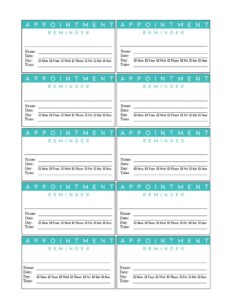
Blue Appointment Reminder Card
Download a free Blue Appointment Reminder Card template to confirm patient and client visits and cut no-shows — free PDF and DOCX download, no signup.
PDF
DOC
6 downloads
0
likes
Download Files
- DOC
A Blue Appointment Reminder Card is a small, professional card you hand or mail to clients to confirm the date and time of their next visit. It’s the simplest, most reliable way for offices to reduce no-shows and keep schedules running smoothly, and you can download it here free in both PDF and DOCX formats with no signup required.
What Is a Blue Appointment Reminder Card?
A Blue Appointment Reminder Card is a compact printed card — typically the size of a business card or a folding wallet card — that a front-desk staff member fills in with a client’s upcoming appointment details. The calming blue design makes it easy to read and recognizable at a glance among the papers people carry. Dental offices, medical clinics, salons, spas, veterinary practices, therapists, and service businesses all use these cards as a tangible booking confirmation. Unlike a digital text or email, a physical card sits in a wallet, on a fridge, or on a desk, providing a visual prompt that helps clients remember when and where to show up.
When Do You Need a Blue Appointment Reminder Card?
This card is useful any time you want a client to leave with a clear, written reminder of a future booking. Common situations include:
- Recurring health visits: A dental hygienist schedules a six-month cleaning and hands the patient a card so they don’t forget the follow-up.
- Multi-session treatments: A physical therapist or chiropractor booking several appointments in a series gives the patient a card listing the next visit.
- Salon and spa rebooking: A stylist books the next haircut or color appointment at checkout and writes it on the card.
- Veterinary follow-ups: A clinic schedules a vaccination booster or post-surgery recheck and sends the pet owner home with a reminder.
- Service and consulting visits: A repair technician, optometrist, or financial advisor confirms a return visit in person.
- Mail-out reminders: Offices that pre-schedule appointments mail completed cards a week or two before the date as a courtesy nudge.
What a Blue Appointment Reminder Card Should Have
An effective reminder card keeps the essentials front and center so nothing is misread. It should clearly show the practice or business name, a place for the client’s name, the appointment date, the appointment time, and a phone number for rescheduling or questions. Many cards also include a line for the day of the week, the provider or staff member’s name, the location or room, and a short cancellation policy note. The blue layout gives each field generous white space, so handwritten details stay legible. The goal is a card a client can glance at in seconds and know exactly when, where, and with whom they’re expected.
How to Fill Out a Blue Appointment Reminder Card
Filling out the card takes under a minute at the front desk. Follow these steps:
- Add your business details: Print or write the practice name, address, and phone number in the header area, or use a pre-printed version of the template.
- Write the client’s name: Enter the patient or client’s full name so the card is unmistakably theirs.
- Fill in the date: Write the appointment date clearly, including the day of the week — for example, “Tuesday, March 12.”
- Enter the time: Record the exact start time and specify AM or PM to avoid confusion.
- Note the provider or location: Add the doctor, stylist, or technician’s name and the room or office if you have multiple.
- Add reminders or notes: Use any blank line for instructions like “arrive 10 minutes early” or “bring insurance card.”
- Confirm the contact line: Double-check the phone number the client should call to reschedule.
- Hand it over: Give the card to the client and verbally confirm the date and time as you do.
Tips for Reducing No-Shows With Reminder Cards
A card works best as part of a small system rather than a one-off gesture. Confirm the date out loud as you hand the card over — saying it reinforces the written reminder. Encourage clients to enter the appointment into their phone calendar on the spot while the card is in hand. For appointments booked far in advance, consider mailing a duplicate card or sending a complementary text reminder a few days before. Keep a stack of pre-printed cards at every workstation so staff never skip the step during a busy checkout. Consistency is what turns a simple card into a measurable drop in missed appointments.
Printing and Customizing the Template
Because the template comes in editable DOCX, you can add your logo, swap in your brand’s shade of blue, and pre-print your business name and phone number before printing a batch. The PDF version is ready to print as-is if you prefer to handwrite every field. Standard card stock at business-card or index-card size works well; many offices print multiple cards per sheet and cut them down. Keep the font large enough to read easily, and leave the date and time fields blank so staff can write them by hand for each client.
Common Mistakes to Avoid
- Omitting AM/PM: A time without the period can send a client in at the wrong half of the day.
- Skipping the day of the week: Listing only a date number makes it easier for clients to misremember.
- Illegible handwriting: Rushed writing defeats the card’s purpose — print clearly in pen.
- No reschedule number: Without a phone number, a client who has a conflict may simply not show.
- Forgetting to hand it over: A card filled out but left at the desk does nothing.
- Not confirming verbally: Pairing the card with a spoken confirmation greatly improves recall.
Frequently Asked Questions
What is a Blue Appointment Reminder Card used for? It’s a small printed card given to clients to confirm the date and time of a future appointment. Offices use it to reduce no-shows and give clients a physical reminder they can keep in a wallet or on a fridge.
How do I fill out the card? Write the client’s name, the appointment date including the day of the week, the exact time with AM or PM, and the provider or location. Add a reschedule phone number and any prep notes, then hand it to the client while confirming the details aloud.
Is the Blue Appointment Reminder Card free to download? Yes. You can download it free here in both PDF and DOCX formats with no signup or account required. Use it as-is or customize the editable version.
Can I add my own logo and colors? Absolutely. Open the DOCX version to insert your logo, adjust the blue shade to match your brand, and pre-print your business name and phone number before printing a batch.
What size should I print the card? Business-card or standard index-card size works well and fits easily in a wallet. Many offices print several cards per sheet on card stock and cut them apart to save paper.
Should I still send digital reminders too? A physical card and a text or email reminder work best together. The card provides a lasting visual cue, while a message a few days before the appointment offers a timely nudge.
This template is provided as a general example for informational purposes only and does not constitute legal, medical, or professional advice. Appointment, privacy, and recordkeeping requirements vary by jurisdiction and industry — consult a qualified professional to ensure your practices meet applicable rules.
Official resource: for the rules that apply to your situation, see the U.S. Small Business Administration.
Related Forms
- Employee Performance Evaluation
- Job Application
- Appointment Book
- Employee Attendance Record
- Red Appointment Reminder Card
- Annual Salary Increase
Browse more in Office.