
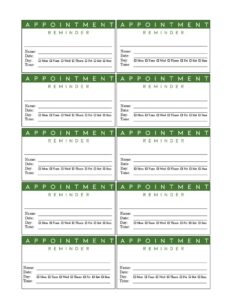
Green Appointment Reminder Card
Reduce no-shows with a Green Appointment Reminder Card template that confirms date, time, and provider details — free download in PDF and DOCX.
PDF
DOC
0
likes
Download Files
- DOC
A Green Appointment Reminder Card is a small printed card that confirms a client or patient’s upcoming appointment date, time, and location. The most common reason people use it is to reduce no-shows by giving someone a tangible reminder to take home. It’s free to download here in both PDF and DOCX formats, with no signup required.
What Is a Green Appointment Reminder Card?
A Green Appointment Reminder Card is a compact, easy-to-hand-out card used by offices, clinics, salons, and service businesses to remind a person of a scheduled visit. The “green” refers to the card’s clean, professional color theme, which makes it instantly recognizable and pleasant to keep on a fridge or in a wallet. The card documents the essentials of an appointment: who the appointment is with, the date, the time, and where to go. Front-desk staff typically fill it in by hand or print it pre-populated, then give it to the client at the end of a visit or mail it ahead of time. It’s a simple, low-cost tool that supports good attendance and clear communication.
When Do You Need a Green Appointment Reminder Card?
Reminder cards are useful any time a future visit is scheduled and you want the client to remember it. Common situations include:
- Medical and dental offices confirming a follow-up exam, cleaning, or treatment several weeks or months out.
- Salons and spas rebooking a regular client for their next color, cut, or facial appointment.
- Therapy, counseling, or chiropractic practices scheduling recurring weekly or biweekly sessions.
- Veterinary clinics reminding pet owners of vaccinations, checkups, or follow-up care.
- Auto shops and repair services setting a return date for inspections, maintenance, or part installation.
- Consultants and tutors confirming a future session and giving the client a physical prompt to plan around.
What a Green Appointment Reminder Card Should Have
A complete reminder card communicates everything the recipient needs at a glance without clutter. The most effective cards include the business or provider name so the person knows who the appointment is with, the appointment date and start time written clearly, and the location or office address. Many cards also include a contact phone number for rescheduling, a short line about cancellation notice, and space for the client’s name. The card should be readable, with enough contrast and white space that the handwritten details stand out. Keeping it small enough to fit in a wallet or be magnetted to a fridge increases the chance it’s actually kept and used.
How to Fill Out a Green Appointment Reminder Card
Because this card is intentionally simple, filling it out takes only a moment. Follow these steps:
- Add your business or provider name. Print or write the practice, salon, or office name at the top so the recipient knows who issued the card.
- Write the client or patient name. If your card includes a name line, fill it in to personalize the reminder and avoid mix-ups.
- Enter the appointment date. Write the full date, including the day of the week, to prevent confusion (for example, “Tuesday, March 12”).
- Enter the appointment time. State the start time clearly and include AM or PM.
- Add the location. Note the address, suite number, or room if your office has more than one entrance or location.
- Include a contact number. Add a phone or text line so the client can call ahead to confirm or reschedule.
- Note any instructions. If there’s space, add reminders like “please arrive 10 minutes early” or your cancellation policy.
Tips for Reducing No-Shows
A reminder card works best as part of a broader system rather than on its own. Hand the card to the client face-to-face at the end of their visit and read the date and time aloud so it registers. Pair the physical card with a follow-up text or call a day or two before the appointment, since multiple touchpoints meaningfully improve attendance. Keep your handwriting legible and avoid abbreviations that could be misread, and double-check that the date and day of the week actually match. If you rebook recurring clients, write the card the moment the next slot is chosen so nothing is forgotten at the desk.
Customizing the Card for Your Business
The DOCX version makes it easy to add your logo, adjust the green color theme to match your branding, or change wording to fit your industry. A dental office might add a line for “type of visit,” while a salon might include the stylist’s name. You can print several cards per sheet to save paper, or order them professionally if you hand out high volumes. Keeping a small stack at the front desk along with a good pen ensures staff can issue one in seconds. Consider adding a QR code that links to your online booking page so clients can reschedule themselves if needed.
Common Mistakes to Avoid
- Leaving the day of the week off. A date alone is easy to misread; including the weekday prevents confusion.
- Forgetting AM or PM. An unspecified time leads to clients showing up hours early or late.
- Illegible handwriting. Rushed or messy details defeat the purpose of the card.
- Omitting a contact number. Without a way to call, clients who need to reschedule may simply not show.
- Not handing it to the client directly. A card left on the counter is easily forgotten.
- Failing to verify the booking. Confirm the appointment is actually in your system before writing the card.
Frequently Asked Questions
What is a Green Appointment Reminder Card? It is a small printed card that confirms a client’s upcoming appointment, including the provider name, date, time, and location. Businesses hand it out or mail it to help people remember their visit and reduce no-shows.
How do I fill out the card? Write or print your business name, the client’s name, the appointment date with the day of the week, the start time with AM or PM, the location, and a contact number for rescheduling. Read the details aloud to the client when you hand it over to reinforce the reminder.
Is this card legally binding? No. A reminder card is purely an informational courtesy and does not create a contract or obligation. It simply documents the agreed appointment so the client remembers to attend.
Can I customize the template for my business? Yes. The DOCX version lets you add your logo, change the green theme, and adjust the fields to match your industry, such as adding a provider name or visit type. You can also print multiple cards per page to save paper.
Should I still send a text or call if I give a card? Yes, combining the physical card with a text or phone reminder a day or two before the appointment is the most effective way to cut no-shows. Multiple touchpoints work better than any single reminder.
How much does this template cost? It is completely free to download here in both PDF and DOCX formats, with no signup or account required. You can print as many copies as you need.
This template is a general example provided for informational purposes only and does not constitute legal, medical, or professional advice. Practices and requirements vary by business and jurisdiction, so adapt the card to your own scheduling policies and consult a qualified professional where appropriate.
Official resource: for the rules that apply to your situation, see the U.S. Small Business Administration.
Related Forms
- Client Information Worksheet
- Room Reservation Form
- Notice of Meeting
- Bank Holidays
- Beauty Salon Appointment
- Appointment Change Form
Browse more in Office.