
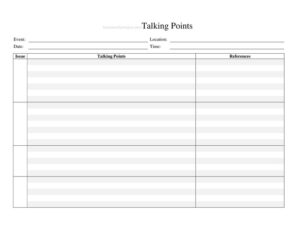
Talking Points
Use this free Talking Points template to keep messaging clear, consistent, and on-point across your campaign or organization—free download in PDF and DOCX.
PDF
DOCX
7 downloads
0
likes
Download Files
- DOCX
A Talking Points document is a concise, organized list of key messages, facts, and prepared responses that help a spokesperson, campaign team, or organization communicate consistently. The most common reason people use it is to stay on message during interviews, debates, town halls, and media calls without fumbling for the right words. You can download this Talking Points template free in both PDF and DOCX formats—no signup required.
What Is a Talking Points Document?
A Talking Points document is a one- or two-page briefing tool that distills a complex issue into a handful of clear, repeatable statements. It is typically prepared by a communications director, press secretary, or campaign manager and distributed to candidates, surrogates, volunteers, and staff. The document captures the core message, supporting facts, anticipated questions, and recommended answers so that everyone speaking on behalf of a campaign or organization stays aligned. In a political context, Talking Points keep a coalition unified, prevent contradictory statements, and ensure that the central narrative reaches voters and reporters in the same shape every time. The goal is consistency, clarity, and confidence under pressure.
When Do You Need a Talking Points Document?
Talking Points are most valuable in moments when messaging discipline matters and time to think is short. Common scenarios include:
- Media interviews: Before a candidate or official goes on radio, television, or podcasts, the team prepares short answers to likely questions.
- Debates and forums: Candidates use Talking Points to anchor responses to opponents and pivot back to priority issues.
- Press releases and statements: A breaking news event requires a fast, unified response from multiple staff members.
- Volunteer and surrogate briefings: Door-knockers, phone-bankers, and supporters need consistent language when speaking to the public.
- Town halls and public meetings: Officials field unscripted questions and rely on prepared points to stay accurate.
- Crisis communication: When a controversy emerges, the team needs an agreed-upon set of facts and responses to avoid mixed signals.
What a Talking Points Document Should Have
A strong Talking Points document is short enough to scan in seconds but complete enough to cover the moment. The essential elements include a clear subject or issue line, the date and version so readers know they have the current copy, and a single overarching message that summarizes everything in one sentence. Beneath that, list three to five supporting points written as quotable phrases. Add a short facts-and-figures section with verified numbers, an anticipated-questions block with recommended answers, and a list of words or framings to avoid. Finally, note an approval source and a contact for questions. Keeping the document focused prevents the spokesperson from drowning in detail when the camera is rolling.
How to Fill Out a Talking Points Document
Because this is a flexible template, build it around the issue at hand:
- Title and issue: Name the topic at the top—for example, “Talking Points: Affordable Housing Plan.”
- Date and version: Enter the date and a version number so old copies can be retired.
- Audience: Note who will use the document—candidate, surrogates, volunteers, or press team—so the tone fits.
- Core message: Write one sentence that captures the central point everyone should repeat.
- Key points: List three to five short, quotable statements that support the core message.
- Supporting facts: Add verified statistics, dates, and sources for credibility.
- Anticipated questions: Write down the toughest likely questions with a recommended one- or two-sentence answer for each.
- Pivot lines: Note transition phrases that steer conversation back to the core message.
- Do-not-say list: Identify language, claims, or framings to avoid.
- Approval and contact: Record who approved the points and who to reach for clarification.
Tips for Writing Effective Talking Points
The best Talking Points sound natural, not robotic. Write the way a person actually speaks—short sentences, plain words, and concrete examples instead of jargon. Lead with the most important point because reporters and audiences remember the first thing they hear. Repeat the core message in slightly different words throughout so it sticks, and pair every claim with a quick fact or example that makes it credible. Test the points aloud before distributing them; if a phrase is hard to say, it is hard to remember. Keep the whole document to a single page when possible so a spokesperson can glance at it during a quick break rather than searching through pages.
Keeping Talking Points Consistent Across a Team
Consistency is the entire purpose of the document, so circulation matters as much as content. Distribute one approved version through a single channel and clearly mark it with a date and version number so no one accidentally works from an outdated draft. When new facts emerge or a position evolves, issue an updated version and tell the team which copy to discard. Brief surrogates and volunteers verbally in addition to sharing the file, and encourage them to use their own voice while staying true to the core message. A short feedback loop—where speakers report which questions actually came up—helps the next version anticipate the real conversation more accurately.
Common Mistakes to Avoid
- Too much detail: A document packed with paragraphs is useless in a fast-moving interview—keep points short and scannable.
- Unverified facts: Including a statistic you cannot source undermines credibility and can backfire publicly.
- No version control: Circulating an undated copy leads to staff repeating outdated or contradictory messages.
- Ignoring tough questions: Skipping the hardest anticipated questions leaves spokespeople exposed at the worst moment.
- Sounding scripted: Stiff, identical phrasing across speakers reads as inauthentic—aim for consistent meaning, not identical words.
- Forgetting the do-not-say list: Without clear guidance on what to avoid, one off-message comment can dominate coverage.
Frequently Asked Questions
What is a Talking Points document used for? It is used to keep a candidate, official, or organization on message by providing a short list of key statements, facts, and prepared answers. Communications teams distribute it before interviews, debates, and public events so everyone speaks consistently. The goal is clear, unified messaging rather than improvised responses.
How do I fill out a Talking Points template? Start with the issue, date, and intended audience, then write one core message and three to five short supporting points beneath it. Add verified facts, anticipated questions with recommended answers, and a brief list of language to avoid. Finish by noting who approved the points and a contact for questions.
How long should Talking Points be? Ideally one page, or two at most. A spokesperson needs to scan the document in seconds, so brevity is essential. If you have extensive background information, keep it in a separate briefing memo and reserve the Talking Points for quotable lines.
Are Talking Points only for political campaigns? No. While they are common in campaigns and government, businesses, nonprofits, and advocacy groups use the same format for press inquiries, product launches, and crisis communication. The template adapts to any situation that requires consistent messaging from multiple speakers.
How often should I update Talking Points? Update them whenever the facts change, a position evolves, or a new question becomes common in the public conversation. Always change the version number and date, and tell your team to discard older copies. Frequent, clearly labeled updates prevent contradictory statements.
Is this Talking Points template free to download? Yes. You can download this Talking Points template free in PDF and DOCX formats with no signup required. Edit it to fit your issue, audience, and organization, and reuse it for as many events as you need.
This Talking Points template is a general example provided for informational purposes only and does not constitute legal, communications, or campaign-finance advice. Messaging rules, disclosure requirements, and election regulations vary by jurisdiction, so consult a qualified professional or your organization’s counsel before publishing.
Related Forms
- Support Outreach Hours
- Exit Poll
- Campaign Funding Violation Complaint Letter
- Voting Demographics By Affiliation
- Campaign Donation Request Letter
- Candidates Comparison Chart
Browse more in Political.