
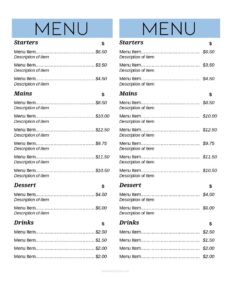
Half-Page Menu
Download a free half-page menu template in PDF and DOCX to create compact, professional restaurant menus, specials, and inserts in minutes—no signup needed.
DOC
3 downloads
0
likes
Download Files
- DOC
A half-page menu is a compact, single-sided or folded menu printed on half a standard sheet, used most often for daily specials, drink lists, dessert inserts, or limited fast-casual menus where a full-size layout would be overkill. It keeps your offerings clean and readable while saving paper and printing costs. This free half-page menu template is available to download instantly in PDF and DOCX formats, with no signup required.
What Is a Half-Page Menu?
A half-page menu is a food and beverage listing formatted to roughly half the size of a standard letter or A4 page. Restaurants, cafes, bars, food trucks, and caterers use it to present a curated set of items without the bulk of a full multi-page booklet. It typically includes a header with the establishment name, organized sections of dishes or drinks, brief descriptions, and prices. Because of its compact footprint, the half-page menu works well as a table tent, a slip-in insert, a counter card, or a quick-reference list. Owners and managers usually issue it, while servers and customers use it daily to order. Its purpose is simple: communicate what is available and what it costs, clearly and attractively.
When Do You Need a Half-Page Menu?
The half-page format shines whenever your selection is focused or rotates frequently. Common situations include:
- Daily or weekly specials — print a fresh half-page each day to feature seasonal dishes without reprinting your main menu.
- Drink and cocktail lists — a tidy beverage menu that sits neatly beside the main menu or stands as a table tent.
- Dessert and coffee menus — handed out after the main course to drive add-on sales.
- Food trucks and quick-service counters — a short, legible list that customers can read while standing in line.
- Brunch, happy hour, or prix-fixe offerings — limited-time menus that justify a smaller, dedicated sheet.
- Catering drop-offs and events — a compact insert listing available packages or buffet items for a single occasion.
Types of Half-Page Menus
Although the size stays consistent, the content varies widely. A single-category menu focuses on one thing—say, wines or pastries. A balanced mini-menu covers a few appetizers, mains, and sides for a streamlined eatery. An insert menu is designed to slip into a larger folder or holder and refreshes often. Choosing the right type helps you decide how many sections to keep and how much descriptive copy each item needs. The template adapts to all of these by letting you add or remove sections.
What a Half-Page Menu Should Have
A strong half-page menu balances information and white space. The essentials are:
- A clear header with the business or menu name (e.g., “Today’s Specials” or “Cocktails”).
- Logical sections such as appetizers, entrees, drinks, or desserts.
- Individual item names with short, appetizing descriptions.
- Prices aligned consistently so they are easy to scan.
- Optional notes for allergens, dietary tags (V, GF), or portion sizes.
- A footer with hours, contact details, or a thank-you line if space allows.
How to Fill Out a Half-Page Menu
Because the template is open and flexible, fill it in section by section so the layout stays balanced:
- Replace the header placeholder with your establishment name or the menu’s purpose, such as “Weekend Brunch.”
- Add an optional subheader or date if the menu is time-limited, like a specials sheet.
- Create your first section heading (for example, “Starters”) and keep section titles short.
- Under each section, type the item name in bold, followed by a one-line description of key ingredients or flavor.
- Enter the price for each item, aligning all prices along the right edge for easy scanning.
- Add dietary or allergen tags beside relevant items if needed.
- Repeat for each additional section, removing any unused sections to avoid empty space.
- Fill the footer with hours, address, phone, or a short closing note.
- Review spacing so the content fits cleanly within the half-page boundary, then export to PDF for printing.
Design and Printing Tips
Half-page menus reward restraint. Use one or two fonts—a bold display font for headings and a clean readable font for body text. Keep descriptions to a single line where possible so the page does not feel crowded. Because the sheet is small, font sizes that look fine on a full page may overwhelm a half-page, so scale type down slightly and rely on white space to guide the eye. For printing, you can place two identical half-page menus on one letter-size sheet and cut down the middle to save paper. Laminating specials menus lets you wipe and reuse table tents, while printing on slightly heavier stock keeps insert menus from curling. Always print a test copy and check it at arm’s length before running a full batch.
Common Mistakes to Avoid
- Overcrowding the page — cramming too many items defeats the purpose of a clean, scannable menu.
- Inconsistent pricing alignment — prices scattered mid-line are hard to compare and look unpolished.
- Tiny fonts — shrinking text to fit more items makes the menu unreadable in low restaurant lighting.
- Forgetting to update prices — a half-page menu is quick to reprint, so never leave outdated costs.
- Missing dietary tags — omitting allergen or vegetarian notes can frustrate guests and slow service.
- Skipping a proofread — typos in dish names or descriptions undercut a professional impression.
Frequently Asked Questions
What is a half-page menu used for? It is used to present a focused selection of food or drinks on a compact sheet, ideal for daily specials, dessert lists, drink menus, table tents, or quick-service counters. The smaller size keeps the menu easy to read and inexpensive to reprint, which makes it perfect for items that change often.
How do I fill out the half-page menu template? Start with your header or menu name, then add section titles such as appetizers or beverages, list each item with a short description, and align the prices on the right. Remove any sections you do not need so the layout stays balanced and uncluttered.
Can I edit the template in Microsoft Word? Yes. The DOCX version is fully editable in Word, Google Docs, and most word processors, so you can change text, fonts, sections, and prices. If you want a ready-to-print file with locked formatting, use the PDF version instead.
How much does this half-page menu template cost? It is completely free to download here in both PDF and DOCX formats, with no signup or account required. You can use it for your restaurant, cafe, food truck, or catering business as many times as you like.
What size should a half-page menu be? A half-page menu is typically about half a standard letter sheet (around 5.5 by 8.5 inches) or half an A4 page, depending on your region. You can print two copies on one full sheet and cut them in half to save paper and printing costs.
Should I laminate my half-page menu? Laminating is a good idea for reusable items like table tents, drink lists, or specials that stay the same for a while, since it protects against spills and wear. For menus that change daily, plain or lightly coated paper is more practical because you reprint them frequently.
This half-page menu template is provided as a general example for informational purposes only and does not constitute legal, financial, tax, or food-safety advice. Menu labeling, allergen disclosure, and pricing requirements vary by jurisdiction—consult a qualified professional or your local authority to ensure your menu meets all applicable regulations.
Related Forms
- Breakfast Menu Casual
- Food Cooling Log
- Catering Menu
- Drink Menu
- Wait To Be Seated Sign
- Menu Template
Browse more in Restaurant.