
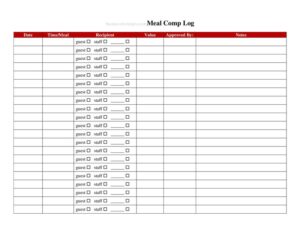
Restaurant Meal Comp Or Discount Log
Track every comped meal and discount with our free Restaurant Meal Comp or Discount Log template — protect margins and stay accountable with a free download.
PDF
DOCX
5 downloads
0
likes
Download Files
- DOCX
A Restaurant Meal Comp or Discount Log is a simple record that captures every complimentary meal, voided item, or price reduction your staff give to guests. Managers use it most often to keep tabs on food cost leakage and to make sure comps and discounts are authorized rather than handed out at random. You can download it free in PDF and DOCX, with no signup required.
What Is a Restaurant Meal Comp or Discount Log?
A Restaurant Meal Comp or Discount Log is an internal tracking document used by restaurants, cafes, and bars to record each instance where a guest’s bill is reduced or fully comped. It documents who authorized the adjustment, the dollar value, the reason, and the table or check number involved. Owners and managers rely on it to monitor how much revenue is being given away, to spot patterns of misuse, and to reconcile the point-of-sale system against actual sales. Because comps and discounts directly erode profit margins, this log turns an otherwise invisible expense into a measurable, reviewable line item that supports accountability across every shift.
When Do You Need a Restaurant Meal Comp or Discount Log?
Any food service operation that allows staff to adjust guest checks benefits from a consistent log. Common situations include:
- Service recovery — comping a dish that arrived cold, late, or incorrect to keep a guest happy.
- Manager courtesy comps — offering a free dessert or round of drinks to regulars, VIPs, or guests celebrating a milestone.
- Employee or family meals — recording discounted staff meals so they don’t distort food cost reports.
- Promotional discounts — logging happy-hour pricing, loyalty rewards, or coupon redemptions for accurate tracking.
- Voided or remade items — documenting kitchen errors that required a dish to be remade and removed from the bill.
- End-of-shift reconciliation — totaling all adjustments so the closing manager can balance the POS against the cash and card drawer.
What a Comp or Discount Log Should Have
A useful log makes each adjustment traceable. At minimum it should capture the date and shift, the server or employee responsible, the table or check number, a description of the comped or discounted item, the dollar amount, the reason or category, and the name or initials of the manager who approved it. A running total column lets you see daily and weekly comp totals at a glance. Many restaurants also add a notes field for context and a signature line so approvals are unambiguous. The clearer each entry, the easier it is to audit later.
How to Fill Out a Restaurant Meal Comp or Discount Log
- Enter the date and shift at the top so entries can be grouped by day and by lunch, dinner, or late-night period.
- Record the time of the adjustment to match it against the POS timestamp during reconciliation.
- Write the table or check number tied to the comp so it can be cross-referenced with the original ticket.
- List the server or employee name who rang up the order and requested the adjustment.
- Describe the item or meal that was comped or discounted — be specific (for example, “ribeye, remade”).
- Note the reason or category, such as service recovery, kitchen error, VIP courtesy, or promotion.
- Enter the dollar amount of the comp or the discount applied, not the full check total.
- Have a manager approve and initial the entry to confirm it was authorized.
- Add notes if the situation needs context, then update the running total at the bottom of the page.
Comp Versus Discount: Knowing the Difference
Although they often share a log, comps and discounts are not the same thing. A comp removes the full price of an item or check, meaning the restaurant receives no revenue for it — common after a service failure or as a goodwill gesture. A discount reduces the price but still collects partial payment, such as a 20% loyalty reward or an employee meal rate. Tracking them separately, or in clearly labeled categories, helps you understand whether your margin loss comes from giveaways or from pricing programs. It also clarifies tax treatment, since discounts typically apply before tax while comps may involve waived charges that still carry sales-tax obligations in some areas.
Using the Log to Control Costs
The real value of a comp log appears over time. Review it weekly to see which servers generate the most adjustments and whether reasons cluster around a single kitchen station or menu item. A spike in remade dishes might point to a recipe or training issue, while frequent “courtesy” comps may signal a need for clearer policy limits. Set a target comp percentage of total sales and compare actual results against it. When staff know every adjustment is logged and approved, casual giveaways drop and accountability rises — protecting margins without making service feel rigid.
Common Mistakes to Avoid
- Skipping approvals — letting servers comp items without a manager initial removes the control that makes the log meaningful.
- Vague reasons — writing only “comp” instead of the actual cause makes patterns impossible to analyze.
- Logging the wrong amount — recording the full check instead of just the comped or discounted portion distorts your totals.
- Forgetting the check number — without it you can’t reconcile the entry against the POS.
- Inconsistent categories — mixing service recovery, promotions, and staff meals together hides where revenue is leaking.
- Never reviewing it — a log that’s filled out but never analyzed offers no protection against misuse.
Frequently Asked Questions
What is a Restaurant Meal Comp or Discount Log used for? It is used to record every comped meal, voided item, or discount given to guests, along with who authorized it and why. This lets managers track how much revenue is given away, reconcile the POS, and catch misuse. It turns informal giveaways into a measurable, reviewable record.
How do I fill out the comp log? For each adjustment, enter the date, shift, time, table or check number, the server’s name, a description of the item, the reason, and the dollar amount of the comp or discount. A manager should initial each entry to confirm approval. Update the running total at the end of the shift.
Should every comp require manager approval? Most restaurants require a manager to authorize comps and significant discounts to prevent abuse and protect margins. The log includes an approval or initials field for exactly this reason. Your specific policy thresholds are up to your management team.
What’s the difference between a comp and a discount? A comp removes the full price of an item so no revenue is collected, often after a service problem. A discount reduces the price but still collects partial payment, such as an employee meal rate or loyalty reward. Tracking them separately clarifies where margin loss comes from.
Is this log a legal or tax document? It is primarily an internal management and accountability tool, but it can also support your accounting and sales-tax records. Because the tax treatment of comps and discounts varies by location, confirm how adjustments affect taxable sales with a qualified professional. Keeping accurate logs makes any review far easier.
Is this template really free to download? Yes. The Restaurant Meal Comp or Discount Log is completely free to download in both PDF and DOCX formats with no signup required. You can print it for the manager’s station or edit the DOCX version to match your menu, shifts, and approval process.
This template is a general example provided for informational purposes only and does not constitute legal, financial, or tax advice. Requirements for recording comps, discounts, and sales tax vary by jurisdiction and by business. Consult a qualified accountant or professional to ensure your practices meet local rules.
Related Forms
- Breakfast Menu Casual
- Coffee Menu
- Wine List
- Freezer Temperature Log
- Seat Yourself Sign
- Alcohol Inventory Log
Browse more in Restaurant.