
Workshop Registration Form
Download a free Workshop Registration Form template in PDF and DOCX to collect attendee details, fees, and consent quickly — free download, no signup.
PDF
DOCX
8 downloads
0
likes
Download Files
- DOCX
A Workshop Registration Form is a single document that captures everything you need to enroll an attendee in a training session, seminar, or hands-on class — their contact details, the workshop they’re joining, any special requirements, and payment. People most often use it to gather sign-ups in an organized, consistent way before an event begins. You can download this template free in PDF and DOCX, with no signup required.
What Is a Workshop Registration Form?
A Workshop Registration Form is a structured intake document used by trainers, schools, nonprofits, community centers, and businesses to formally register participants in a scheduled workshop. It records who is attending, which session they’re signing up for, how they heard about it, what accommodations they may need, and how they intend to pay. Whether the workshop is a free community talk or a paid professional certification course, the form gives the organizer a clean, repeatable record for each attendee. It also doubles as a planning tool, helping organizers anticipate headcounts, equipment needs, accessibility arrangements, and revenue — all from one tidy page rather than scattered emails and phone messages.
When Do You Need a Workshop Registration Form?
This form is useful any time you need to collect attendee information in advance and keep it consistent across a group. Common situations include:
- Professional development sessions — registering employees or members for a half-day or full-day skills workshop.
- Community or nonprofit classes — signing up residents for arts, wellness, or educational programs at a community center.
- Paid seminars and certification courses — collecting both attendee details and payment information together.
- School or university workshops — enrolling students and tracking prior experience or grade level.
- Conference breakout sessions — managing limited-capacity rooms and equipment for each session.
- Recurring training series — capturing multiple session dates and times under one registration.
It works equally well for in-person events with assigned buildings and rooms and for hybrid formats where you still need a verified roster.
What a Workshop Registration Form Should Have
A complete registration form balances three goals: identifying the attendee, defining the workshop, and handling logistics and payment. The essential elements are a clear participant section (name, contact details, and any demographic fields you actually need), a workshop section that names the session, the facilitator, the dates, times, and location, and an accommodations section for disabilities or special requirements. Paid events also need a pricing block with each option, any member discount, a running total, and accepted payment methods. Finally, a terms-and-conditions acknowledgment with a signature and date turns the form into a binding agreement to attend and pay. Including a “where did you hear about us” prompt adds marketing value at no extra effort.
How to Fill Out a Workshop Registration Form
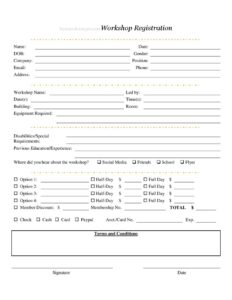
- Enter the participant’s Name, Date of registration, DOB, and Gender if requested.
- Add affiliation details: Company, Position, Email, Phone, and Address so organizers can confirm and follow up.
- Specify the session under Workshop Name, the facilitator in Led by, and the scheduled Date(s) and Time(s).
- Note the location using Building and Room so attendees know exactly where to go.
- List any Equipment Required and complete Disabilities/Special Requirements so accommodations can be arranged.
- Record Previous Education/Experience to help the facilitator gauge skill levels.
- Answer Where did you hear about the workshop? — checking Social Media, Friends, School, or Flyer.
- Select the registration tier from Option 1 through Option 4, entering Half-Day $ or Full Day $ amounts.
- Apply any Member Discount $ with your Membership No., then calculate the TOTAL.
- Choose a payment method — Check, Cash, Card, or PayPal — and add Acct./Card No. and Exp. where needed.
- Read the Terms and Conditions, then add your Signature and Date.
Handling Payment and Discounts Clearly
The pricing portion of this form deserves careful attention because it doubles as your record of what each attendee owes. Decide upfront which option corresponds to which fee — for example, mapping Option 1 to a half-day rate and Option 2 to a full-day rate — and write the amounts in the Half-Day and Full Day fields rather than leaving them implied. If a participant qualifies for the Member Discount, record both the discount amount and the Membership No. so the deduction is verifiable later. The TOTAL should reflect the chosen option minus any discount. For card or PayPal payments, treat the Acct./Card No. and Exp. fields as sensitive: store completed forms securely, redact numbers from any copies you share, and avoid emailing the unprotected document.
Why the Marketing and Accessibility Fields Matter
Two sections are easy to overlook but add real value. The “Where did you hear about the workshop?” question tells you which channels — social media, word of mouth, schools, or printed flyers — actually fill seats, so you can spend future promotion budget wisely. The Disabilities/Special Requirements field is just as important: collecting accommodation needs at registration gives organizers time to arrange accessible rooms, materials, interpreters, or seating before the event rather than scrambling on the day.
Common Mistakes to Avoid
- Leaving the payment option ambiguous — always pair each selected option with a written dollar amount and a calculated TOTAL.
- Skipping the special requirements field — missing accommodations can exclude participants and create last-minute problems.
- Forgetting the signature and date — without them, the terms acknowledgment is incomplete.
- Recording card details insecurely — never store or transmit Acct./Card No. and Exp. in plain, unprotected files.
- Omitting location details — leaving Building and Room blank leads to confused, late arrivals.
- Reusing one form for multiple sessions — fill a separate form per attendee per workshop to keep your roster clean.
Frequently Asked Questions
What is a Workshop Registration Form used for? It is used to formally enroll a participant in a workshop while capturing their contact details, chosen session, accommodation needs, and payment. Organizers rely on it to build accurate attendance rosters and plan logistics. It keeps every sign-up consistent and easy to reference.
How do I fill out a Workshop Registration Form? Start with the attendee’s personal and contact information, then specify the workshop name, facilitator, dates, times, and location. Note any equipment or special requirements, select a pricing option and apply any member discount, and choose a payment method. Finish by reviewing the terms and adding a signature and date.
Is a Workshop Registration Form legally binding? Once an attendee signs and dates the terms-and-conditions section, the form generally functions as an agreement to attend and pay under the stated conditions. The exact enforceability depends on the wording of your terms and on local law. For paid or high-value programs, have your terms reviewed by a qualified professional.
Does the form need to be notarized or witnessed? No. A standard workshop registration does not require notarization or a witness; the attendee’s signature is sufficient. Notarization is reserved for legal instruments like deeds or affidavits, not event sign-ups.
How should I handle the payment and card fields safely? Treat the Acct./Card No. and Exp. fields as confidential, store completed forms in a secure location, and limit who can access them. Avoid emailing forms that contain full card numbers, and consider redacting payment details from any copies you keep. Following basic data-protection practices reduces risk for you and your attendees.
How much does this Workshop Registration Form cost? The template is completely free to download from Business Forms Pro in both PDF and DOCX formats, with no signup required. You can edit the fields, pricing options, and terms to match your event. Use it for as many workshops as you like.
This template is provided as a general example for informational purposes only and does not constitute legal, financial, or tax advice. Requirements for registration agreements, payment handling, and data privacy vary by jurisdiction. Consult a qualified professional before relying on this form for any specific situation.
Related Forms
- Group Meeting Attendance Log
- Event Registration Form
- Employee Sign In Sheet
- Potluck Sign Up Sheet
- Team Entry Form
- Meeting Sign In Sheet
Browse more in Sign In / Sign Up Sheets.