
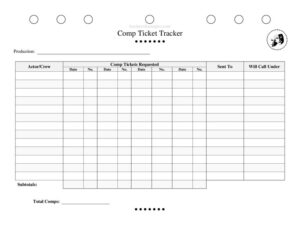
Comp Ticket Tracker
Track free house seats and complimentary tickets with this free Comp Ticket Tracker template for theater productions, available as a free download.
PDF
DOCX
0
likes
Download Files
- DOCX
A Comp Ticket Tracker is a simple log that theater companies use to record every complimentary ticket given out for a production, so house management knows exactly who requested seats, how many were issued, and where they should be left at will call. The most common reason people reach for one is to keep comp tickets from quietly eating into paid sales without anyone noticing. You can download this Comp Ticket Tracker free in PDF and DOCX, with no signup required.
What Is a Comp Ticket Tracker?
A Comp Ticket Tracker is an internal record sheet used by box office staff, stage managers, and producers to document complimentary (non-paying) tickets for a show. “Comps” are free tickets given to cast, crew, press, investors, friends and family, or industry guests. The tracker captures who requested each set of seats, how many tickets were promised, the performance date, and how the recipient will pick them up. Because comp seats reduce available paid inventory, this document gives a production a single source of truth for accountability. It helps reconcile the house count, prevents double-promising the same seats, and creates a clear paper trail when budgets and attendance are reviewed after closing night.
When Do You Need a Comp Ticket Tracker?
Any production that hands out free seats benefits from a dedicated tracker. Common situations include:
- Opening night and press performances — when critics, photographers, and media guests are invited and you need to confirm their seats are held.
- Cast and crew comps — most contracts or company policies allow performers and crew a set number of free tickets per run, which must be tallied.
- Investor and donor invitations — backers, sponsors, and board members often receive house seats that producers want logged separately.
- Friends-and-family or industry nights — agents, casting directors, and personal guests requesting tickets through actors.
- Reconciling the house count — when the box office needs to subtract comps from total capacity to know how many paid seats remain.
- Post-run budgeting — when producers review how many free tickets were distributed across the entire engagement.
What a Comp Ticket Tracker Should Have
A complete tracker leaves no room for confusion at the box office window. The essentials are the production title, the name of the person or department requesting the comps, the number of tickets requested, and the performance date. It should also include a line number for easy reference, the name of the guest the tickets are sent to, and the name the seats are held under at will call. Finally, the sheet should support running subtotals and a grand total of comps so the total never exceeds what the production can afford to give away. Keeping all of these elements on one page makes nightly reconciliation fast and accurate.
How to Fill Out a Comp Ticket Tracker
- Production: Write the name of the show at the top so the sheet stays tied to the correct production, especially in a venue running multiple titles.
- Actor/Crew: Enter the name of the cast member, crew member, or department requesting the comps. This is who is accountable for the request.
- No.: Assign a sequential line number to each comp entry for quick cross-referencing during a busy night.
- Date: Record the specific performance date the comp tickets are for, since most comps are tied to one show, not the whole run.
- Comp Tickets Requested: Note how many seats are being requested for that entry.
- Sent To: Write the name of the guest who will actually attend and pick up the tickets.
- Will Call Under: Enter the exact name the tickets will be held under at the box office window so staff can locate them instantly.
- Subtotals: Tally comps per requester or per performance as needed.
- Total Comps: Add everything for the final count of free tickets distributed.
Tips for Managing Comps Across a Run
Comp management is as much about discipline as documentation. Set a cap before the run begins — for example, a fixed number of comps per actor per performance — and make that policy clear to the company. Encourage cast and crew to submit comp requests by a deadline, such as noon on show day, so the box office isn’t scrambling at the half-hour call. Keep the tracker in one place, whether a printed binder at the box office or a shared digital copy, and designate a single person (often the house manager or company manager) to update it. For high-demand performances like opening night, prioritize press and contractual comps before discretionary friends-and-family requests, since seats fill quickly.
How the Tracker Helps at the Box Office Window
On performance nights, the “Will Call Under” and “Sent To” columns do the heaviest lifting. A guest may arrive expecting tickets under their own name, but the actor requested them under the actor’s name instead — the tracker resolves that mismatch in seconds. When the box office can scan one clean sheet, lines move faster and guests aren’t turned away by mistake. The running subtotals also let staff confirm in real time that the number of comp seats matches what was authorized, flagging any over-promised tickets before they become a seating problem in a sold-out house.
Common Mistakes to Avoid
- Leaving “Will Call Under” blank — without a pickup name, box office staff cannot match the guest to the held seats.
- Not tying comps to a specific date — a comp listed without a performance date can be claimed on the wrong night.
- Skipping the running total — losing track of total comps can cut into paid sales and overfill the house.
- Allowing duplicate requests — the same guest logged twice by different cast members wastes seats.
- Updating from memory after the show — record each request as it comes in, not after the fact.
- Confusing “Sent To” with “Actor/Crew” — the requester and the attending guest are often different people.
Frequently Asked Questions
What is a Comp Ticket Tracker? It is an internal log that records every complimentary ticket issued for a theater production, including who requested it, how many seats, the performance date, and the will-call pickup name. It gives a production one reliable place to manage free seats and reconcile them against total capacity.
Who usually fills out the tracker? Typically the house manager, company manager, or box office staff maintains the master sheet, while cast and crew submit their individual comp requests to be logged. Centralizing it under one person prevents conflicting or duplicate entries.
What’s the difference between “Sent To” and “Will Call Under”? “Sent To” is the guest who will attend the performance, while “Will Call Under” is the name the tickets are physically held under at the box office. They are often the same, but not always — an actor may hold a guest’s seats under their own name.
How do I prevent comps from cutting into paid sales? Set a comp cap before the run, log every request as it arrives, and watch the Total Comps figure so it never exceeds what the production authorized. The running subtotals make it easy to spot when you’re approaching the limit.
Can I edit this template for my production? Yes. The DOCX version is fully editable, so you can rename columns, add performance dates, or adjust totals to match your venue’s policies. The PDF is ready to print and fill in by hand at the box office.
How much does this Comp Ticket Tracker cost? It is completely free to download in both PDF and DOCX formats, with no signup or account required. You can use it for a single show or copy it across an entire season.
This template is a general example provided for informational purposes only and is not legal, financial, or contractual advice. Comp ticket policies vary by venue, union agreement, and production — consult your company management or a qualified professional for guidance specific to your situation.
Related Forms
- Storage Contents Tracker
- Props List
- Preliminary Props List
- Character Breakdown
- Focus Chart
- Intermission Checklist
Browse more in Theater.