
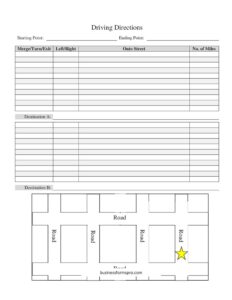
Driving Directions With Map
Use this free Driving Directions With Map template to write clear step-by-step routes for events, deliveries, and guests — free download in PDF and DOCX.
PDF
DOCX
0
likes
Download Files
- DOCX
A Driving Directions With Map form is a simple printable sheet for writing out clear, turn-by-turn directions from a starting point to a destination, alongside space for a hand-drawn or printed map. People most often use it to give guests, clients, drivers, or new employees an easy-to-follow route to a specific location. You can download it free in both PDF and DOCX formats — no signup required.
What Is a Driving Directions With Map Form?
A Driving Directions With Map form is a structured worksheet that organizes a route into discrete, repeatable steps. Instead of relying on a screenshot or a verbal explanation, it captures each merge, turn, or exit in writing, notes which street to turn onto, and records the distance between steps. It typically pairs these written directions with a blank area for a map sketch or attached printout. Event hosts, real estate agents, delivery coordinators, venue managers, and office administrators all use it to make sure visitors arrive at the right place without confusion. Because it is filled out by hand or typed, it works even when GPS signals are weak or recipients prefer paper.
When Do You Need a Driving Directions With Map Form?
- Event invitations — including directions to a wedding, party, conference, or fundraiser where the venue is hard to find or unmapped.
- Real estate showings — guiding buyers from a main road to a property with a long driveway, gated entry, or rural address.
- Deliveries and service calls — giving drivers or technicians precise turns to a loading dock, back entrance, or job site.
- New employee onboarding — showing first-day hires how to reach the office, parking lot, or correct building entrance.
- Field trips and group travel — distributing the same route to multiple drivers in a caravan or carpool.
- Businesses with multiple locations — providing directions from one branch (Destination A) to another (Destination B).
What a Driving Directions With Map Form Should Have
A complete directions sheet should state the starting point and ending point in plain terms, list each maneuver in the order it happens, and specify the direction of each turn. Every step should include the street you turn onto and the approximate distance you travel before the next action. The form should also leave room for a map — either sketched by hand or attached as a printout — and may include slots for two related destinations so a single sheet covers more than one stop. Clear landmarks, exit numbers, and notes about parking round out a truly useful version.
How to Fill Out a Driving Directions With Map Form
- Starting Point: Write where the driver begins — a full street address, a well-known intersection, or a recognizable landmark such as a highway entrance.
- Ending Point: Enter the final destination clearly, including any suite, gate, or building number the driver needs.
- Merge / Turn / Exit: For each step, indicate the type of maneuver — merge onto a highway, take an exit, or make a turn.
- Left / Right: Specify the direction of each turn so there is no guesswork at an intersection.
- Onto Street: Name the road the driver moves onto after the maneuver, using the exact street name and route number where possible.
- No. of Miles: Record the approximate distance to travel before the next step, helping drivers know when to expect the next turn.
- Destination A and Destination B: If the sheet covers two stops, label each route clearly and complete the steps for both.
- Map: Sketch the route in the map area or attach a printed map, marking the start, key turns, and the destination.
Tips for Writing Directions People Can Actually Follow
The best directions read like spoken instructions. Add landmarks alongside street names — “turn right at the gas station onto Maple Avenue” is far easier to follow than a street name alone, especially when signs are small or missing. Round mileage to a sensible figure (for example, 0.5 miles or 2 miles) rather than precise decimals, and call out tricky spots such as quick lane changes, unmarked roads, or exits that come up fast. Note parking instructions and which entrance to use at the destination. If you expect the route to be driven at night or in bad weather, mention features that stay visible, like a lit sign or a traffic signal.
Driving Directions Versus a GPS Pin
A shared GPS pin is convenient, but it can fail in areas with poor coverage, lead drivers to the wrong side of a large property, or route them down a road that is closed. A written directions sheet gives the recipient a reliable backup and lets you add context an app cannot — such as which gate to use, where to park, or who to call on arrival. Many hosts include both: a digital pin for everyday navigation and this printed sheet for clarity and as a fallback. Keeping a paper copy in the vehicle also helps when phones run out of battery.
Common Mistakes to Avoid
- Vague turn directions — writing “turn at the light” without specifying left or right leaves drivers stranded at the intersection.
- Skipping mileage — without the No. of Miles, drivers cannot judge whether they have missed a turn.
- Using only street names — adding landmarks prevents confusion when signs are obscured or absent.
- Forgetting the final approach — directions that stop at the street but ignore the driveway, gate, or parking lot lead to last-minute frustration.
- Not testing the route — drive or trace it yourself to catch closed roads, one-way streets, or confusing merges before sharing.
- Leaving the map blank — a quick sketch or attached printout reinforces the written steps and helps visual navigators.
Frequently Asked Questions
What is a Driving Directions With Map form used for? It is used to write clear, step-by-step driving directions and pair them with a map so guests, drivers, or clients can reach a specific location easily. It is especially helpful when an address is hard to find or when GPS coverage is unreliable in the area.
How do I fill out the directions steps? Start with the Starting Point and Ending Point, then list each maneuver in order, noting whether it is a merge, turn, or exit, the left or right direction, the street you turn onto, and the number of miles to the next step. Add landmarks where helpful for extra clarity.
What are Destination A and Destination B for? These fields let a single sheet cover two separate routes or stops — for example, directions to a ceremony venue and then a reception, or to two different office branches. Label each route clearly so the reader knows which steps belong to which destination.
Do I need to attach a real map? A map is not strictly required, but it greatly improves clarity. You can sketch the route by hand in the map area or attach a printed map and mark the start, key turns, and destination.
Is this template free to download? Yes. This Driving Directions With Map template is completely free to download in both PDF and DOCX formats, with no signup or payment required. You can edit the DOCX version or print the PDF as-is.
Can I use it for business deliveries or events? Absolutely. It works well for delivery drivers, service technicians, event guests, real estate showings, and new employee onboarding — anywhere a clear, reliable route needs to be shared on paper.
This template is provided as a general example for informational purposes only and does not constitute professional, legal, or safety advice. Always verify routes, road conditions, and local traffic rules before travel, and drive responsibly.
Related Forms
- Pocket Temperature Converter
- Auction Bid Sheet
- Driving Directions
- Articles of Incorporation
- Book Club Ballot
- Weekly Schedule By Name
Browse more in Miscellaneous.