
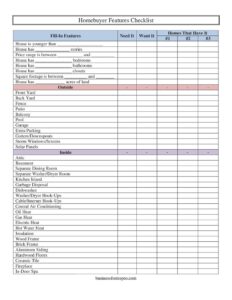
Homebuyer Features Checklist
Use this free Homebuyer Features Checklist template to rank home must-haves and wants, compare properties, and stay organized — free download in PDF and DOCX.
PDF
DOC
13 downloads
1
likes
Download Files
- DOC
A Homebuyer Features Checklist is a simple worksheet that helps you list, prioritize, and compare the features you want in a home before you start touring properties. The most common reason buyers use one is to separate true deal-breakers from nice-to-haves so they can shop efficiently and avoid emotional, regret-prone decisions. This template is free to download in both PDF and DOCX formats, with no signup required.
What Is a Homebuyer Features Checklist?
A Homebuyer Features Checklist is a buyer-created planning document that captures your housing priorities in one organized place. It is used by home shoppers, couples, families, and the real estate agents who guide them, and it documents which home characteristics you consider essential, which are merely desirable, and which homes actually meet those criteria. Rather than relying on memory after a long day of showings, the checklist gives you a consistent scorecard for every property. It typically covers fundamentals like price range, bedrooms, bathrooms, and square footage, plus exterior and interior features such as a garage, fireplace, or central air conditioning. The goal is clarity: a shared, written reference that keeps everyone focused on the same goals.
When Do You Need a Homebuyer Features Checklist?
This checklist is useful at nearly every stage of the home search, but especially in these situations:
- Before you start touring: Define your needs and wants so your agent can pull listings that genuinely fit.
- When buying with a partner or family: Resolve differences early by writing down what each person considers a must-have versus a want.
- During open houses and showings: Carry the checklist to record which homes have which features, instead of trusting memory.
- When comparing finalists: Line up two or three serious contenders feature by feature to make an objective decision.
- When budgeting trade-offs: Decide whether you would sacrifice a pool or extra acreage to stay inside your price range.
- When working with a mortgage pre-approval: Match your wish list against what your approved price range can realistically deliver.
What a Homebuyer Features Checklist Should Have
A complete checklist should let you record each feature, flag whether it is a Need It or a Want It, and note which Homes That Have It. It should include core specifications — price range, number of stories, bedrooms, bathrooms, closets, square footage, lot acreage, and home age. It should also break out exterior items (front yard, back yard, fence, patio, balcony, pool, garage, extra parking, gutters/downspouts, storm windows/screens, solar panels) and interior items (attic, basement, separate dining room, laundry room, kitchen island, dishwasher, garbage disposal, heating and cooling type, flooring, framing, fireplace, and more). A fill-in row for custom features rounds it out so nothing important gets overlooked.
How to Fill Out a Homebuyer Features Checklist
- Start with the core criteria at the top: note the maximum house age (“younger than”), preferred number of stories, and your price range between a low and high figure.
- Record your target bedrooms, bathrooms, and closets, then your desired square footage range and acres of land.
- Move to the Outside section. For each item — front yard, back yard, fence, patio, balcony, pool, garage, extra parking, gutters/downspouts, storm windows/screens, and solar panels — mark it as Need It or Want It.
- Complete the Inside section in the same way: attic, basement, separate dining room, separate washer/dryer room, kitchen island, garbage disposal, dishwasher, washer/dryer hook-ups, and cable/internet hook-ups.
- Specify systems and materials: choose your preferred heating type (oil, gas, electric, or hot water), note central air conditioning and insulation, and indicate framing (wood, brick, or aluminum siding), flooring (hardwood, ceramic tile), plus a fireplace or in-door spa.
- Use the Fill-In Features rows to add anything unique to you, then in the Homes That Have It column, jot the address or nickname of each property that matches as you tour.
How to Prioritize Needs Versus Wants
The power of this checklist lies in the Need It and Want It columns. A need is something that would make a home unworkable for your daily life — perhaps a minimum number of bedrooms for your family, washer/dryer hook-ups, or a price range your budget can support. A want is a feature that would delight you but that you could live without, such as a pool, in-door spa, or kitchen island. Be honest and disciplined: if everything becomes a need, the list loses its value. A practical approach is to limit yourself to a handful of true needs and let the rest fall into the wants column. When two homes tie on your needs, the wants become the tiebreaker.
Using the Checklist During Showings
Bring a printed copy to every showing or load the DOCX onto a tablet. As you walk through each property, check off the features it offers in the Homes That Have It column and note the address. Take a quick photo of anything that surprises you, good or bad. After several showings, the completed sheets create an at-a-glance comparison so you can rank candidates objectively instead of relying on the last home you happened to see. Sharing the filled-out checklist with your real estate agent also helps them refine future listing recommendations.
Common Mistakes to Avoid
- Marking too many features as needs: Reserve “Need It” for genuine deal-breakers, or you may rule out every home in your range.
- Ignoring the price range: Set a realistic low-to-high band based on your pre-approval before adding luxury wants.
- Forgetting systems and materials: Heating type, insulation, and framing affect comfort and cost but are easy to overlook on a tour.
- Not updating as you learn: Your priorities may shift after a few showings — revise the checklist instead of clinging to the original.
- Skipping the fill-in rows: If a unique feature matters to you, write it in so it gets evaluated consistently.
- Touring without it: The checklist only works if you actually carry it and record features at each home.
Frequently Asked Questions
What is a Homebuyer Features Checklist used for? It is used to organize and prioritize the features you want in a home, then compare actual properties against those priorities. Buyers rely on it to stay focused, communicate clearly with agents and partners, and make objective decisions during a busy search.
How do I fill out the Need It versus Want It columns? Mark a feature as “Need It” only if a home without it would not work for you, and “Want It” if it would be a welcome bonus you could live without. Keeping needs short and honest helps you avoid eliminating otherwise great homes.
Is this checklist legally binding? No. A Homebuyer Features Checklist is a personal planning tool, not a contract, offer, or agreement. It carries no legal weight and is simply meant to guide your decision-making and conversations with your agent.
Can I customize the features on the list? Yes. The template includes Fill-In Features rows so you can add anything specific to your situation, such as a home office, accessibility features, or a particular school district. Edit the DOCX version freely to match your priorities.
How much does this template cost? It is completely free to download here in both PDF and DOCX formats, with no signup or payment required. You can print copies for every showing or edit the digital version on your computer.
Should I share the completed checklist with my real estate agent? Yes, sharing it is highly recommended. Your agent can use your needs, wants, price range, and feature preferences to send you better-matched listings and avoid wasting time on homes that miss your essentials.
This template is a general example provided for informational purposes only and does not constitute legal, financial, or real estate advice. Home-buying requirements, disclosures, and practices vary by location and situation — consult a qualified real estate professional, lender, or attorney before making any purchase decisions.
Official resource: for the rules that apply to your situation, see HUD.
Related Forms
- Real Estate Listing Tracker
- Complain To Landlord
- Real Estate Needs Wants Checklist
- Rental Lease Extension Request
- Home Showing Tracker
- Closed Sales Tracker
Browse more in Rental and Real Estate.