
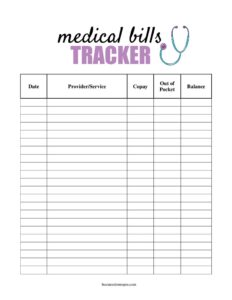
Medical Bills Tracker
Organize healthcare costs with a free Medical Bills Tracker template that logs charges, insurance payments, and balances due, available as a free download.
PDF
DOCX
3 downloads
0
likes
Download Files
- DOCX
A Medical Bills Tracker is a simple worksheet for recording every healthcare charge, insurance payment, and balance you owe in one place. People most often use it to keep medical expenses organized during a busy treatment period or tax season, and to catch billing errors before they pay. You can download it free in PDF and DOCX, with no signup required.
What Is a Medical Bills Tracker?
A Medical Bills Tracker is a personal record-keeping tool used by patients, caregivers, and families to monitor medical expenses over time. It documents who provided care, the date of service, the amount billed, how much insurance covered, and what remains your responsibility. Unlike an official invoice issued by a hospital or clinic, this tracker is something you maintain yourself to reconcile the many bills, statements, and Explanation of Benefits (EOB) forms that arrive from different sources. It gives you a running picture of total spending, outstanding balances, and payment progress. Whether you manage one chronic condition or coordinate care for an aging parent, the tracker turns scattered paperwork into a clear, reviewable summary.
When Do You Need a Medical Bills Tracker?
This tool is helpful any time medical paperwork starts to pile up. Common situations include:
- Managing ongoing treatment for a chronic illness with recurring appointments and prescriptions.
- Recovering from surgery or hospitalization, when bills arrive separately from the facility, surgeon, anesthesiologist, and lab.
- Coordinating care and finances for a child, spouse, or elderly relative as a caregiver.
- Reconciling provider bills against your insurer’s Explanation of Benefits to confirm you were charged correctly.
- Gathering documentation of out-of-pocket medical costs for tax deductions, an HSA/FSA, or a flexible spending reimbursement.
- Tracking progress toward your annual deductible and out-of-pocket maximum across multiple providers.
What a Medical Bills Tracker Should Have
A useful tracker captures enough detail to identify each bill and reconcile it later. At minimum it should include the provider or facility name, the date of service, a short description of the visit or procedure, the total amount billed, the portion insurance paid, any adjustments or write-offs, your out-of-pocket responsibility, the payment status, and the date you paid. A notes column is valuable for recording claim numbers, disputes, or follow-up needs. A running total row at the bottom lets you see cumulative spending at a glance, which is especially useful when comparing against your deductible or preparing tax records.
How to Fill Out a Medical Bills Tracker
Work one bill at a time and complete a row for each charge:
- Date of service: Enter the date the care was actually provided, not the date the bill arrived, so entries match your insurer’s records.
- Provider/facility: Write the name of the doctor, hospital, lab, or pharmacy that delivered the service.
- Description: Note the type of visit, test, or procedure (e.g., “annual physical” or “MRI, left knee”).
- Amount billed: Record the full charge listed on the provider’s statement before insurance.
- Insurance paid: Enter the amount your insurer covered, taken from the matching EOB.
- Adjustments: List any contractual discount or write-off so the math reconciles.
- You owe: Record your remaining responsibility he the amount past the insurer’s contribution and adjustments.
- Status and date paid: Mark each item as unpaid, partial, or paid, and note when payment was made.
- Notes: Add claim numbers, dispute details, or reminders, then update the running total.
Reconciling Bills Against Your EOB
One of the biggest benefits of a Medical Bills Tracker is catching errors. After a visit, you typically receive two documents: the provider’s bill and your insurer’s Explanation of Benefits. The EOB is not a bill — it explains what the insurer was charged, what it allowed, what it paid, and what you owe. Before paying any provider bill, match it line by line to the corresponding EOB. If the provider is billing you more than the EOB says you owe, that is a red flag worth a phone call. Recording both numbers in your tracker makes these mismatches obvious and gives you a paper trail if you need to dispute a charge.
Tips for Staying Organized
Update the tracker the same day a bill or EOB arrives so nothing slips through the cracks. Keep digital or paper copies of each statement filed by date of service, and reference them in the notes column. Use a consistent provider naming style so you can sort and total by source. If you are saving for tax purposes, separate qualifying medical expenses from cosmetic or non-deductible items. For families managing multiple patients, consider one tracker per person to avoid confusion. Reviewing the tracker monthly helps you spot bills that should have arrived but didn’t, and balances that are quietly heading to collections.
Common Mistakes to Avoid
- Paying a provider bill before checking it against the matching EOB, which can mean paying more than you actually owe.
- Mixing the billed amount with the amount you owe — track them in separate columns so the math stays clear.
- Forgetting to log the date paid, which makes it hard to prove a balance was settled.
- Leaving out small charges like copays and prescriptions, which add up quickly over a year.
- Not recording claim or account numbers in the notes, making disputes and follow-up calls harder.
- Failing to update the running total, so you lose sight of progress toward your deductible or out-of-pocket maximum.
Frequently Asked Questions
What is a Medical Bills Tracker used for? It is used to log and organize every healthcare charge, insurance payment, and remaining balance in one place. The goal is to keep medical expenses clear, catch billing errors, and have a ready record for taxes, reimbursements, or disputes.
How do I fill out a Medical Bills Tracker? Complete one row per bill, entering the date of service, the provider, a description, the amount billed, what insurance paid, any adjustments, your responsibility, and the payment status. Update the notes and running total as you go so the sheet always reflects your current balances.
Is a Medical Bills Tracker the same as a bill or invoice? No. A bill or invoice is the official charge issued by a provider, while this tracker is a personal record you maintain to summarize and reconcile those bills. It has no billing authority — it simply helps you stay organized.
Can I use this tracker for tax or HSA purposes? Yes, it is a convenient way to gather documentation of out-of-pocket medical costs that may be deductible or reimbursable through an HSA or FSA. Keep the original receipts and statements as well, since tax authorities and plan administrators require supporting documents.
Does this form need to be signed or notarized? No. A Medical Bills Tracker is a private organizational tool, not a legal contract, so it does not require a signature, witness, or notary. You simply fill it in for your own reference.
How much does this Medical Bills Tracker cost? It is completely free to download from Business Forms Pro in both PDF and DOCX formats, with no signup required. Use the PDF to print and write by hand, or the DOCX to customize columns in a word processor.
This Medical Bills Tracker template is a general example provided for informational purposes only and is not medical, legal, tax, or financial advice. Insurance, billing, and tax requirements vary by plan and jurisdiction — consult a qualified professional or your insurer for guidance specific to your situation.
Related Forms
- Medical Records Release Letter
- Medical Release Letter
- Request Medical Payment Plan
- Accident Claim letter
- Health Insurance Comparison Chart
- Injury Report Record
Browse more in Medical.