
Parental Image Use Permission Form
Download a free Parental Image Use Permission Form template that lets parents authorize or restrict photos and videos of their child — free download in PDF and DOCX.
PDF
DOCX
1 downloads
0
likes
Download Files
- DOCX
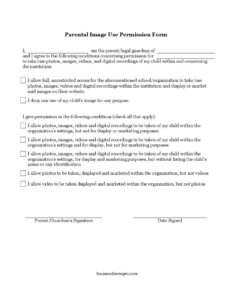
A Parental Image Use Permission Form is a short consent document that lets a parent or legal guardian decide whether — and how — a school or organization may take and use photos, images, videos, and digital recordings of their child. It is most commonly used at enrollment or registration so that institutions have clear, written permission on file before they capture or publish any images. You can download this form for free in both PDF and DOCX formats, with no signup required.
What Is a Parental Image Use Permission Form?
A Parental Image Use Permission Form is a written authorization signed by a child’s parent or legal guardian that defines exactly how a school, daycare, club, sports team, or similar organization may record and display the child’s likeness. It is issued by the institution and completed by the guardian. The form documents the parent’s choices — from full unrestricted permission to a complete denial of any image use — and may include conditional options, such as allowing photos but not videos, or permitting display without marketing. Because it protects a child’s privacy and shields the organization from liability, this signed record is an essential part of responsible recordkeeping.
When Do You Need a Parental Image Use Permission Form?
Organizations that interact with children should collect this form before any images are captured or used. Common situations include:
- A school enrolling new students and wanting to feature classroom activities on its website or brochures.
- A daycare or preschool posting daily photos to a parent portal or social media page.
- A youth sports league or club photographing games, practices, and award ceremonies.
- A summer camp creating promotional videos or a yearbook-style recap of the season.
- A nonprofit or after-school program using event photos in newsletters and grant applications.
- A church group, theater troupe, or community center documenting performances and activities.
In each case, the form gives the institution a documented basis for using a child’s image and gives parents control over how their child appears in public-facing materials.
Types of Permission This Form Captures
One of the strengths of this template is that it does not force an all-or-nothing decision. Parents can grant full, unrestricted access for use on the organization’s website and in marketing. They can deny any use entirely. Or they can select among several middle-ground conditions:
- Allow images to be taken within the organization’s settings but not displayed or marketed.
- Allow images to be taken and displayed, but not used for marketing.
- Allow display and marketing, but without listing the child’s name or any identifying information.
- Allow photos to be taken, displayed, and marketed, but not videos.
- Allow video to be taken, displayed, and marketed, but not photos.
These granular choices respect the reality that many families are comfortable with internal use but cautious about public-facing or commercial use.
What a Parental Image Use Permission Form Should Have
A complete form should clearly identify the parent or guardian, the child, and the organization requesting permission. It must present the permission options in plain language so the guardian understands each choice. It should include checkboxes for conditional consent, a place to indicate full permission or full denial, and a clear signature and date line that makes the authorization legally meaningful. The form should also make it obvious that the choices apply to photos, images, videos, and digital recordings taken within and concerning the institution.
How to Fill Out a Parental Image Use Permission Form
- In the opening statement, enter your full name in the first blank to identify yourself as the parent or legal guardian.
- In the second blank, write your child’s full name so it is clear whose image the permission concerns.
- In the third blank, enter the name of the school or organization that is requesting permission to take and use the images.
- Read the full, unrestricted permission option carefully. Select it only if you allow the organization to take, use, display, and market images on their website without limits.
- If you do not want any images of your child used for any purpose, select the denial option instead.
- If you prefer conditional permission, review the checklist and check all options that apply — for example, allowing internal use but not marketing, allowing display without the child’s name, or permitting photos but not videos.
- Sign on the Parent/Guardian’s Signature line and enter the date signed to make your selections official.
Tips for Parents and Organizations
Parents should choose only one consistent position — selecting both full permission and a restrictive condition creates confusion. If you are unsure, the conditional options let you allow internal photos while protecting your child from public marketing. Organizations should keep the signed form on file for the duration of the child’s enrollment and re-collect it if their image-use practices change. It is good practice to honor the most restrictive interpretation when a form is ambiguous, and to remove or stop using images promptly if a guardian later withdraws consent.
Common Mistakes to Avoid
- Leaving the parent, child, or organization name blank, which makes the authorization hard to enforce.
- Checking both full permission and a restrictive condition, creating contradictory instructions.
- Forgetting to sign and date the form — an unsigned form is not valid consent.
- Assuming silence equals consent; organizations should not use a child’s image without a completed form.
- Failing to update the form when a child changes schools or when the organization adopts new marketing channels.
- Overlooking the difference between display (internal or website use) and marketing (promotional or commercial use) when selecting conditions.
Frequently Asked Questions
What is a Parental Image Use Permission Form? It is a consent document a parent or legal guardian signs to authorize or restrict how a school or organization takes and uses photos, videos, and digital recordings of their child. It records the guardian’s specific choices and protects the child’s privacy.
How do I fill out the form? Enter your name, your child’s name, and the organization’s name, then select either full permission, full denial, or one or more conditional options from the checklist. Finish by signing and dating the form to make your selections official.
Does this form need to be notarized or witnessed? Notarization is generally not required for an image-use permission form, since it is a consent document rather than a sworn legal instrument. A signature and date from the parent or guardian are typically sufficient, though requirements can vary by organization and jurisdiction.
Is the form legally binding? Once signed and dated by the parent or guardian, the form serves as documented consent that both parties can rely on. It clarifies the scope of permission, but its enforceability and any privacy obligations depend on local laws and the organization’s policies.
Can I change my mind after signing? Yes. A parent or guardian can usually withdraw or update their consent by notifying the organization in writing and submitting a revised form. The organization should then stop using new images and remove existing ones where reasonably possible.
How much does this form cost? Nothing — this Parental Image Use Permission Form is completely free to download here in PDF and DOCX formats, with no signup required. You can edit the DOCX version to add your organization’s name or logo.
This template is a general example provided for informational purposes only and is not legal advice. Privacy and consent requirements vary by jurisdiction and by organization, so consult a qualified attorney or professional to ensure your form meets applicable laws and your specific needs.
Related Forms
- Work Order
- Maintenance Request
- Household Items Release Form
- Rejection Response Letter
- Drug and Alcohol Testing Individual
- Damage Claim
Browse more in Request and Authorization.