
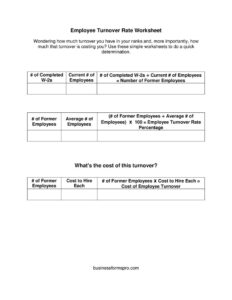
Employee Turnover Rate
Calculate your staff turnover and what it costs with the free Employee Turnover Rate Worksheet template — free download in PDF and DOCX, no signup needed.
PDF
DOCX
0
likes
Download Files
- DOCX
The Employee Turnover Rate Worksheet is a simple calculation tool that helps you measure how many employees leave your organization over a given period and estimate what that turnover is costing you. Most people reach for it when they suspect attrition is climbing and need a quick, defensible number to share with leadership. It is free to download here in both PDF and DOCX formats, with no signup required.
What Is an Employee Turnover Rate Worksheet?
An Employee Turnover Rate Worksheet is a one-page form used by HR managers, business owners, and operations leaders to convert raw headcount data into a meaningful percentage. It documents how many people you employed during a period, how many left, and what it costs to replace each one. Rather than relying on a gut feeling that “people keep quitting,” the worksheet turns scattered numbers — completed W-2s, current staff, former staff, and hiring costs — into a turnover rate and an estimated dollar impact. It is a planning and reporting tool, not a legal document, and it is most often refreshed annually or quarterly to track trends.
When Do You Need an Employee Turnover Rate Worksheet?
This worksheet earns its keep any time you need to put a number on attrition. Common situations include:
- Annual HR reporting — summarizing how many employees left over the year for a board, owner, or executive review.
- Budgeting season — projecting recruiting, onboarding, and training costs for the coming year based on expected churn.
- Spotting a problem early — confirming whether a department or location is losing people faster than the rest of the business.
- Justifying retention investments — building a case for raises, better benefits, or improved onboarding by showing what replacing each worker actually costs.
- Comparing periods — measuring whether a recent policy change reduced or increased the rate quarter over quarter.
- Benchmarking against your industry — checking how your rate stacks up against typical figures for similar businesses.
What an Employee Turnover Rate Worksheet Should Have
A complete worksheet captures everything needed to produce both a rate and a cost figure. At minimum it should include the number of completed W-2s for the period, your current employee count, the count of former employees who departed, an average number of employees across the period, and the estimated cost to hire and replace each worker. With those inputs, the form can show two outputs that matter most: the turnover rate as a percentage and the total estimated cost of that turnover. Clearly labeled fields and a defined time period — usually one calendar year — keep the math consistent and the results comparable from one cycle to the next.
How to Fill Out an Employee Turnover Rate Worksheet
- Enter the number of completed W-2s. Pull this from payroll or your tax records. It represents everyone you paid during the year and is a reliable count of total people employed across the period.
- Record your current number of employees. Count everyone on the payroll as of the date you are completing the worksheet — this is your present, active headcount.
- Enter the number of former employees. Subtract your current staff from the W-2 count, or count the people who separated during the period. These are the departures the rate is based on.
- Calculate the average number of employees. A simple approach is to add your headcount at the start of the period to your headcount at the end and divide by two, giving a steady denominator for the calculation.
- Enter the cost to hire each employee. Estimate recruiting fees, advertising, interviewing time, onboarding, and training per new hire.
- Compute the results. Divide former employees by the average number of employees and multiply by 100 for your turnover rate; multiply former employees by the cost to hire to estimate total turnover cost.
How the Turnover Rate Math Works
The core formula is straightforward: turnover rate = (number of former employees ÷ average number of employees) × 100. If you lost 8 people and averaged 50 employees, your rate is 16%. The worksheet’s cost side multiplies departures by your per-hire replacement cost, so the same 8 departures at $4,000 each represents a $32,000 hit. Seeing both figures together is powerful — a rate alone can feel abstract, but pairing it with a dollar amount makes the business case for retention obvious. For more nuance, you can run the worksheet separately for voluntary versus involuntary departures, or by department, to pinpoint exactly where the losses concentrate.
Making Your Numbers Comparable Over Time
A single turnover rate is interesting; a trend line is actionable. To get reliable comparisons, keep your method identical each time you complete the worksheet — always use the same period length, the same way of calculating the average headcount, and the same definition of who counts as a “former employee.” Decide upfront whether you include seasonal or temporary workers, since adding them in one year and excluding them the next will distort the picture. Save each completed worksheet with its date so you can line up several periods side by side and see whether your interventions are actually moving the needle.
Common Mistakes to Avoid
- Using current headcount as the denominator instead of the average number of employees, which inflates or deflates the rate, especially in a growing or shrinking company.
- Forgetting to define the period — mixing a partial year with a full year makes comparisons meaningless.
- Underestimating the cost to hire by counting only the job-board fee and ignoring lost productivity, manager time, and ramp-up.
- Double-counting employees who were rehired or transferred between locations within the same period.
- Lumping voluntary and involuntary departures together when the two tell very different stories about your workplace.
- Changing the calculation method from one period to the next, which breaks any trend you are trying to track.
Frequently Asked Questions
What is a good employee turnover rate? A “good” rate depends heavily on your industry — retail and hospitality typically run far higher than manufacturing or professional services. Rather than chasing a single benchmark, focus on your own trend over time and compare against typical figures for similar businesses in your sector.
How do I calculate turnover rate with this worksheet? Divide the number of former employees by the average number of employees, then multiply by 100 to get a percentage. The worksheet lays out each input — completed W-2s, current employees, former employees, and average headcount — so you can plug in your figures and arrive at the rate quickly.
Why does the worksheet ask for the number of W-2s? The completed W-2 count is a dependable total of everyone you paid during the year, including people who have since left. It gives you an accurate base headcount and helps you derive the number of former employees when subtracting your current staff.
How do I estimate the cost to hire each employee? Add up recruiting and advertising spend, interviewing and screening time, onboarding, training, and the productivity lost while a role sits vacant or a new hire ramps up. Even a rough estimate, applied consistently, turns your turnover rate into a meaningful dollar figure.
Is this worksheet legally binding or an official document? No. It is an internal planning and analysis tool, not a contract or a filing of any kind. You can adapt the fields freely to match how your organization tracks headcount and hiring costs.
How much does this template cost? Nothing — the Employee Turnover Rate Worksheet is completely free to download here in PDF and DOCX, with no account or signup required. You can use the PDF as-is or open the DOCX to customize the labels and add your own columns.
This worksheet is a general example provided for informational purposes only and does not constitute legal, financial, tax, or human-resources advice. Calculation methods and reporting requirements vary by organization and jurisdiction; consult a qualified HR or financial professional for guidance specific to your business.
Official resource: for the rules that apply to your situation, see the U.S. Department of Labor.
Related Forms
- Accrued Benefits Statement
- Adverse Action Notice
- Employee Appraisal
- Direct Deposit Authorization
- Interview Invitation
- Grievance Report
Browse more in Employment.