
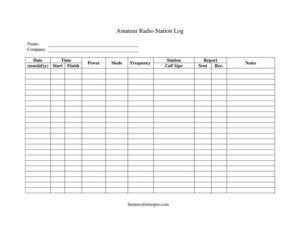
Amateur Radio Station Log
Download a free Amateur Radio Station Log template to record contacts, frequencies, modes and signal reports cleanly — free PDF and DOCX download.
PDF
DOCX
4 downloads
0
likes
Download Files
- DOCX
An Amateur Radio Station Log is a record sheet hams use to document every two-way contact (QSO) they make, capturing the other station’s call sign, the date and time, the frequency and mode, and the signal reports exchanged. Most operators reach for it to keep an accurate, verifiable history of their on-air activity for awards, QSL confirmations, and personal reference. You can download this template free in both PDF and DOCX formats with no signup required.
What Is an Amateur Radio Station Log?
An Amateur Radio Station Log is a structured record kept by a licensed amateur radio operator that lists the contacts made from their station. Each line documents who was worked, when, on what frequency and mode, at what power, and how well each station heard the other. While many countries no longer legally require a station log, the practice remains a cornerstone of the hobby. The log supports applications for operating awards, helps resolve QSL card exchanges, demonstrates compliance during interference investigations, and gives the operator a satisfying running history of their activity. Whether kept by a single operator or a club station, it is the official memory of what happened on the air.
When Do You Need an Amateur Radio Station Log?
A log is useful any time you transmit, but certain situations make it essential:
- Chasing operating awards such as Worked All States, DXCC, or Worked All Continents, where confirmed contacts must be documented.
- Exchanging QSL cards with stations you have worked, so you can match dates, times, frequencies, and reports exactly.
- Operating contests or special events where every contact must be recorded with precise time and exchange details.
- Running a Field Day, portable, or emergency communications operation where multiple operators share one station log.
- Documenting your activity for license renewal records, interference inquiries, or club requirements.
- Tracking propagation and antenna experiments, where notes on power, band, and reports reveal what works at your location.
What an Amateur Radio Station Log Should Have
A complete log entry leaves no ambiguity about a contact. The essentials are the date and time of the QSO (ideally in UTC to avoid time-zone confusion), the call sign of the station worked, the frequency and band, the operating mode (such as SSB, CW, FM, or a digital mode), and the signal reports both sent and received. Good logs also note the operator’s name and station details, the power level used, and a free-text notes area for QTH, equipment, weather, or anything memorable. Consistency matters more than elaborate formatting: a clean, readable line that another operator could verify against their own log is the goal.
How to Fill Out an Amateur Radio Station Log
- Date: Enter the date of the contact, using UTC where possible for cross-checking against other stations.
- Start / Time / Finish: Record the time you began the contact in the Start field, the working time in Time, and when the QSO ended in Finish.
- Call Sign: Write the worked station’s call sign exactly as heard, double-checking phonetics.
- Name / Station / Company: Note the other operator’s name, their station identifier or club, and any associated organization.
- Frequency: Log the operating frequency in MHz or kHz so the band is clear.
- Mode: Enter the mode used — SSB, CW, FM, AM, or a digital mode like FT8.
- Power: Record your transmit power in watts.
- Report (Sent / Rec.): Enter the signal report you Sent and the one you Received, usually in RST format.
- Notes: Add QTH, equipment, antenna, conditions, or follow-up reminders.
Understanding Signal Reports and Modes
The Sent and Rec. fields most often use the RST system: Readability (1-5), Strength (1-9), and Tone (1-9, used mainly for CW). On voice modes you typically exchange just readability and strength, such as “59.” Digital modes like FT8 use signal-to-noise figures in decibels instead. Recording these accurately is what makes a contact verifiable later. The Mode and Frequency fields work together to define the band segment you operated in, which matters for awards that require contacts across specific bands. When in doubt, write down exactly what was exchanged on the air rather than what you think it should have been — the value of a log lies in its honesty and precision.
Tips for Keeping a Reliable Log
Log the contact while it is happening or immediately afterward, never from memory hours later. Keep your times in UTC and your frequencies consistent so entries line up with the stations you worked. If you operate portable or under a special prefix, note that in the Station or Notes field. For busy sessions like contests, a clean paper log can be transcribed into logging software afterward, and this template is ideal for that field-friendly first capture. Back up paper logs by scanning or photographing completed pages so a coffee spill never erases a rare DX contact.
Common Mistakes to Avoid
- Mixing time zones — switching between local time and UTC makes contacts impossible to confirm with other logs.
- Guessing the call sign instead of asking for a repeat; an incorrect call invalidates QSL and award claims.
- Leaving the mode or frequency blank, which removes the band context needed for award credit.
- Recording only one signal report instead of both Sent and Rec. values.
- Writing illegibly or out of order, making the log hard to transcribe later.
- Forgetting to back up a paper log, risking the loss of irreplaceable contacts.
Frequently Asked Questions
What is an Amateur Radio Station Log used for? It is used to record the details of every contact you make from your station, including the call sign worked, the date and time, the frequency, the mode, and the signal reports exchanged. Operators rely on it for award applications, QSL card matching, and keeping a personal history of their on-air activity.
Am I legally required to keep a station log? Logging requirements vary by country and have been relaxed or eliminated in many places, but a log can still be requested during an interference investigation. Even where it is optional, keeping one is strongly recommended for confirming contacts and supporting award claims. Check your national licensing authority’s rules to be sure.
Should I log times in UTC or local time? UTC is the standard in amateur radio because it removes confusion across time zones and makes it easy to match your entries with stations elsewhere in the world. The template’s Date, Start, Time, and Finish fields work well with UTC. If you must use local time, label it clearly to avoid mismatches.
What goes in the Sent and Rec. report fields? The Sent field holds the signal report you gave the other station, and Rec. holds the report they gave you, typically in the RST format such as “59” on voice. On digital modes you would record signal-to-noise values instead. Logging both makes the contact verifiable from either side.
Can I use this log for contests and Field Day? Yes. The template captures the essential exchange information needed for contests and shared club operations, and it is convenient for portable or emergency setups. Many operators use a paper log like this in the field and later transcribe the entries into logging software.
How much does this template cost? It is completely free to download in both PDF and DOCX formats, with no signup or payment required. Print as many copies as you need for your station, club, or portable operations, and edit the DOCX version to add fields if you wish.
This template is a general example provided for informational purposes only and does not constitute legal or regulatory advice. Amateur radio licensing and logging requirements vary by country and jurisdiction — consult your national licensing authority or a qualified expert for guidance specific to your situation.
Related Forms
- Asset List
- Garment Inventory Form
- Computers Storage Inventory Card
- Auction Sell List
- Vehicle Repair Log
- Firearm Inventory
Browse more in Log and Inventory.