
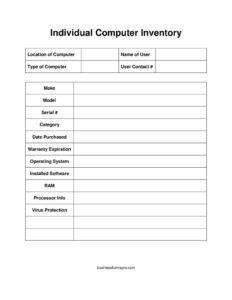
Individual Computer Inventory
Track every workstation with this free Individual Computer Inventory template — record specs, software, and warranty details in PDF or DOCX free download.
PDF
DOCX
4 downloads
0
likes
Download Files
- DOCX
An Individual Computer Inventory is a single-machine record that documents who uses a computer, where it lives, and exactly what hardware and software it contains. People most often use it to keep an accurate, audit-ready snapshot of each workstation or laptop in an organization. You can download it free in PDF and DOCX, with no signup required.
What Is an Individual Computer Inventory?
An Individual Computer Inventory is a form that captures the complete profile of one specific computer rather than an entire fleet on a single sheet. It is typically created and maintained by IT staff, office managers, or asset coordinators, and it documents identifying details such as the make, model, and serial number, along with the assigned user, location, technical specifications, and software configuration. The purpose is to give a clear, standardized reference for each device so that support, warranty claims, software licensing, and asset tracking are fast and accurate. Because each form covers one machine, it pairs neatly with a broader inventory list and serves as the detailed back-up record behind a summary spreadsheet.
When Do You Need an Individual Computer Inventory?
This form is useful any time you need to account for a specific device in detail. Common scenarios include:
- Onboarding a new employee — record the machine assigned to them, its specs, and contact details for support.
- IT asset audits — verify that physical hardware matches your records during an annual or quarterly review.
- Warranty and repair tracking — quickly check the purchase date and warranty expiration before logging a service call.
- Software license management — confirm which operating system and installed software a given machine runs.
- Security and compliance reviews — document that virus protection is installed and current on each device.
- Equipment transfers or offboarding — update the user and location when a computer changes hands or is retired.
What an Individual Computer Inventory Should Have
A complete record balances identification details with technical specifications. At minimum it should clearly identify the device (make, model, and serial number), the assigned user and their contact number, and the physical location. It should also capture the device category and type, the purchase date and warranty expiration for lifecycle planning, and the full technical profile: operating system, processor, RAM, installed software, and the virus protection in use. Together these fields let anyone reading the form understand both what the machine is and how it is configured, without having to physically inspect it.
How to Fill Out an Individual Computer Inventory
- Location of computer — note the building, floor, room, or desk where the device sits.
- Name of user — enter the employee or owner assigned to the machine.
- Type of computer — specify desktop, laptop, tablet, or server.
- User contact # — record a phone or extension for reaching the assigned user.
- Make and model — list the manufacturer and exact model name or number.
- Serial # — copy the serial number from the device label exactly.
- Category — classify the asset (for example, primary workstation, loaner, or executive laptop).
- Date purchased and warranty expiration — enter both dates for lifecycle and support planning.
- Operating system — note the OS and version.
- Installed software — list the key applications and any licensed titles.
- RAM and processor info — record memory capacity and CPU details.
- Virus protection — name the security software installed and confirm it is active.
Reading the Serial Number and Specifications Correctly
The serial number is the single most important field for warranty claims and theft recovery, so transcribe it exactly — including any letters that resemble numbers. On most laptops it appears on a sticker on the underside or inside the battery compartment; on desktops, check the rear panel or side. For RAM and processor info, you can read these directly from the operating system’s system information panel rather than guessing from the original purchase listing, since memory may have been upgraded after purchase. Listing the precise OS version (not just the family name) helps when troubleshooting compatibility or applying security patches.
Keeping the Inventory Useful Over Time
An inventory is only valuable if it stays current. Update the form whenever a machine is reassigned, relocated, upgraded, or has new software installed. Many teams store one completed form per device in a shared folder and review them during scheduled audits. Recording the warranty expiration lets you plan replacements before support lapses, while tracking virus protection supports security checks. Consider adding a “last updated” note when you revise a record so reviewers know how fresh the information is. This single-device form complements a master inventory list — the list gives the overview, and each form holds the detail.
Common Mistakes to Avoid
- Mistyping the serial number — a single wrong character can stall a warranty claim.
- Leaving the warranty expiration blank — you lose the ability to plan repairs and replacements.
- Recording original specs after an upgrade — verify RAM and processor details from the live system.
- Forgetting to update the user and location when equipment is reassigned.
- Listing vague software entries — name specific applications and versions for licensing clarity.
- Skipping virus protection details — this field matters for security and compliance reviews.
Frequently Asked Questions
What is an Individual Computer Inventory used for? It is used to document the full profile of one specific computer, including its hardware, software, assigned user, and warranty status. IT teams and office managers rely on it for asset tracking, support, audits, and lifecycle planning. Keeping one form per device makes it easy to find detailed information quickly.
How do I fill out an Individual Computer Inventory? Start with identification fields — location, user, type, make, model, and serial number — then add the purchase and warranty dates. Finish with the technical profile: operating system, installed software, RAM, processor info, and virus protection. Read specifications directly from the device so the record reflects its current configuration.
Where do I find the serial number and specs? The serial number is usually on a label on the underside of a laptop or the rear or side panel of a desktop. RAM, processor, and operating system details can be read from the system information screen built into the OS. Recording them from the live machine avoids errors caused by post-purchase upgrades.
Is this form a legal document? No — it is an internal record-keeping tool, not a contract or legally binding agreement. It serves as a reference for IT, finance, and management to track and support equipment. Treat it as part of your organization’s asset documentation rather than a legal instrument.
How often should I update the inventory? Update the form whenever the machine is reassigned, moved, upgraded, or receives new software, and review all records during scheduled audits. Many teams revisit their inventory quarterly or annually. Noting the date of each update helps reviewers gauge how current the information is.
Is this template really free to download? Yes. The Individual Computer Inventory template is available as a free download in both PDF and DOCX formats with no signup required. You can edit the DOCX version to add fields like an asset tag number or department if your organization needs them.
This template is a general example provided for informational purposes only and does not constitute legal, financial, or IT compliance advice. Record-keeping and security requirements vary by organization and jurisdiction — consult a qualified professional to ensure your inventory practices meet your specific needs.
Related Forms
- Employee Password Tracker
- Office Supplies Inventory
- Emergency Supplies List
- Firearm Inventory
- Comic Book Inventory
- List of Home Services
Browse more in Log and Inventory.