
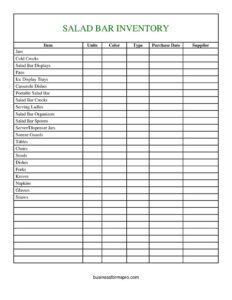
Salad Bar Items Inventory Spreadsheet
Track every salad bar item, dish, and serving tool with this free Salad Bar Items Inventory Spreadsheet template — free download in PDF and DOCX.
PDF
DOCX
1 downloads
0
likes
Download Files
- DOCX
A Salad Bar Items Inventory Spreadsheet is a simple tracking sheet used by restaurants, cafeterias, buffets, and catering operations to record every food container, serving tool, display unit, and dining accessory tied to their salad bar. The most common reason people use one is to know exactly what equipment they own, what condition it is in, and what needs reordering before service. It is free to download here in both PDF and DOCX formats, with no signup required.
What Is a Salad Bar Items Inventory Spreadsheet?
A Salad Bar Items Inventory Spreadsheet is an organized list that documents the physical assets and supplies that make up a self-service or staffed salad bar. It is typically maintained by a kitchen manager, buffet supervisor, or food service operator and captures details like item type, quantity, color, supplier, and purchase date. The template covers everything from cold crocks and sneeze guards to forks, napkins, and straws. Rather than relying on memory, the sheet gives a single reference point for counting stock, planning replacements, and assigning value to equipment. It also helps standardize how a multi-location operation tracks the same items, so counts stay consistent across shifts and sites.
When Do You Need a Salad Bar Items Inventory Spreadsheet?
This inventory sheet earns its place any time you need an accurate, dated record of salad bar equipment and consumables. Common situations include:
- Opening or restocking a salad bar — confirm you have enough pans, jars, and ladles before the doors open.
- Weekly or monthly stock counts — track usage of disposables like napkins, straws, and glasses to forecast reorders.
- Equipment audits and insurance records — document salad bar displays, sneeze guards, and tables with purchase dates for asset valuation.
- Setting up catering or off-site events — load out a portable salad bar with the right crocks, organizers, and serving spoons.
- Replacing damaged or worn items — flag cracked dishes, bent forks, or stained crocks for supplier reordering.
- Handing off between managers or shifts — give incoming staff a clear count so nothing goes missing or unaccounted for.
What a Salad Bar Inventory Sheet Should Have
A complete salad bar inventory captures both what you have and where it came from. At minimum, each line should identify the item, how many units you hold, and enough detail to tell similar items apart. Color and type fields help distinguish, for example, a clear server jar from a colored one, or a small crock from a large one. Supplier and purchase date give you the buying history needed to reorder and to estimate depreciation. The template groups items into logical families — serving containers (jars, crocks, pans), display hardware (salad bar displays, sneeze guards, ice display trays), and dining supplies (dishes, forks, napkins) — so counts stay organized and quick to scan during a physical audit.
How to Fill Out a Salad Bar Items Inventory Spreadsheet
- Item: Enter the name of the piece you are counting, such as Salad Bar Crocks, Serving Ladles, or Sneeze Guards.
- Units: Record the quantity on hand for that item at the time of the count.
- Color: Note the color or finish to distinguish similar pieces (e.g., clear, white, stainless).
- Type: Specify size, style, or material — like deep vs. shallow pans, or plastic vs. glass server jars.
- Purchase Date: Add when the item was bought to track age and warranty windows.
- Supplier: List the vendor so you know where to reorder.
- Equipment rows: Work through each listed category — Jars, Cold Crocks, Salad Bar Displays, Pans, Ice Display Trays, Casserole Dishes, Portable Salad Bar, Salad Bar Crocks, Serving Ladles, Salad Bar Organizers, Salad Bar Spoons, Server/Dispenser Jars, and Sneeze Guards.
- Furniture rows: Count Tables, Chairs, and Stools used at the bar.
- Dining and disposable rows: Finish with Dishes, Forks, Knives, Napkins, Glasses, and Straws, noting current quantities so you can reorder consumables in time.
Tracking Reusable Equipment vs. Disposable Supplies
One useful way to read this spreadsheet is to split it into durable assets and consumables. Durable items — cold crocks, salad bar displays, sneeze guards, ice display trays, casserole dishes, the portable salad bar unit, tables, chairs, and stools — are counted to confirm they exist and remain in good condition. You generally replace these only when they break or wear out, so the purchase date and supplier fields matter most for warranty and asset records. Consumables such as napkins, straws, and sometimes disposable glasses get used up daily, so the units column drives your reorder timing. Keeping both on one sheet lets a manager see the full picture during a single walk-through of the station.
Tips for Accurate Salad Bar Counts
Count at a consistent time, ideally before or after service when the bar is fully reset and nothing is in the dish pit. Use the same wording for each item every cycle so your records stay comparable month to month. Photograph the station before a count so you can verify display hardware and serving tools against the sheet. For disposables, set a par level — a minimum quantity that triggers a reorder — and note it next to the supplier so anyone counting knows when to order. Finally, store completed sheets by date to spot usage trends and seasonal demand.
Common Mistakes to Avoid
- Skipping the color and type fields — without them, similar jars or crocks blur together and counts become unreliable.
- Forgetting the purchase date — you lose the history needed for warranties, replacement planning, and asset valuation.
- Leaving the supplier blank — reordering becomes slow when no one knows where an item was bought.
- Counting only food, not equipment — sneeze guards, ladles, and display trays are easy to overlook but essential to service.
- Inconsistent units — mixing packs, cases, and individual pieces in the same column distorts your totals.
- Not dating the count itself — an undated inventory can’t be compared against the previous cycle.
Frequently Asked Questions
What is a Salad Bar Items Inventory Spreadsheet used for? It is used to record and count all the equipment, serving tools, display hardware, and dining supplies that make up a salad bar. Food service managers rely on it for stock counts, reordering, equipment audits, and shift handoffs. The goal is a single, dated reference for everything the station needs to operate.
What items should I include on the sheet? Include serving containers like jars, crocks, and pans; display hardware such as salad bar displays, ice display trays, and sneeze guards; serving tools like ladles, spoons, and organizers; furniture including tables, chairs, and stools; and dining and disposable supplies like dishes, forks, knives, napkins, glasses, and straws. The template already lists these categories so you can simply enter your quantities.
How do I fill out the units and type columns? Enter the exact quantity on hand in the units column, and use the type column to specify size, style, or material so similar items don’t get confused. For example, you might list deep pans separately from shallow pans, or clear server jars apart from colored ones. Consistent wording across counts keeps your records comparable over time.
Is this spreadsheet free to download? Yes. The Salad Bar Items Inventory Spreadsheet is completely free to download in both PDF and DOCX formats, with no signup or payment required. You can print the PDF for a clipboard count or edit the DOCX version to add your own item rows and par levels.
How often should I update the inventory? Most operations count disposables weekly and durable equipment monthly, though high-volume buffets may count daily. Always date each completed sheet so you can track usage trends and catch missing items quickly. Updating on a regular schedule keeps reorders timely and prevents running short during service.
Can I use this for a catering or portable salad bar? Absolutely. The template includes a dedicated row for a portable salad bar plus all the crocks, organizers, and serving tools you would load out for off-site events. Use it as a packing checklist so nothing is left behind when you set up at a venue.
This template is a general example provided for informational purposes only and does not constitute legal, financial, tax, or food safety compliance advice. Equipment requirements and health regulations vary by jurisdiction — consult your local health department or a qualified professional to ensure your salad bar meets all applicable standards.
Related Forms
- Sleepover Checklist
- Monthly Cleaning Log
- Perpetual Inventory Form
- Short Term Disability Claims Tracker
- Outgoing Mail Detailed Log
- Inventory Count Sheet
Browse more in Log and Inventory.