
Large-Print Packing List
Download a free Large-Print Packing List template in PDF and DOCX to clearly document shipped items, quantities, and weights with easy-to-read text.
PDF
DOCX
4 downloads
0
likes
Download Files
- DOCX
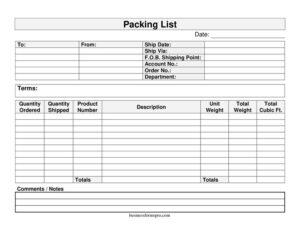
A Large-Print Packing List is a shipping document that itemizes the contents of a package or shipment using oversized, easy-to-read text and fields. People most often use it when they need a packing list that can be scanned quickly on a busy loading dock or read comfortably by warehouse staff, drivers, and recipients. You can download this template free in both PDF and DOCX formats, with no signup required.
What Is a Large-Print Packing List?
A Large-Print Packing List is an itemized record that accompanies a shipment and tells the receiver exactly what is inside the box, crate, or pallet. It is typically issued by the seller, supplier, or shipping department and travels with the goods rather than being mailed separately. The large-print format makes the key details — quantities, product numbers, weights, and totals — legible at a glance, which is helpful in dimly lit warehouses or for staff who prefer larger text. Unlike an invoice, it usually omits pricing and focuses purely on what is physically being shipped, helping the recipient verify that everything ordered actually arrived.
When Do You Need a Large-Print Packing List?
This form fits a wide range of shipping and fulfillment situations. Common scenarios include:
- Sending an order to a customer and including a clear, readable list of contents inside the carton.
- Transferring inventory between warehouses, branches, or departments and needing a legible count for the receiving team.
- Fulfilling a wholesale or bulk order where quantities ordered and quantities shipped may differ due to backorders.
- Shipping heavy freight on pallets where unit weight, total weight, and total cubic feet matter for carrier billing and handling.
- Providing dock workers and forklift operators with a document they can read quickly without squinting at small print.
- Documenting a return, sample shipment, or replacement order so both parties have a matching record of what changed hands.
What a Large-Print Packing List Should Have
A complete packing list lets the receiver match the contents against the original order without confusion. The essentials include the shipment date and order details, the names and locations of the sender and recipient, a line-by-line breakdown of each product with its quantity ordered and quantity shipped, the product number and description, and the weight and volume figures used for freight calculations. Totals for quantity, weight, and cubic feet tie everything together, and a comments or notes area captures anything unusual — such as backordered items, damaged packaging, or special handling instructions. Account, order, and department references keep the document linked to the correct transaction.
How to Fill Out a Large-Print Packing List
- Enter the Date the packing list is prepared.
- Fill in To with the recipient’s name and shipping address, and From with your company’s name and return address.
- Record the Ship Date the goods leave your facility and the Ship Via carrier or method (for example, ground freight or a specific courier).
- Note the F.O.B. Shipping Point term to clarify where ownership and freight responsibility transfer.
- Add reference numbers: Account No., Order No., the Department placing or receiving the order, and the payment or shipping Terms.
- For each line item, list the Quantity Ordered, Quantity Shipped, Product Number, and a plain Description.
- Enter the Unit Weight for each item and calculate the Total Weight for that line.
- Record the Total Cubic Ft. for volume-based handling, then sum the columns in the Totals row.
- Use the Comments / Notes field for backorders, partial shipments, or special instructions before signing and packing a copy with the shipment.
Reading the Weight and Volume Columns
The Unit Weight, Total Weight, and Total Cubic Ft. fields are more than formalities — they often drive how a carrier bills the shipment and how dock crews plan handling. Multiply each item’s unit weight by its quantity shipped to get the line total, then add the lines to confirm the grand total matches the scale reading at the dock. Cubic feet helps the carrier determine whether the freight is billed by weight or by dimensional volume, which matters for light but bulky goods. When these figures are accurate and easy to read, you reduce the chance of reweigh fees, billing disputes, and surprises when the truck is loaded.
How It Differs From an Invoice
It is easy to confuse a packing list with an invoice, but they serve different purposes. A packing list documents what physically ships — quantities, descriptions, and weights — and travels with the goods. An invoice documents what is owed, listing prices, taxes, and payment terms, and is usually sent to the accounts payable contact. Because the packing list here omits pricing, the receiving team can verify contents without exposing financial details to dock or warehouse staff. Many businesses include both documents with a shipment so receiving and accounting each have the record they need.
Common Mistakes to Avoid
- Leaving Quantity Shipped blank when it differs from Quantity Ordered, which hides backorders and triggers disputes.
- Using vague descriptions instead of clear product numbers, making it hard for the receiver to match items.
- Forgetting to total the weight columns, so the figures don’t reconcile with the carrier’s scale.
- Mixing up the To and From fields, sending the list to the wrong address.
- Omitting the Order No. or Account No., breaking the link to the original transaction.
- Skipping the Comments / Notes field when special handling or partial shipment details should be recorded.
Frequently Asked Questions
What is a Large-Print Packing List used for? It is used to itemize the contents of a shipment in oversized, easy-to-read text so receivers, drivers, and warehouse staff can verify what was sent. It lists quantities, product numbers, descriptions, and weights, and travels inside or attached to the package. The large-print layout helps in low-light docks or for anyone who prefers bigger text.
How do I fill out the quantity ordered versus quantity shipped fields? Enter the amount the customer requested under Quantity Ordered and the amount actually packed under Quantity Shipped. When the two differ, note the reason — such as a backorder — in the Comments / Notes field. Keeping both numbers visible prevents confusion when the recipient counts the goods.
Does a packing list need pricing or signatures? No, a packing list focuses on contents rather than cost, so prices are usually left off and handled on a separate invoice. A signature is optional but can be added by the person who packed or received the shipment for accountability. This template leaves room in the Comments section for any acknowledgment you want to add.
Is a packing list legally binding? A packing list is primarily a record-keeping and verification document rather than a contract, but it can serve as supporting evidence if a delivery dispute arises. Its value comes from being accurate and matching the actual contents. For binding terms, rely on your purchase order, invoice, and shipping agreement.
What does F.O.B. Shipping Point mean on this form? F.O.B. Shipping Point indicates that ownership and freight responsibility transfer to the buyer once the goods leave the seller’s location. Recording it on the packing list reminds both parties who is responsible for the shipment during transit. Terms vary by agreement, so confirm them with your shipping contract.
How much does this template cost? The Large-Print Packing List template is completely free to download from Business Forms Pro in both PDF and DOCX formats, with no signup required. You can print it as-is or open the DOCX to customize fields, add your logo, or adjust columns. Use it for as many shipments as you need.
This template is provided as a general example for informational purposes only and does not constitute legal, financial, or shipping compliance advice. Documentation and freight requirements vary by jurisdiction and carrier — consult a qualified professional or your shipping provider for guidance specific to your situation.
Related Forms
- Edit Log
- Beauty Salon Equipment And Furniture Inventory Card
- Pool Maintenance Log
- Petsitter Daily Log
- Publication Submission Tracker
- Social Media Tracker
Browse more in Log and Inventory.