
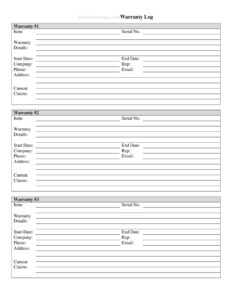
Warranty Log
Track product warranties, purchase dates, and expiration with this free Warranty Log template — organize your coverage in minutes. Free download in PDF and DOCX.
PDF
DOCX
4 downloads
0
likes
Download Files
- DOCX
A Warranty Log is a simple record-keeping sheet that lists the products you own along with their warranty details, so you always know what is covered and until when. The most common reason people use one is to avoid losing track of warranty expiration dates and missing the window to claim a free repair or replacement. You can download this Warranty Log free in both PDF and DOCX formats — no signup required.
What Is a Warranty Log?
A Warranty Log is a centralized document used by households and businesses to track every product covered by a manufacturer or extended warranty. It is typically maintained by a homeowner, office manager, facilities team, or anyone responsible for assets and equipment. The log records what each item is, when it was purchased, who sold it, the length of coverage, and the expiration date. Rather than digging through drawers of receipts or scattered emails, the Warranty Log puts all of that information in one place. It serves as both a reference for filing claims and a planning tool for budgeting replacements once coverage lapses.
When Do You Need a Warranty Log?
A Warranty Log becomes valuable any time you own multiple items with overlapping or staggered coverage periods. Common situations include:
- Furnishing a home: Tracking warranties on appliances, electronics, HVAC systems, and furniture purchased over several years.
- Managing office equipment: Logging coverage for computers, printers, servers, and other business hardware.
- Running a rental or property portfolio: Keeping records of warranties on water heaters, ovens, and fixtures across multiple units.
- Filing a warranty claim: Quickly confirming whether an item is still covered and locating the receipt or proof of purchase.
- Selling or transferring an asset: Showing a buyer that an item still has transferable coverage remaining.
- Budgeting for replacements: Seeing at a glance which warranties expire soon so you can plan repairs or purchases ahead of time.
What a Warranty Log Should Have
A complete Warranty Log captures enough detail to identify each product and verify coverage without hunting for the original paperwork. The core elements include the item name or description, brand and model, serial number, the date of purchase, the retailer or vendor, the warranty period or type, the expiration date, and a place to note the location of the receipt or proof of purchase. Adding a status column (active, expired, claimed) and a notes field for claim reference numbers makes the log far more useful. The goal is a single, scannable table where any entry tells you exactly what is covered and what to do if something fails.
How to Fill Out a Warranty Log
Work through the log one row per item so each product has its own complete record:
- Item / product name: Enter a clear description such as “Refrigerator” or “Laser printer” so the entry is easy to find.
- Brand and model: Record the manufacturer and model number, which you will need to reference in any claim.
- Serial number: Copy the serial number from the product label — manufacturers almost always require it.
- Purchase date: Note the exact date of purchase, since warranty periods usually start from this date.
- Retailer or vendor: Write where you bought it, in case the claim must go through the seller.
- Price paid: Optional, but useful for insurance and replacement planning.
- Warranty type and length: Record whether it is a standard, extended, or limited warranty and the duration (for example, 1 year or 5 years).
- Expiration date: Calculate and enter the end date of coverage.
- Proof of purchase location: Note where the receipt or invoice is stored — a folder, email, or cloud drive.
- Status and notes: Mark whether coverage is active, expired, or claimed, and add any claim numbers or contact details.
Tips for Keeping Your Warranty Log Useful
A log is only as good as the habit behind it. Update it the same day you make a purchase, while the receipt and box are still in front of you. Snap a photo of the receipt and the product’s serial-number label and store both alongside your log so the information cannot fade or be misplaced. If you use the DOCX version, sort the table by expiration date so the items closest to losing coverage rise to the top. Set a calendar reminder a month before any major warranty expires — that buffer gives you time to test the product and file a claim if anything is wrong. For shared households or offices, keep the log somewhere everyone can reach it.
Warranty Log vs. Receipt Folder
Some people rely on a shoebox or folder of receipts and assume that is enough. The difference is that a Warranty Log summarizes the key facts in a searchable, at-a-glance format, while a receipt folder only stores raw documents you still have to dig through. The two work best together: the log tells you instantly whether an item is covered and where to look, and the stored receipt provides the official proof when you actually file a claim. Think of the log as the index and the receipts as the archive.
Common Mistakes to Avoid
- Skipping the serial number: Many warranty claims are rejected without it, so capture it at purchase.
- Forgetting to record the purchase date: Coverage usually counts from this date, and an estimate may not hold up.
- Not noting where the receipt is: A log that says “covered” is useless if you cannot produce proof.
- Letting the log go stale: Entries added months later are often inaccurate or incomplete.
- Ignoring expiration reminders: The whole point is to act before coverage ends, not after.
- Lumping multiple items into one row: Each product deserves its own line for clean tracking.
Frequently Asked Questions
What is a Warranty Log used for? It is used to track every product you own that carries a warranty, including purchase dates, coverage length, and expiration. This lets you confirm coverage quickly and file claims before a warranty lapses, instead of searching through scattered receipts.
How do I fill out a Warranty Log? Add one row per item with its name, brand, model, serial number, purchase date, vendor, warranty length, and expiration date. Also note where the receipt is stored and the current status so each entry is complete and actionable.
Is a Warranty Log a legal document? No, it is a personal or internal record-keeping tool, not a contract. The actual warranty terms are governed by the manufacturer’s or retailer’s written warranty, which is the document that carries legal weight.
Do I still need to keep my receipts? Yes. The log is a summary and quick reference, but most manufacturers require the original receipt or proof of purchase to honor a claim. Store receipts alongside the log or note exactly where they are kept.
How much does this Warranty Log template cost? It is completely free to download from Business Forms Pro in both PDF and DOCX formats, with no signup required. You can print it as-is or edit the DOCX version to add your own columns.
Can I use one Warranty Log for both home and business items? You can, though many people keep separate logs to simplify recordkeeping and reporting. If you combine them, consider adding a column to mark whether each item is personal or business-related.
This Warranty Log template is provided as a general example for informational purposes only and is not legal, financial, or tax advice. Warranty terms and consumer-protection rules vary by manufacturer and jurisdiction — review your specific warranty documents and consult a qualified professional if you have questions about your coverage.
Related Forms
- Price List
- General Journal
- Drivers Daily Log
- Supplier Schedule
- IT Inventory
- Store Closing Procedure Checklist
Browse more in Log and Inventory.