
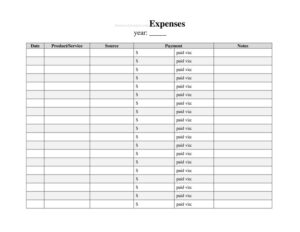
Side Hustle Expenses Log
Track every business cost with our free Side Hustle Expenses Log template, organize spending and simplify taxes with an easy free download in PDF or DOCX.
PDF
DOCX
0
likes
Download Files
- DOCX
A Side Hustle Expenses Log is a simple record-keeping sheet where you list every cost tied to your side business, from supplies and software to mileage and marketing. People use it most often to keep their personal and business spending separate and to have clean numbers ready at tax time. It’s free to download here in both PDF and DOCX formats, with no signup required.
What Is a Side Hustle Expenses Log?
A Side Hustle Expenses Log is a tracking document used by freelancers, gig workers, online sellers, and anyone running a small business on the side. It captures each purchase or business-related expense in one place, recording the date, what you bought, the category, the amount, and how you paid. The log gives you a running picture of where your money goes so you can measure profitability, set prices, and claim legitimate deductions. Unlike a bank statement, it organizes spending into meaningful categories and adds context that a transaction line never shows. Whether you keep it on paper, print it monthly, or fill it in digitally, the log turns scattered receipts into an orderly, reviewable summary you actually understand.
When Do You Need a Side Hustle Expenses Log?
Almost any side income activity generates costs worth tracking. A consistent log helps in situations like these:
- Starting a new side hustle — capturing setup costs such as a domain, business cards, or starter inventory from day one.
- Selling products online — recording the cost of goods, shipping supplies, and platform or listing fees for Etsy, eBay, or a Shopify store.
- Driving or delivery gigs — logging fuel, mileage, tolls, parking, and vehicle maintenance for rideshare or courier work.
- Freelance and creative work — tracking software subscriptions, stock images, equipment, and contractor payments.
- Preparing for tax season — having a categorized total ready instead of digging through a year of receipts in April.
- Reviewing whether the hustle pays — comparing total expenses against income to see your real profit margin each month.
What a Side Hustle Expenses Log Should Have
A useful expense log balances detail with simplicity. At minimum it should capture the date of each expense, a clear description of what was purchased, an expense category, the amount spent, the payment method, and a note for any context you’ll forget later. Many people add a vendor or merchant name, a column to flag whether a receipt was saved, and a monthly subtotal row. The categories you use should match your business — common ones include supplies, software, advertising, shipping, fees, travel, and equipment. A running total at the bottom lets you see cumulative spending at a glance and makes it easy to transfer figures into a spreadsheet or tax form.
How to Fill Out a Side Hustle Expenses Log
- Add your business name and the period. At the top, note the side hustle name and the month or quarter the sheet covers so you can file pages in order.
- Enter the date. For each expense, write the date of purchase exactly as it appears on the receipt or statement.
- Describe the expense. Be specific — “shipping boxes, 25-pack” is more useful than just “supplies” when you review months later.
- Assign a category. Choose a consistent category such as supplies, software, advertising, fees, or travel so totals group neatly.
- Record the amount. Enter the cost including tax. Keep one currency throughout the sheet.
- Note the payment method. Mark whether you paid by business card, personal card, cash, or transfer to reconcile against statements.
- Flag the receipt. Check whether you saved or photographed the receipt for your records.
- Add a note. Capture anything that explains the purchase, like a client name or project.
- Total the column. At the end of the period, sum the amount column for your spending total.
Tips for Keeping Your Log Accurate
The best log is the one you actually update. Set a routine — enter expenses the same day you buy, or block ten minutes every Sunday to catch up from your receipts and card statements. Photograph paper receipts immediately, since thermal ink fades and small slips disappear. Use the same category names every time so your monthly totals stay comparable. If you mix personal and business purchases on one card, highlight the business lines as you go rather than untangling them later. Finally, keep your completed logs together in a labeled folder, physical or digital, so a full year of records is easy to pull when you need it.
Why Separate Business Expenses Matter
Mixing side-hustle costs with everyday spending is one of the most common reasons people overpay tax or miss deductions. A dedicated expense log creates a clear boundary: every line on it is business-related, which makes it far easier to identify what may be deductible and to prove those amounts if you’re ever asked. It also gives you honest insight into your business. Seeing that subscription fees quietly add up to a meaningful monthly figure might prompt you to cancel a tool you barely use. Over time, your logs become a record of how the hustle grew and where you can trim costs to keep more of what you earn.
Common Mistakes to Avoid
- Logging sporadically — waiting weeks means forgotten purchases and lost receipts; brief, regular updates are far more reliable.
- Vague descriptions — entries like “misc” or “stuff” are useless when you review or need to justify a cost.
- Inconsistent categories — switching between “ads” and “advertising” splits your totals and clouds the picture.
- Ignoring small amounts — minor recurring fees add up; leaving them out understates your true spending.
- Not saving receipts — a log line without backup documentation is harder to defend if questioned.
- Mixing currencies or tax-handling — be consistent about whether amounts include tax so your totals stay accurate.
Frequently Asked Questions
What is a Side Hustle Expenses Log used for? It’s used to record and organize every cost connected to a side business so you can track spending, measure profit, and prepare clean figures for tax time. It keeps business purchases separate from personal ones and turns scattered receipts into an orderly summary you can review at a glance.
Is this expense log template free to download? Yes. The Side Hustle Expenses Log is completely free to download here in both PDF and DOCX formats, with no signup or payment required. You can print it for handwritten tracking or open the DOCX to customize categories before you start.
How do I fill it out? Add your business name and the period at the top, then record each expense on its own row with the date, a clear description, a category, the amount, and the payment method. Flag whether you saved the receipt, add a note if helpful, and total the amount column at the end of the period.
Does an expense log replace keeping receipts? No. The log organizes and summarizes your spending, but you should still keep the underlying receipts or invoices as proof of each purchase. Many people note on the log whether a receipt was saved and store the actual receipts in a matching folder.
Can I use it for tax deductions? A well-kept log makes it much easier to identify potentially deductible business expenses and to total them by category. However, what is actually deductible depends on your local tax rules, so use the log to organize your numbers and confirm eligibility with a tax professional.
Can I customize the categories? Absolutely. The DOCX version lets you rename or add categories to match your specific side hustle, whether that’s reselling, freelancing, driving, or crafting. Keeping consistent category names from month to month is what makes your totals genuinely useful.
This template is a general example provided for informational purposes only and is not legal, financial, or tax advice. Tax rules and record-keeping requirements vary by jurisdiction and by individual circumstances — consult a qualified accountant or tax professional before relying on it for any filing.
Related Forms
- Maintenance Log
- Hotel Maintenance Request
- Job Application Tracker
- Coffee Shop Items Inventory Card
- Evidence Log
- Cigar Tasting Log
Browse more in Log and Inventory.