
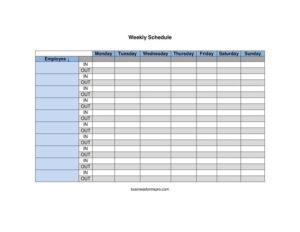
Weekly Schedule By Name
Organize staff hours with a Weekly Schedule By Name template that maps each person's shifts across the week — get your free download in PDF and DOCX.
PDF
DOCX
2 downloads
0
likes
Download Files
- DOCX
A Weekly Schedule By Name is a simple planning grid that lists each employee or team member by name and shows their assigned hours, shifts, or tasks for every day of the week. People most often use it to coordinate staff coverage and avoid scheduling gaps, and you can download it free here in both PDF and DOCX formats with no signup required.
What Is a Weekly Schedule By Name?
A Weekly Schedule By Name is a one-page or printable document organized around individual people rather than around departments or job functions. Each row represents a single named person, and the columns run across the days of the week — typically Monday through Sunday — so anyone can see at a glance who is working when. Managers, shift leads, small business owners, and even families and volunteer coordinators use it to plan coverage, communicate expectations, and keep everyone accountable. Because it is built name-first, it answers the most common workplace question instantly: “Is this person scheduled today, and what hours?” It works equally well for paid staff, volunteers, contractors, or household chore rotations.
When Do You Need a Weekly Schedule By Name?
This format shines whenever you need to track several people across a recurring seven-day cycle. Common situations include:
- Retail or restaurant shifts: assigning opening, closing, and mid-day coverage to named staff so no time slot is left uncovered.
- Office or remote teams: showing who is in the office, working from home, or on call each day of the week.
- Healthcare and care facilities: mapping nurses, aides, or caregivers to specific days and patient coverage windows.
- Volunteer or event coordination: organizing helpers for a festival, fundraiser, or weekend program by name and time block.
- Cleaning, maintenance, or field crews: dispatching named workers to sites or routes on set days.
- Household and family planning: tracking chores, carpool duties, or childcare responsibilities among family members across the week.
Types of Weekly Schedules
Weekly schedules generally come in two flavors. A schedule by name (this template) puts the person first, which is ideal when you manage a defined roster and want each individual to find their own row quickly. A schedule by shift or department puts the time slot first, which suits operations where you fill slots regardless of who takes them. Many organizations keep both: a by-name version for staff communication and a by-shift version for coverage analysis. The by-name layout is especially friendly for printing and posting in a break room.
What a Weekly Schedule By Name Should Have
A complete and useful weekly schedule includes a few core elements. First, a clear title and the week-of date so there is no confusion about which seven days it covers. Second, a column for each person’s name, listed in a consistent order. Third, a column for each day of the week, with space to write start and end times, shift labels, or task assignments. Fourth, room for notes — time-off, lunch breaks, special instructions, or total hours. Finally, optional totals so each person and each day can be tallied. A header noting who created or approved the schedule adds accountability.
How to Fill Out a Weekly Schedule By Name
- Add the week-of date: write the Monday (or first day) of the week at the top so the schedule is clearly dated and can be filed or compared later.
- List each name: enter every person on your roster down the left-hand column, grouping by team or seniority if that helps readability.
- Label the day columns: confirm the days run in the order you need — many teams start with Monday, while service businesses may begin with Sunday.
- Fill in each cell: for every person and day, write the start and end times (for example, 9:00 AM–5:00 PM), a shift code, or a task. Leave cells blank or mark “OFF” for non-working days.
- Note exceptions: mark approved time off, partial days, or training in the appropriate cell or a notes column.
- Add totals if needed: tally weekly hours per person and coverage per day to spot under- or over-staffing.
- Review and distribute: double-check for gaps and overlaps, then print, email, or post the finished schedule.
Tips for Building a Schedule People Actually Follow
The best schedule is the one your team trusts and reads without confusion. Use a consistent time format throughout — pick either 12-hour or 24-hour notation and stick with it. Keep abbreviations and shift codes in a small legend so a new hire understands them. Publish the schedule with enough lead time that people can plan their personal lives and request changes; a few days’ notice dramatically reduces no-shows. When you make a change after posting, highlight or date the revision so everyone knows they are looking at the latest version. Finally, keep prior weeks on file — they help you forecast busy periods and resolve disputes about who was scheduled when.
Common Mistakes to Avoid
- Forgetting the week-of date: an undated schedule causes confusion when several weeks pile up.
- Mixing time formats: switching between AM/PM and 24-hour notation invites misreads and missed shifts.
- Leaving days ambiguous: a blank cell could mean “off” or “not yet assigned” — always mark it explicitly.
- Ignoring overlaps and gaps: double-booking one person or leaving a time slot uncovered defeats the purpose of the grid.
- Not communicating revisions: updating the master copy without notifying the team leads to people working the old version.
- Skipping a notes column: without space for time-off or special instructions, important context gets lost.
Frequently Asked Questions
What is a Weekly Schedule By Name? It is a planning template that lists each person on a separate row and shows their assigned hours or tasks for each day of the week. The name-first layout lets every individual quickly find their own line and lets managers confirm coverage at a glance.
How do I fill out a Weekly Schedule By Name? Start by entering the week-of date, then list each person down the left column and the seven days across the top. Fill each cell with start and end times or a shift label, mark days off clearly, and add any notes or hour totals before sharing it.
Is a weekly schedule a legally binding document? On its own, a posted schedule is an internal communication tool rather than a binding contract. That said, some regions have predictive-scheduling or advance-notice rules for employers, so check your local labor regulations to be sure you are compliant.
Can I edit the template to fit my team? Yes. The DOCX version is fully editable, so you can add or remove names, change which day the week starts on, insert shift codes, or add columns for totals and notes. The PDF is ideal if you prefer to print blank copies and fill them in by hand.
How much does this template cost? It is completely free to download from Business Forms Pro in both PDF and DOCX formats, with no signup, account, or payment required. You can use it for as many weeks and teams as you need.
Should I use a schedule by name or by shift? Use the by-name format when you have a set roster and want each person to find their own hours easily. Choose a by-shift format when you primarily need to fill coverage slots regardless of who takes them — and feel free to keep both versions for different purposes.
This template is provided as a general example for informational purposes only and does not constitute legal, employment, or human-resources advice. Scheduling and labor requirements vary by jurisdiction and by industry — consult a qualified professional or your local labor authority to ensure your practices comply with applicable rules.
Related Forms
Browse more in Miscellaneous.