
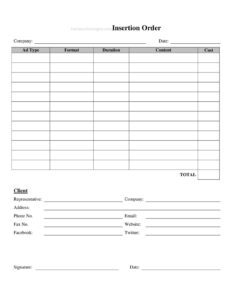
Insertion Order
Use this free Insertion Order template to confirm advertising buys, placements, and rates clearly between advertisers and media outlets — free download in PDF/DOCX.
PDF
DOCX
5 downloads
0
likes
Download Files
- DOCX
An insertion order (often abbreviated IO) is a written agreement that confirms the details of an advertising buy between an advertiser or agency and a publisher or media outlet. People most commonly use one to lock in placements, dates, and rates before a campaign goes live, creating a clear record both sides can reference. You can download this insertion order template for free in PDF and DOCX, with no signup required.
What Is an Insertion Order?
An insertion order is a document issued by an advertiser, marketing agency, or media buyer and accepted by a publisher — such as a magazine, website, podcast, billboard company, or broadcast station — to authorize the purchase of specific ad space or airtime. It spells out exactly what is being bought: the ad units, where and when they will run, the agreed price, and any production or targeting specifications. In effect, the IO turns a verbal or emailed media plan into a binding commitment. It protects the advertiser from unexpected charges and protects the publisher by confirming the order in writing before any space is reserved or creative is scheduled.
When Do You Need an Insertion Order?
An insertion order comes into play whenever money and media space change hands and both parties want the terms documented. Common scenarios include:
- Buying digital display or video ads directly from a website or publisher rather than through a self-serve ad platform.
- Reserving print advertising in a magazine, newspaper, or trade publication for one or more issues.
- Booking radio, podcast, or broadcast spots where you need to confirm air dates, dayparts, and the number of spots.
- Arranging sponsorships or native content with a content creator or media brand for an agreed campaign window.
- Securing out-of-home placements such as billboards, transit ads, or event signage with set start and end dates.
- Documenting an agency-to-publisher buy on behalf of a client, so billing and approvals are traceable.
What an Insertion Order Should Have
A complete insertion order leaves no room for guessing. At minimum it should identify the advertiser and the publisher, the agency placing the order (if any), and the campaign or client name. It needs a clear description of each ad placement — the medium, ad size or format, position, and quantity. It must state the flight dates (when ads start and stop running), the unit rate, total cost, and how the total was calculated. Strong IOs also include billing and payment terms, cancellation and make-good policies, creative specifications and deadlines, and signature lines for both parties. A unique IO number and issue date make the order easy to track and reconcile against invoices later.
How to Fill Out an Insertion Order
Because templates vary, fill in every field that applies to your buy and mark others “N/A.” Follow these steps:
- Add header details: Enter an insertion order number and the date the order is issued so both sides can reference it.
- Identify the parties: List the advertiser’s name and contact, the agency (if applicable), and the publisher or media outlet receiving the order.
- Name the campaign: Record the client or campaign name and any internal reference or PO number.
- Describe each placement: Specify the medium, ad format or size, position, and quantity of impressions, insertions, or spots.
- Set the schedule: Enter the start and end (flight) dates for each placement.
- Enter rates and totals: Add the unit rate, number of units, line totals, and the grand total for the order.
- State billing terms: Note payment due dates, billing contact, and any agency commission.
- List specifications and deadlines: Include creative file requirements and the date materials are due.
- Add terms and signatures: Confirm cancellation and make-good policies, then have authorized representatives from both sides sign and date.
Insertion Order vs. Media Plan and Invoice
It helps to know where the insertion order sits in the buying process. A media plan is a proposal that outlines recommended outlets, audiences, and budgets — it is strategic and not yet a commitment. The insertion order is the next step: it formalizes the chosen items from the plan into an authorized purchase with firm dates and rates. Later, the invoice bills for what actually ran. Keeping these three documents aligned — plan, IO, and invoice — lets you catch discrepancies quickly, such as a placement that was ordered but never delivered, or a rate that was quoted differently than billed.
Tips for Using an Insertion Order Effectively
Treat the IO as the single source of truth for the buy. Spell out impressions, spots, or insertions in numbers rather than vague phrases like “a few weeks.” Define what happens if a placement underdelivers — typically a make-good (replacement) or credit — so there is no dispute later. Attach or reference the creative specifications and approved artwork to avoid last-minute production scrambles. If you place orders regularly with the same publisher, keep your IO numbering sequential so every campaign is easy to find. Always confirm receipt and a countersignature before assuming the space is locked.
Common Mistakes to Avoid
- Leaving flight dates vague: Always give exact start and end dates so there’s no confusion about when ads run.
- Omitting cancellation terms: Without a stated cancellation window, you may owe for space you no longer want.
- Mismatched totals: Double-check that unit rate times quantity equals the line total and that all lines add up to the grand total.
- Forgetting creative deadlines: Missing the materials-due date can cause your spot to be skipped without a refund.
- No signatures: An unsigned IO may not be enforceable; get authorized sign-off from both sides.
- Skipping the IO number: Untracked orders are hard to reconcile against invoices and lead to billing errors.
Frequently Asked Questions
What is an insertion order used for? It is used to confirm and authorize the purchase of advertising space or airtime in writing. The IO documents the placements, dates, rates, and terms so the advertiser and publisher share an identical understanding of the buy before anything runs.
Is an insertion order legally binding? Once both parties sign or otherwise accept it, an insertion order generally functions as a binding agreement for the described placements and terms. Because enforceability depends on contract law in your area and the specific wording, review any custom terms carefully before signing.
What’s the difference between an insertion order and a contract? An insertion order is itself a type of contract focused on a specific ad buy, while a broader advertising or master services agreement may govern an ongoing relationship. Many publishers use both — a master agreement for general terms and individual IOs for each campaign.
Who fills out the insertion order? Usually the advertiser or the agency buying media prepares the IO and sends it to the publisher for confirmation. The publisher reviews availability and rates, then signs to accept the order.
Can I cancel an insertion order? Cancellation depends on the terms written into the IO, which often include a notice period and possible cancellation fees. Always read the cancellation and make-good clauses before signing so you understand your obligations.
How much does this insertion order template cost? This template is completely free to download from Business Forms Pro in both PDF and DOCX formats, with no signup required. You can edit the DOCX version to match your placements, rates, and terms.
This insertion order template is a general example provided for informational purposes only and is not legal, financial, or tax advice. Advertising terms and contract requirements vary by jurisdiction and by publisher — consult a qualified professional before relying on this document for an important transaction.
Official resource: for the rules that apply to your situation, see the U.S. Small Business Administration.
Related Forms
- Appointment Change Form
- Appointment Request Form
- Fancy Appointment Reminder Card
- Notice of Meeting
- Phone Memo
- Meeting Agenda
Browse more in Office.