
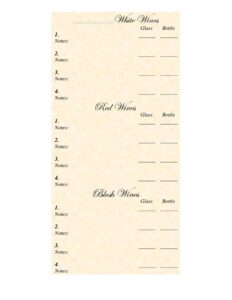
Wine List
Create a polished restaurant wine list with this free template, organizing wines by type, region, and price for easy ordering — free download.
PDF
DOCX
3 downloads
0
likes
Download Files
- DOCX
A wine list is the menu a restaurant, bar, or event venue uses to present available wines to guests, organized so they can browse and order with confidence. The most common reason people use one is to showcase a curated selection by style, region, and price in a clean, professional format. This wine list template is free to download in both PDF and DOCX, with no signup required.
What Is a Wine List?
A wine list is a structured document that catalogs the wines a venue offers for sale, typically grouped into categories such as sparkling, white, rosé, red, and dessert wines. It is created by restaurant owners, sommeliers, beverage managers, or event planners, and it documents each wine’s name, producer, vintage, region, and price by the glass or bottle. Beyond simply listing what’s available, a well-built wine list communicates the personality of a venue, supports staff recommendations, and helps guests pair selections with their meal. Whether printed for table service, displayed on a bar, or attached to a banquet package, the wine list is both a sales tool and a guest-facing menu that reflects the care behind a beverage program.
When Do You Need a Wine List?
A wine list is useful any time wine is sold or served and guests need a clear way to choose. Common situations include:
- Opening or refreshing a restaurant menu — when you launch a new venue or rotate your seasonal beverage offerings and need a fresh document.
- Bars and wine bars — presenting by-the-glass pours alongside full bottles so patrons can sample widely.
- Catered events and weddings — giving clients a curated selection to choose from within a banquet or package price.
- Hotels and lounges — offering room-service or lobby-bar wine options with regional variety.
- Tasting rooms and wineries — listing estate wines, flights, and reserve bottles for direct sales.
- Pop-ups and private dinners — providing a tidy, professional menu for a one-time or recurring event.
What a Wine List Should Have
A complete wine list balances detail with readability. Guests should be able to scan it quickly while still finding enough information to make an informed choice. Key elements include clear category headings (sparkling, white, rosé, red, dessert), the wine name and producer, the grape variety or blend, the vintage year, the region or country of origin, and pricing by the glass and bottle where applicable. Many lists also add short tasting notes, food-pairing suggestions, or icons for organic and biodynamic wines. A consistent layout — with prices aligned and categories visually separated — makes the document feel polished and trustworthy. Including a header with your venue name and the date or season helps you keep editions organized.
How to Fill Out a Wine List
Because a wine list is a flexible template, you’ll customize it to match your inventory. Follow these steps:
- Add your venue header. Enter the restaurant or bar name, and optionally a season or effective date so you can track versions.
- Set up categories. Create section headings such as Sparkling, White, Rosé, Red, and Dessert/Fortified, and consider sub-grouping by region or grape.
- List each wine name and producer. Write the full bottling name and winery so staff and guests can identify it precisely.
- Note the grape and vintage. Add the variety or blend and the year, since both influence taste and value.
- Record the region. Include the appellation, region, and country to signal style and quality.
- Enter prices. Fill in the by-the-glass and by-the-bottle prices in clearly aligned columns.
- Add optional notes. Include brief tasting descriptions or pairing tips where space allows.
- Review and proofread. Double-check spelling of producers and regions, confirm prices, and ensure formatting is consistent before printing or publishing.
Organizing Wines for Easy Ordering
How you arrange the list shapes how guests order. The most common approach groups wines by color and style, then by lightest to fullest body within each section — for example, crisp Sauvignon Blanc before rich oaked Chardonnay. Some venues organize by region (an Old World versus New World split) or by occasion (everyday pours versus reserve selections). Whatever structure you choose, keep it consistent so guests learn the logic quickly. Place a few approachable, value-friendly options near the top of each category, and reserve higher-priced bottles for a clearly labeled section. If you offer flights or tasting sets, give them their own area so they stand out.
Keeping Your List Current
Wine inventory changes constantly as vintages sell out and new bottles arrive. Treat the list as a living document: review it on a regular schedule, mark items as sold out rather than leaving stale entries, and update vintages when a new year replaces the old one. Because this template is editable in DOCX, you can revise quickly and reprint without redesigning from scratch. Saving dated versions also helps you analyze which wines sell best over time and adjust your buying accordingly.
Common Mistakes to Avoid
- Listing wines you’re out of stock on — frustrating guests and forcing servers to apologize and re-pitch.
- Omitting the vintage — leaving guests unsure whether they’re getting the year they expect.
- Inconsistent pricing columns — mixing glass and bottle prices without clear labels causes confusion.
- Misspelling producers or regions — small errors undermine credibility, especially with knowledgeable guests.
- Overcrowding the page — cramming too many wines or tiny fonts makes the list hard to read in dim dining rooms.
- Forgetting to date the list — making it impossible to know which edition is current when several versions float around.
Frequently Asked Questions
What is a wine list used for? A wine list presents the wines a venue offers so guests can browse and order easily. It documents each wine’s name, vintage, region, and price, and it also serves as a sales and branding tool that reflects the quality of your beverage program.
How do I fill out this wine list template? Start by adding your venue name and date, then create category headings like white, red, and sparkling. For each wine, enter the producer, name, grape, vintage, region, and price by the glass and bottle, and add optional tasting notes before proofreading and printing.
How should I organize the wines? The most common method groups wines by style and color, ordered from lightest to fullest within each section. You can also organize by region or by price tier — just keep the logic consistent so guests can navigate quickly.
Do I need to include prices for both glass and bottle? Only if you offer both. Many venues sell certain wines only by the bottle, in which case you can leave the glass column blank or use a separate by-the-glass section. Clearly label each column to avoid confusion.
Can I edit the template after downloading? Yes. The DOCX version is fully editable, so you can add or remove wines, change categories, update vintages, and adjust prices as your inventory changes. The PDF version is ideal for a finished list you want to print or share.
Is this wine list template free? Yes, it is completely free to download in both PDF and DOCX formats with no signup required. You can use it for restaurants, bars, events, tasting rooms, or private dinners and customize it as often as you like.
This wine list template is a general example provided for informational purposes only and is not legal, financial, or regulatory advice. Rules for selling and serving alcohol, including licensing and labeling requirements, vary by jurisdiction — consult your local authorities or a qualified professional to ensure compliance.
Related Forms
- Shift Request Form
- Food Order Form
- No Free Refills Sign
- Minimum Internal Temperature Chart
- Knife Sharpening Log
- Coffee Menu
Browse more in Restaurant.