
Understudy Tracker
Use a free Understudy Tracker template to organize standbys, swings, and cover assignments for every role in your production—free download in PDF and DOCX.
PDF
DOCX
4 downloads
0
likes
Download Files
- DOCX
An Understudy Tracker is a stage management document that maps every principal role in a production to the performers who cover it, so the team always knows who steps in when a lead is unavailable. It is most commonly used by stage managers and company managers to keep cover assignments clear during rehearsals and the run of a show. You can download it free in PDF and DOCX, with no signup required.
What Is an Understudy Tracker?
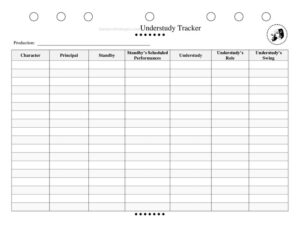
An Understudy Tracker is a reference sheet that organizes cover assignments across a theatrical production. It lists each principal character, the performer who normally plays that role, and the standbys, understudies, and swings designated to cover it if the principal cannot perform. Stage managers, production stage managers, and company managers typically maintain it and share it with the directing team and producers. Rather than relying on memory or scattered notes, the tracker gives everyone a single, reliable place to confirm who covers what. It documents scheduled standby performances and the additional roles a swing is responsible for, which matters in fast-moving productions where one missing actor can disrupt an entire show.
When Do You Need an Understudy Tracker?
Almost any production with covers benefits from a tracker, but it becomes essential in certain situations:
- Opening a multi-role show where several principals each have designated understudies and standbys to keep straight.
- Casting swings who must be ready to cover multiple ensemble tracks on short notice.
- Managing scheduled standby performances, such as matinees or specific dates when a star is contractually off.
- Handling sudden illness or injury, when the team needs to know instantly who is next in line to go on.
- Touring or long runs, where cast changes are frequent and cover responsibilities shift over time.
- Rehearsal scheduling, so understudy put-in rehearsals and swing run-throughs can be planned around the right people.
What an Understudy Tracker Should Have
A complete tracker leaves no role uncovered and no cover assignment ambiguous. It should clearly identify the production, list every character that requires a cover, and name the principal performer for each one. For each role, it should show any standby and that standby’s scheduled performances, the understudy assigned, the specific understudy role, and any swing coverage. The goal is that anyone reading the sheet—director, dance captain, or the night’s calling stage manager—can answer “who goes on if this person is out?” in seconds. Keeping the document current is just as important as filling it out correctly; an out-of-date tracker can be worse than none at all.
How to Fill Out an Understudy Tracker
- Production: Enter the title of the show at the top so the tracker is unmistakably tied to the correct production.
- Character: List the role that needs coverage—repeat the form for each principal character requiring a cover.
- Principal: Write the name of the performer who normally plays this character in the standard cast.
- Standby: Enter the standby who is contracted to cover this role, typically off-stage and ready to go on without performing in the show nightly.
- Standby’s Scheduled Performances: Note any dates or performances the standby is scheduled to play, such as the principal’s regular night off.
- Understudy: Name the cast member—often an ensemble performer—designated to cover the role from within the company.
- Understudy’s Role: Record the understudy’s primary role in the show so you know what they would leave to step up.
- Understudy’s Swing: Identify the swing who covers the understudy’s own track when that understudy goes on, preventing a coverage gap down the line.
Work through each character methodically and confirm every cover with the performers and the production office before circulating the sheet.
Understanding Standbys, Understudies, and Swings
These three roles overlap but are distinct, and the tracker exists largely to keep them organized. A standby typically does not appear in the show on a regular basis; they are on call to cover a specific principal and may have scheduled performances built into a contract. An understudy usually performs another role in the production—often in the ensemble—and steps up to cover a principal when needed. A swing covers multiple ensemble or chorus tracks and slots in wherever a gap appears, including when an understudy moves up. Because one substitution can cascade through several roles, the tracker’s job is to show the full chain: who covers the principal, what role that person vacates, and who fills that vacancy.
Keeping the Tracker Current
An understudy tracker is a living document. Update it whenever casting changes, a swing is added, or scheduled standby dates shift. Date each version and distribute the latest copy to the stage management team, the dance captain, and the production office. During the run, post a copy in the stage management area and keep a digital version accessible to anyone who might call a performance. Reviewing the tracker before each performance week is a simple habit that prevents last-minute confusion when an actor calls out.
Common Mistakes to Avoid
- Leaving a role uncovered—every principal that can be out should have at least one named cover.
- Ignoring the cascade—failing to note who covers the understudy’s own track when they go up.
- Letting the sheet go stale—not updating it after cast changes, replacements, or schedule shifts.
- Vague names—using first names only when multiple company members share one, causing confusion in a crisis.
- Forgetting scheduled standby dates—missing pre-planned performances leads to double-bookings or empty roles.
- No single source of truth—keeping multiple conflicting copies instead of one dated, distributed version.
Frequently Asked Questions
What is an Understudy Tracker used for? It is a stage management tool that records who covers each principal role in a production. It maps characters to principals, standbys, understudies, and swings so the team always knows who goes on if a performer is unavailable. This prevents confusion and keeps the show running smoothly.
What is the difference between a standby, an understudy, and a swing? A standby is usually on call to cover a specific principal and may not perform regularly. An understudy typically plays another role and steps up to cover a principal when needed. A swing covers multiple ensemble tracks and fills gaps, including when an understudy moves up.
Who fills out the Understudy Tracker? The production stage manager or stage management team usually maintains it, often in coordination with the dance captain and company management. They confirm every cover assignment with performers and the production office before sharing the document.
How often should the tracker be updated? Treat it as a living document and revise it whenever casting changes, a swing is added, or scheduled standby dates shift. Many teams date each version and review the tracker before every performance week to keep it accurate.
Is an Understudy Tracker a legal or contractual document? No—it is an internal organizational tool, not a contract. Actual cover obligations and scheduled standby performances are governed by performers’ contracts and any applicable union agreements, which the tracker simply reflects rather than replaces.
How much does this template cost? It is completely free to download here in both PDF and DOCX formats, with no signup required. You can edit the DOCX version to add more characters, columns, or production-specific details to fit your show.
This Understudy Tracker template is a general example provided for informational and organizational purposes only. It is not legal, contractual, or professional advice, and cover obligations may be governed by performers’ contracts and union rules that vary by production and jurisdiction. Consult your producers, company management, or a qualified professional for guidance specific to your show.
Related Forms
- Run Sheet
- Intermission Checklist
- Blocking Key
- Page Blocking Breakdown
- Production Schedule
- Props Preset By Act
Browse more in Theater.